How to Browse the Internet on Apple Watch Through watchOS 5's WebKit Integration - MacRumorsOpen MenuShow RoundupsShow Forums menuVisit ForumsOpen Sidebar
Skip to Content

How to Browse the Internet on Apple Watch Through watchOS 5's WebKit Integration

by

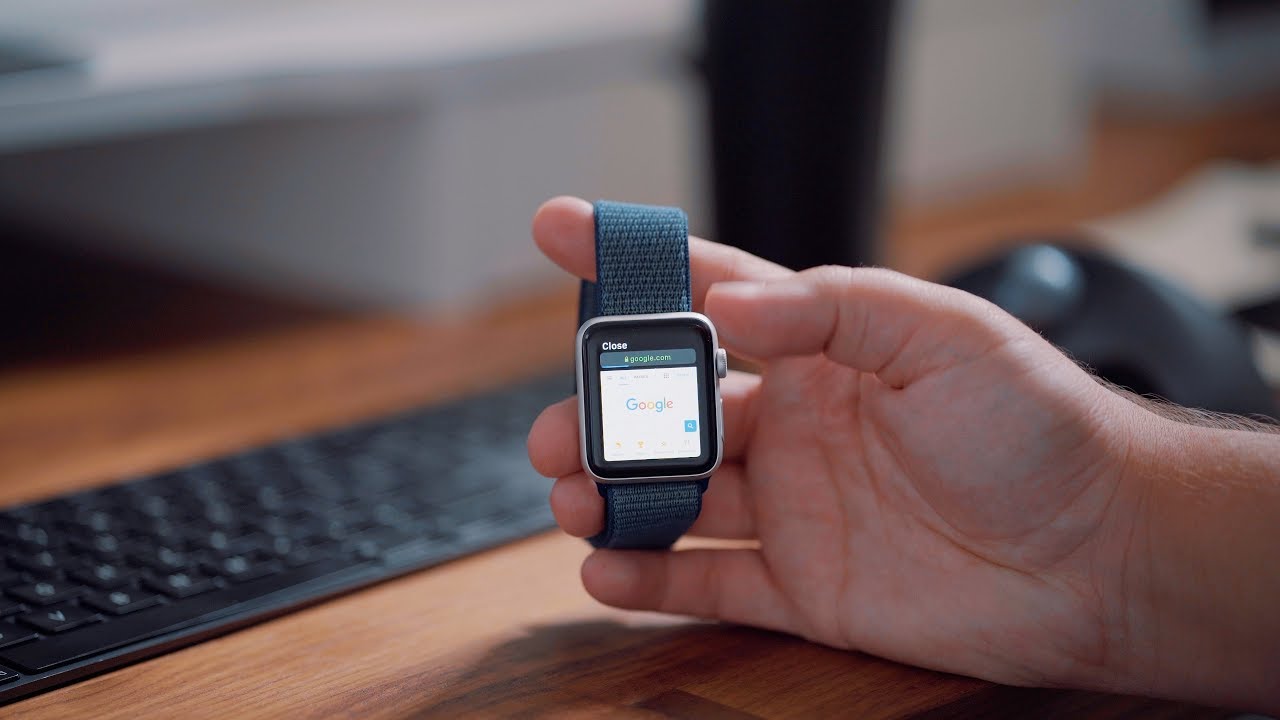
With watchOS 5, Apple has added support for WebKit, which is designed to allow you to view content from the web right on your wrist, something that's entirely new to the Apple Watch.

There's no full web browser so you're not going to see a Safari app for Apple Watch anytime soon, but you can now click on and open web links in apps like Mail and Messages.
WebKit in Messages

If someone sends you a link to your Apple Watch in the Messages app, you can tap on it to open up a little mini web browser right in the Messages app.

applewatchmessagesweb
You can open all kinds of webpages, from restaurant menus to airline flight information. Webpages are interactive and you can click on links and browse as you normally would.

WebKit in Mail

Just like Messages, if you get an email with a web link in it, you can open it up using the Mail app. You can also view HTML emails on the Apple Watch for the first time thanks to the WebKit integration.

Using Google and Other Websites on Apple Watch

As we mentioned earlier, there's no built-in Safari app on the Apple Watch for browsing the web, but you can cheat. Here's how:
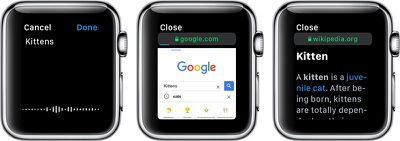
applewatchgooglesearch

  1. From your iPhone or Mac, send yourself an iMessage with a link to Google.com (or any other search engine).
  2. On the Apple Watch, open up the Messages app.
  3. Tap on your name, and then tap on the Google.com link that you sent yourself.
  4. Wait for the Google site to load on the Apple Watch.
  5. Tap on the search field.
  6. Speak or spell out whatever you want to search for.
  7. Tap the search button.

You can load all kinds of websites on the Apple Watch, from Wikipedia to restaurant sites for finding menus, to airline check-in sites to websites like MacRumors.com. It's essentially a full browser that's been miniaturized for the wrist.

Some content will not load on the Apple Watch. You can't watch YouTube videos, for example, nor will other types of video content load. Complicated websites with a lot of content, such as news sites, can take awhile to load or can refuse to load all together, so simple browsing is best on the Apple Watch.

Where possible, the little Apple Watch browser will use Reader Mode for text heavy websites, so you will see simple, easy-to-view sites with no ads. Mobile optimized sites work the best on the Apple Watch.

applewatchwebbrowsing
Using Google in the Messages app for browsing the web isn't something that you're going to want to do all the time because it's slow and tedious on such a small screen, not to mention it eats up a lot of battery, but it's useful for an emergency where you need to look something up and don't have an iPhone handy.

For browsing the web on the Apple Watch, you will always need to use the search cheat because Apple doesn't allow access to the URL bar. You can tap it, but there's no way to enter a web address.

WebKit Gestures

WebKit on Apple Watch supports several gestures, which are outlined below.

applewatchbrowsingcontrols

  • Use the Digital Crown or a finger on the screen to scroll.
  • Double tap to zoom in and double tap again to zoom out.
  • Long press to access options for Back, Forward, Reload, and Reader Mode.
  • Swipe to move forwards or backwards through different sites.
  • Tap a text field to speak or spell out text.

How to Clear Website Data on Apple Watch

Being able to browse the web on the Apple Watch through Mail and Messages means that your Apple Watch is storing some website data. You can delete all of this data in the Settings app. Here's how:
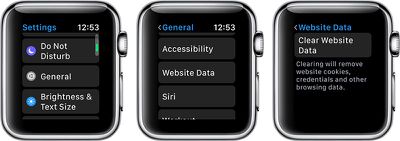
applewatchclearwebsitedata

  1. Open the Settings app on Apple Watch.
  2. Choose General.
  3. Scroll down to Website Data.
  4. Select "Clear Website Data."

Using this option will remove all website cookies, credentials, and browsing data. It does not appear that Apple Watch stores any browsing history in a viewable format, so there's no option to clear just history.

Availability

According to Apple, WebKit integration is limited to Apple Watch Series 3 models. WebKit and websites will not load on the Apple Watch Series 1 and Series 2 models.


Related Roundup: Apple Watch 12
Buyer's Guide: Apple Watch (Buy Now)
Related Forum: Apple Watch

Top Rated Comments

107 months ago
I've always wa-
nted to read par-
agraphs that are
hyphenated ev-
ery fourth word!
Score: 43 Votes (Like | Disagree)
107 months ago
Perhaps I am a pessimist but I just can’t think of any practical scenarios where this would be useful.

With a bigger screen, however...
Score: 13 Votes (Like | Disagree)
107 months ago
The main reason they added WebKit support is to fix those cases where you get an email and you can't preview it as the watch states it contains elements it can't render, it will no longer do that on the Series 3 and newer, it will just render the email.
Score: 6 Votes (Like | Disagree)
chucker23n1 Avatar
107 months ago
This looks like something intended only for consistency between different platforms of iMessages or so. Even then, doesn't the watch need to be paired to a phone anyways?
Think of it less as a web browser and more as a rich text renderer. For instance, this makes viewing basic HTML e-mails possible.
Score: 6 Votes (Like | Disagree)
Scottsoapbox Avatar
107 months ago
If you want to browse the internet, take your phone out of your pocket!
Score: 5 Votes (Like | Disagree)
107 months ago
So..iPad Mini refresh is back on? :)
Score: 4 Votes (Like | Disagree)

Popular Stories

apple watch series 3 design

Apple Offers Steps to Fix Daylight Saving Time Bug on Apple Watch

Sunday November 1, 2026 3:34 am PST by
Apple has published a support document describing what to do if your Apple Watch continues to show time that's off by one hour after daylight savings time changes. "This incorrect time appears only on the Always On display when your wrist is down," says Apple. "When you activate the display by tapping it or raising your wrist, the time changes to the correct hour." To fix the issue, Apple says ...


siri recap live rewind

watchOS 27.3 Brings Live Rewind and Siri Recap to Apple Watch

Tuesday November 3, 2026 10:35 am PST by
With the first beta of watchOS 27.3, Apple is introducing new Audio Intelligence features it previewed for the Apple Watch Series 12 and Ultra 4 earlier this year. Powered by the S11 chip, Audio Intelligence includes Live Rewind, Siri Recap, Sound Recognition, and Shazam Music Recognition. Sound Recognition and Shazam are already on the watch, but Live Rewind and Siri Recap are now available ...
apple watch series 3 design

Apple Watch Users in Europe Report Daylight Saving Glitch

Monday October 26, 2026 5:26 am PDT by
Some Apple Watch users running watchOS 27 are reporting a daylight saving glitch after clocks went back in the UK and Europe on Sunday. In a MacRumors forums thread, five users – several in the UK and central Europe – say their watch shows the correct time when activated, but the Always-On display keeps showing summer time, leaving it an hour fast. The problem has also been reported in...
Latest Stories
Apple Store Subscription Sign-Up Controversy Exposed
7 hours ago
Siri AI Rumored to Become 'More Like an Agent' as Early as Next Year
17 hours ago
Apple Taking New Approach to Developing iOS 28 and macOS 28
19 hours ago
Early Apple Black Friday Deals on Apple Watch, MacBook Air, and More
2 days ago
'Backglow' Lets You Customize New MacBook Pro's Glowing Apple Logo
2 days ago
Top Stories: Apple Product Launches, iOS 27.3 Beta, and More
2 days ago
More Fun iPhone Duo Apps: 30 New Picks to Try
2 days ago
Hands-On With Apple's New OLED Touchscreen MacBook Pro
3 days ago
Apple Store With All-New Design Opening Soon in Southern California
3 days ago
Control the Glowing Apple Logo on Your New MacBook Pro
3 days ago
Apple Shares New 'Apple Card: Apply and Use in Minutes' Ad
3 days ago
Apple Says More Than 100,000 Apps Optimized for iPhone Duo, Here's What's Still Missing
3 days ago
Early Black Friday Deals Kickoff With Steep Discounts on Apple Watch Ultras and More
3 days ago
The MacRumors Show: iOS 27.3 Looks Like a Huge Update
3 days ago
Best Buy's Black Friday Event Begins With Sitewide Savings on Apple, TVs, More
3 days ago
Apple Releasing Yet Another Two New Products Next Week
3 days ago
MacBook Air Drops to Lowest Price in Months With Amazon's $250 Discount
3 days ago
Apple Rumored to Drop the iPhone's Action Button Next Year
3 days ago
Apple's Extended Return Policy Now in Effect for 2026 Holiday Season
3 days ago
Apple Music Classical Updated With New Icon and Refreshed Design
3 days ago
OLED iPad Mini, M6 iMac, and New MacBook Pros Available From Today
3 days ago
Apple Surveys iPhone Duo Buyers About Crease and Camera
3 days ago
Apple's First Touchscreen Mac is Now Arriving to Customers
4 days ago
Claude Gets Personal Finance Feature With Bank Account Linking
4 days ago
Apple Arcade Adds Crossy Road Rush and NBA 2K27
4 days ago
Apple's New HomeView Smart Home Hub: Here's How Much RAM It Has
4 days ago
iPad Mini vs. iPad Air Buyer's Guide: Now Just $50 Apart
4 days ago
First iOS 27.3 and macOS Golden Gate 27.3 Public Betas Now Available
4 days ago
Apple Announces a New Mac Sales Record
4 days ago
Paid $200 for Logic Pro? Apple Says You Won't Get This New Feature
4 days ago







































