

Apple Watch tracks your movement and heart rate. It uses that information in conjunction with your gender, height, age, and weight to estimate how many calories you burn during daily movement, including light strolls and dedicated workouts.
However, Apple Watch needs proper calibration to get the most accurate reading of your movement and heart rate, which is used to help determine distance and pace measurements when you are walking or running without your iPhone, or while using a treadmill.
Calibration is fairly easy and takes about 20 minutes of exercise. For this purpose, you will need both your iPhone and your Apple Watch. After calibrating, you won't need to bring your iPhone on walks or runs anymore.
Make sure the environment is ideal for GPS tracking. Flat ground with good reception and clear skies works best, but as long as your GPS is on, you should be just fine.
Ensure that Location Services is activated on your iPhone. Open the Settings app and select Privacy. Then tap Location Services and make sure the switch is in the On position.
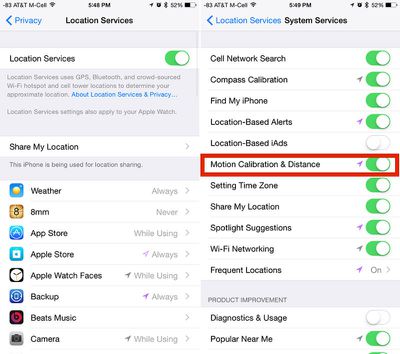
Check that "Motion Calibration and Distance" is activated on your iPhone. On the Location Services screen, scroll down to the very bottom and select System Services. Find Motion Calibration & Distance and make sure the switch is in the On position.
Hold your iPhone in your hand or attach it to an armband during your outdoor run or walk. This will help get the best possible calibration on your iPhone.
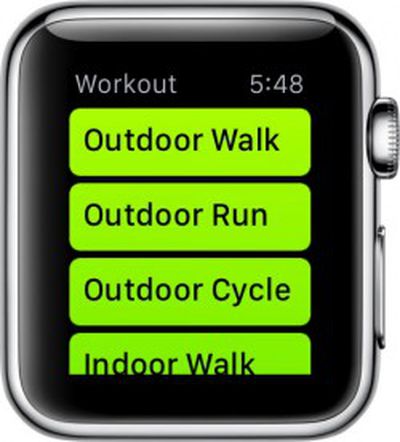 Open the Workout app on Apple Watch and select Outdoor Walk or Outdoor Run and set your goal. Tap Start and begin. Walk or run for 20 minutes.
If you are unable to walk or run for 20 minutes at one time, you can spread the calibration over multiple outdoor sessions. Just make sure you bring your iPhone with you each time.
You may need to perform multiple 20-minute calibration workouts. If you normally walk or run at varying speeds, for example if you tend to run for three minutes and walk for one minute, you will need to calibrate each speed separately (or do 40 minutes worth of walking/running). Basically, the more you calibrate, the more accurate the reading will be.
Calibration data is stored on Apple Watch. If you unpair it from your iPhone, you will have to recalibrate in the future.
The calibration process also helps improve estimates of calorie burning and movement approximations in the Activity app. So, it is a good idea to complete the process, even if you don't plan on running or walking outdoors on a regular basis.
















Top Rated Comments
Your hips don't lie?
Please don't MR. These instructions were so confusing, I got my leg caught in the ceiling fan.
https://support.apple.com/en-us/HT204516
On a mobile device it will show at the top of the list, on a desktop it is off to the side. That being said, it seems like now is a good time for them to rethink the way the site works on mobile.
MacRumors, I understand you guys are trying to get better SEO with all these guides, but they are really irrelevant for a lot of your users. Currently, on a mobile device, the top 3 articles are "how to" watch guides. You are starting to alienate some of the long time readers.