How to Cancel App Store Subscriptions - MacRumorsOpen MenuShow RoundupsShow Forums menuVisit ForumsOpen Sidebar
Skip to Content

How to Cancel App Store Subscriptions

by

apple music icon ios 15Several TV and music services and other apps offer free trials through the App Store that automatically renew to become paid subscriptions after the trial period ends.

If you want to prevent an ‌App Store‌ subscription from running beyond the trial period or cancel a subscription you're currently paying for, then read on. This article explains how to cancel any ‌App Store‌ subscription on iOS, Mac, and Apple TV.

How to Cancel App Store Subscriptions on iOS

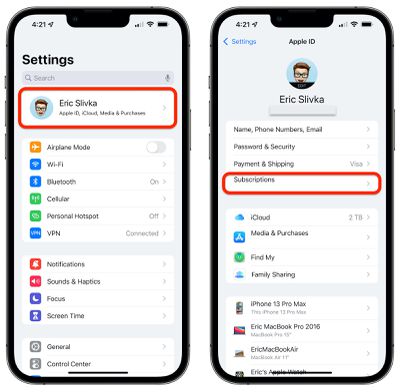
  1. Open Settings on your iPhone or iPad.
  2. Tap your Apple ID at the top of the page.
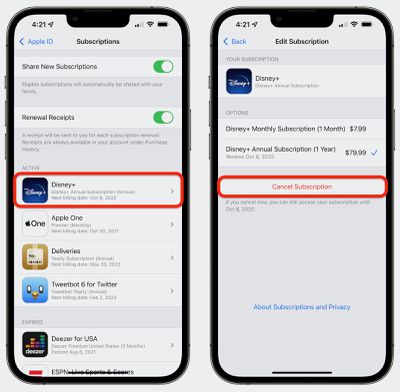
    ios cancel subscriptions 1
  3. Tap Subscriptions.
  4. Tap on the subscription in the list that you wish to cancel.
    ios cancel subscriptions 2
  5. Tap Cancel Subscription at the bottom.
How to Cancel App Store Subscriptions on Mac

  1. Launch the ‌App Store‌ application.
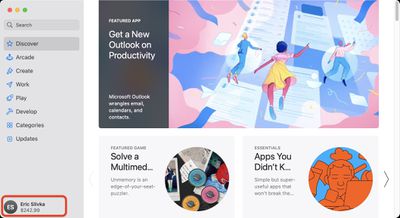
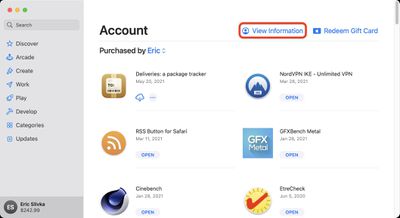
  2. At the bottom left corner, click on your name to load your account and previous purchases.
    mac cancel subscriptions 1
  3. Near the top right of the window, click View Information. Enter your ‌Apple ID‌ credentials if required.
    mac cancel subscriptions 2
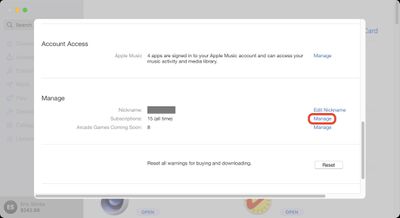
  4. Scroll down to the Manage section and on the Subscriptions line, click Manage.
    mac cancel subscriptions 3
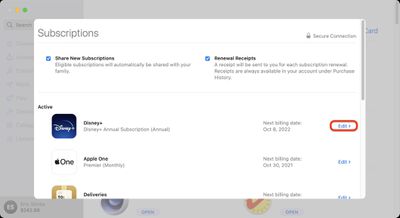
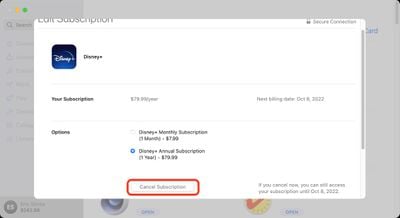
  5. In the Active section, click Edit next to the subscription that you want to cancel.
    mac cancel subscriptions 4
  6. Click the Cancel Subscription button.
    mac cancel subscriptions 5

How to Cancel Subscriptions on Apple TV

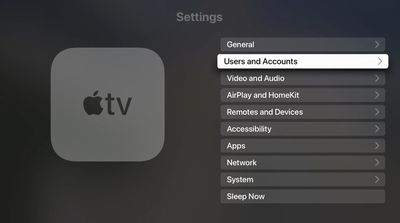
  1. Open Settings on your ‌Apple TV‌.
  2. Select Users and Accounts.
    tvos cancel subscriptions 1
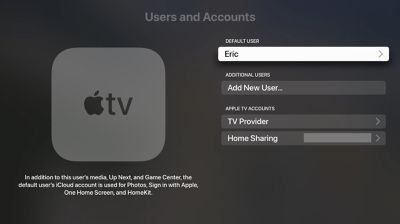
  3. Select the user you wish to manage subscriptions for.
    tvos cancel subscriptions 2
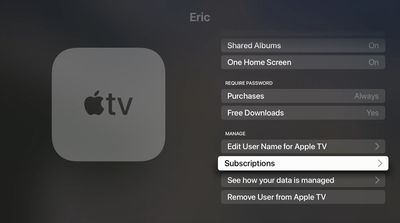
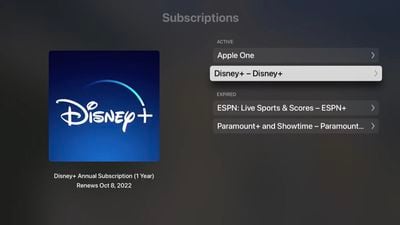
  4. Scroll down and select Subscriptions. Enter your ‌Apple ID‌ credentials if requested.
    tvos cancel subscriptions 3
  5. Choose the subscription that you want to end.
    tvos cancel subscriptions 4
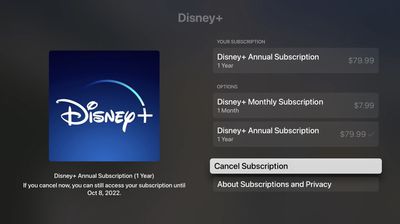
  6. Select Cancel Subscription.
    tvos cancel subscriptions 5
  7. Confirm that you want to cancel.

How to Change a Subscription or Re-subscribe to a Canceled Service

Apple keeps a record of your subscription history, which makes it easy to re-subscribe to a service you previously canceled. (Note that after re-subscribing to a service, your subscription will automatically renew until you cancel it again.) You can also change an existing subscription from the same screens. The following steps relate to iOS and are largely similar to the ones for canceling a subscription.

  1. Open Settings on your iPhone or ‌iPad‌.
  2. Tap your ‌Apple ID‌ at the top of the page.
  3. Tap Subscriptions.
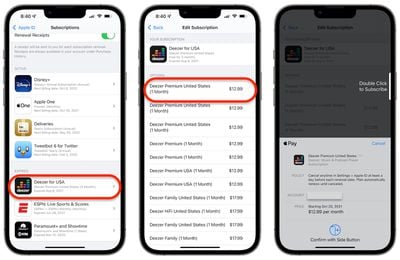
  4. Under the Expired section, tap on the service that you wish to re-subscribe to, or tap an active subscription to change it.
    ios change resubscribe
  5. Tap the in-app purchase payment method you want to use to purchase the new subscription and authorize with Touch ID or Face ID.
How to Change or Re-subscribe to a Service on Mac

  1. Launch the ‌App Store‌ application.

  2. At the bottom left corner, click on your name to load your account and previous purchases.
  3. Near the top right of the window, click View Information. Enter your ‌Apple ID‌ credentials if required.
  4. Scroll down to the Manage section and on the Subscriptions line, click Manage.
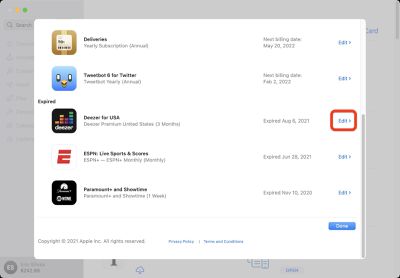
  5. In the Expired section, click Edit next to the service that you want to re-subscribe to, or click Edit next to an active subscription to change it.
    mac change resubscribe 1
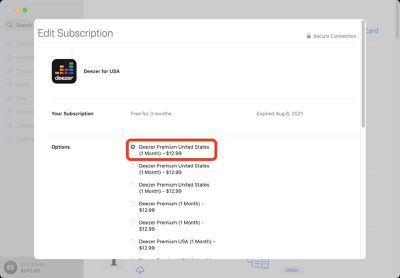
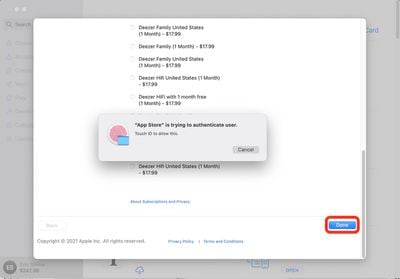
  6. Select your desired subscription option.
    mac change resubscribe 2
  7. Click the Done button at the bottom of the page and authorize with your credentials or ‌Touch ID‌.
    mac change resubscribe 3

Top Rated Comments

star-affinity Avatar
112 months ago
It's seems to be difficult (impossible?) to manage subscriptions when not having an Apple device or iTunes around.

My friend who has an Android phone wanted to manage his daughter's subscription (she has an iPhone) and when clicking the link in an email from Apple to do so, it seems he was directed to the Android Music app which he didn't have installed. There was no mention about that app being required to manage the subscription.

I think this is something that should be manageable by logging into one's Apple ID in a web browser.
Score: 4 Votes (Like | Disagree)
nburwell Avatar
112 months ago
For me, managing subscriptions is a breeze on my iOS devices. I don't have to call anyone to cancel a subscription. I can simply just go into my Apple ID and cancel any of the services I'm subscribed to.

I really do loath calling to cancel service (I'm looking at you SiriusXM) only to have the phone rep go over "other packages" that I might be interested in.
Score: 2 Votes (Like | Disagree)
Plutonius Avatar
112 months ago
The best way to never get stuck paying on a trial subscription (when you don't cancel in time) is to not subscribe to the trial offer unless you actually plan on getting the service and you want to check it out (i.e. don't subscribe just because the trial is free). :).
Score: 2 Votes (Like | Disagree)
Aluminum213 Avatar
112 months ago
Why would I do such a sinful thing?
Score: 2 Votes (Like | Disagree)

Popular Stories

Apple Creator Studio iWork suite

Apple Pulls Keynote, Pages and Numbers From App Store [Update: Back]

Thursday October 22, 2026 11:01 am PDT by
Apple has temporarily removed Keynote, Pages, and Numbers from the App Store, just after releasing an update that added iPhone Duo support and a new Intelligent Assistant. It is not clear if the apps were removed intentionally, or if it is a bug. Apple has not said when the apps will be reinstated, but if it was in error, they should return soon. Update: The Mac versions are back without...
iPhone Duo Apps feature

Apple Reveals More Than 50 Apps That Will Be Updated for iPhone Duo

Thursday October 22, 2026 6:04 am PDT by
Apple today highlighted more than 50 third-party App Store apps that are or will soon be fully optimized for the iPhone Duo and its various layouts and poses. You can hold the iPhone Duo and set it down in a number of ways, such as partially folded like a book, placed down on a surface, or standing on its edges: With the Netflix app, for example, Apple said iPhone Duo users can scroll...
Apple Says Over 100000 Apps Optimized for iPhone Duo But These Are Still Missing Feature 1

Apple Says More Than 100,000 Apps Optimized for iPhone Duo, Here's What's Still Missing

Friday November 6, 2026 9:18 am PST by
Apple today announced that more than 100,000 apps have been optimized for the iPhone Duo, released two weeks ago. We confirmed that this figure refers to apps built with the iOS 27.1 SDK or later, meaning these apps fill the full width of the iPhone Duo's inner and outer displays and have vertical controls in the status bar. A statement from Susan Prescott, Apple's Vice President of...
Latest Stories
Early Apple Black Friday Deals on Apple Watch, MacBook Air, and More
15 hours ago
'Backglow' Lets You Customize New MacBook Pro's Glowing Apple Logo
15 hours ago
Top Stories: Apple Product Launches, iOS 27.3 Beta, and More
22 hours ago
More Fun iPhone Duo Apps: 30 New Picks to Try
2 days ago
Hands-On With Apple's New OLED Touchscreen MacBook Pro
2 days ago
Apple Store With All-New Design Opening Soon in Southern California
2 days ago
Control the Glowing Apple Logo on Your New MacBook Pro
2 days ago
Apple Shares New 'Apple Card: Apply and Use in Minutes' Ad
2 days ago
Apple Says More Than 100,000 Apps Optimized for iPhone Duo, Here's What's Still Missing
2 days ago
Early Black Friday Deals Kickoff With Steep Discounts on Apple Watch Ultras and More
2 days ago
The MacRumors Show: iOS 27.3 Looks Like a Huge Update
2 days ago
Best Buy's Black Friday Event Begins With Sitewide Savings on Apple, TVs, More
2 days ago
Apple Releasing Yet Another Two New Products Next Week
2 days ago
MacBook Air Drops to Lowest Price in Months With Amazon's $250 Discount
2 days ago
Apple Rumored to Drop the iPhone's Action Button Next Year
2 days ago
Apple's Extended Return Policy Now in Effect for 2026 Holiday Season
2 days ago
Apple Music Classical Updated With New Icon and Refreshed Design
2 days ago
OLED iPad Mini, M6 iMac, and New MacBook Pros Available From Today
2 days ago
Apple Surveys iPhone Duo Buyers About Crease and Camera
3 days ago
Apple's First Touchscreen Mac is Now Arriving to Customers
3 days ago
Claude Gets Personal Finance Feature With Bank Account Linking
3 days ago
Apple Arcade Adds Crossy Road Rush and NBA 2K27
3 days ago
Apple's New HomeView Smart Home Hub: Here's How Much RAM It Has
3 days ago
iPad Mini vs. iPad Air Buyer's Guide: Now Just $50 Apart
3 days ago
First iOS 27.3 and macOS Golden Gate 27.3 Public Betas Now Available
3 days ago
Apple Announces a New Mac Sales Record
3 days ago
Paid $200 for Logic Pro? Apple Says You Won't Get This New Feature
3 days ago
Instagram's Edits Video Editor is Now Available on Mac
3 days ago
Prevent Siri and Search From Accessing Specific iPhone Apps
3 days ago
Best Early Black Friday Deals on iPhone 18 Pro and iPhone Duo
3 days ago