Use ChatGPT as Your iPhone's Action Button Assistant - MacRumorsOpen MenuShow RoundupsShow Forums menuVisit ForumsOpen Sidebar
Skip to Content

Use ChatGPT as Your iPhone's Action Button Assistant

by

Apple doesn't currently allow iPhone users to change the Side button's Siri functionality to another assistant, but owners of iPhone 15 Pro and newer models can assign ChatGPT to the Action button instead. Keep reading to learn how.
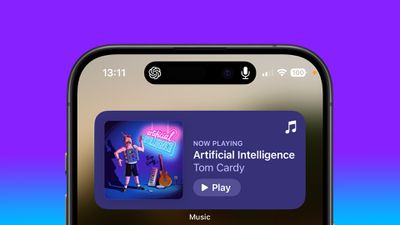
chatgpt iphone dynamic island
OpenAI's free ChatGPT app for iPhone lets you interact with the chatbot using text or voice. What's more, if you assign voice mode directly to the Action button, you can use it to jump straight into a spoken conversation, giving you quick, handsfree access to a far more capable assistant.

  1. Install the ChatGPT app, then sign into your account or create a new one.
  2. Next, open the Settings app.
  3. Tap Action Button.
  4. Swipe to Controls, then tap the two chevrons beside the currently assigned control.
  5. Using the control search field, type "ChatGPT."
  6. Select the control Open ChatGPT Voice.
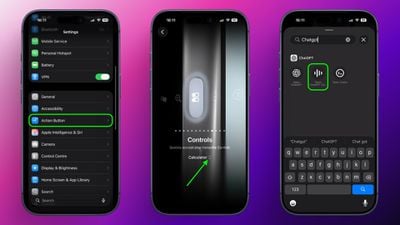
chatgpt voice action button

A long press of the Action button will now open ChatGPT's voice mode. The first time you activate it, the app may request microphone access. Tap Allow to proceed. After that, you can begin speaking immediately.

A recent update means voice conversations now take place inside the same chat window as text-based prompts, instead of switching to a separate voice-only interface. Responses appear in real time, combining spoken output with on-screen text and any visuals the model generates. This keeps your conversation's context intact and makes switching between typing and speaking smoother.

Continue the Conversation Anywhere

You can also leave the ChatGPT app during a voice session without ending it. When you swipe away, the conversation continues and appears in the Dynamic Island as long as the assistant is listening and preparing a response. To stop, tap the Dynamic Island to return to the app, then tap End.

Note that while this setup gives you a fast, physical shortcut to a richer, more context-aware assistant, ChatGPT can't perform Siri-like system actions like accessing your calendar or setting an alarm.


Tag: ChatGPT

Top Rated Comments

I7guy Avatar
12 months ago
After trying out different actions, including opening up the trunk…I like the ability to put the phone on mute. That is the default action and that is where it is now.

Score: 26 Votes (Like | Disagree)
Techwatcher Avatar
12 months ago
Hell no. Shazam is by far the best option. ChatGPT needs to go away.
Score: 17 Votes (Like | Disagree)
12 months ago

It won’t. Siri though, might. Well not in name perhaps, but it’s very likely it will just be a skin for Google Gemini.
Siri isn't going away.

The report on the street is that Apple is going to license a separate installation of Gemini that will reside on Apple's PPC (Private Cloud Compute) servers to power Siri. Google would have zero access to this installation, so no data scraping will occur.

Apple has been wise to not rush into the LLM-powered AI Assistant era until the technology has matured and the compute costs come down. That's now happening.

What Apple should've done is gone full bore into the SLM (Small Language Model) architecture instead of "one model to rule them all". Have specialized models for different tasks, with Siri being a "conductor", but this technology also didn't exist in a usable form until recently.

While the frontier labs are releasing new models are break-neck speeds, we're only just now — this week, in fact — starting to see models that would be able to meet the needs of Siri.

Great time to be alive.
Score: 12 Votes (Like | Disagree)
tonie walker Avatar
12 months ago
mine is just Mute all the way
Score: 12 Votes (Like | Disagree)
TFrank2 Avatar
12 months ago

mine is just Mute all the way
I’d love to have a dedicated physical silent mode slider come back so we could have both. I know it’s simple to just mute in control center but maintaining the tactile feel/option is a plus IMO.
Score: 10 Votes (Like | Disagree)
bLackjackj Avatar
12 months ago
Is this an official ad for ChatGPT?

You can literally set the “action button” to any iPhone app,..why a whole article?
Score: 8 Votes (Like | Disagree)

Popular Stories

General macOS Mail Feature

ChatGPT Can Now Access Your iCloud Mail and Calendar

Tuesday October 27, 2026 12:51 pm PDT by
OpenAI today said it added iCloud Mail and Calendar plugins to ChatGPT. With the iCloud Calendar integration, ChatGPT can read, schedule, and update events that show up on your iPhone's Calendar app or any third-party app that uses iCloud Calendar. The Mail integration lets ChatGPT search and read iCloud Mail, manage messages and drafts, send email, and look up iCloud contacts. iCloud...
apple pro tell logo

Apple Launching Five New Products Today

Thursday November 5, 2026 12:59 am PST by
Apple is launching five new products on Friday, November 6, following pre-orders that opened last week, including its first touchscreen MacBook Pro models. The following new products will be available from today: iPad mini with OLED display and A20 Pro chip iMac with M6 chip 14-inch MacBook Pro with M6 chip 14-inch MacBook Pro with OLED touchscreen 16-inch MacBook Pro with OLED...
duo aquarium

More Fun iPhone Duo Apps: 30 New Picks to Try

Friday November 6, 2026 3:27 pm PST by
When the iPhone Duo launched, we shared a list of some of the fun apps developers created for the new form factor. Two weeks out, developers are continuing to come up with fresh ideas, so we thought we'd share some of our favorites. Games Marbles Unhinged ($2.99) - Marbles Unhinged is a marble maze designed for the Duo. When you fold it, the floor turns into a ramp. If you stand the top...
Latest Stories
Siri AI Rumored to Become 'More Like an Agent' as Early as Next Year
4 hours ago
Apple Taking New Approach to Developing iOS 28 and macOS 28
6 hours ago
Early Apple Black Friday Deals on Apple Watch, MacBook Air, and More
1 day ago
'Backglow' Lets You Customize New MacBook Pro's Glowing Apple Logo
1 day ago
Top Stories: Apple Product Launches, iOS 27.3 Beta, and More
1 day ago
More Fun iPhone Duo Apps: 30 New Picks to Try
2 days ago
Hands-On With Apple's New OLED Touchscreen MacBook Pro
2 days ago
Apple Store With All-New Design Opening Soon in Southern California
2 days ago
Control the Glowing Apple Logo on Your New MacBook Pro
2 days ago
Apple Shares New 'Apple Card: Apply and Use in Minutes' Ad
2 days ago
Apple Says More Than 100,000 Apps Optimized for iPhone Duo, Here's What's Still Missing
2 days ago
Early Black Friday Deals Kickoff With Steep Discounts on Apple Watch Ultras and More
2 days ago
The MacRumors Show: iOS 27.3 Looks Like a Huge Update
2 days ago
Best Buy's Black Friday Event Begins With Sitewide Savings on Apple, TVs, More
2 days ago
Apple Releasing Yet Another Two New Products Next Week
2 days ago
MacBook Air Drops to Lowest Price in Months With Amazon's $250 Discount
2 days ago
Apple Rumored to Drop the iPhone's Action Button Next Year
2 days ago
Apple's Extended Return Policy Now in Effect for 2026 Holiday Season
2 days ago
Apple Music Classical Updated With New Icon and Refreshed Design
2 days ago
OLED iPad Mini, M6 iMac, and New MacBook Pros Available From Today
2 days ago
Apple Surveys iPhone Duo Buyers About Crease and Camera
3 days ago
Apple's First Touchscreen Mac is Now Arriving to Customers
3 days ago
Claude Gets Personal Finance Feature With Bank Account Linking
3 days ago
Apple Arcade Adds Crossy Road Rush and NBA 2K27
3 days ago
Apple's New HomeView Smart Home Hub: Here's How Much RAM It Has
3 days ago
iPad Mini vs. iPad Air Buyer's Guide: Now Just $50 Apart
3 days ago
First iOS 27.3 and macOS Golden Gate 27.3 Public Betas Now Available
3 days ago
Apple Announces a New Mac Sales Record
3 days ago
Paid $200 for Logic Pro? Apple Says You Won't Get This New Feature
3 days ago
Instagram's Edits Video Editor is Now Available on Mac
3 days ago









































