Apple's AirPods Max headphones offer around 20 hours of listening time or talk time on a single charge when you have Active Noise Cancellation and spatial audio turned on. If you pop AirPods Max in their Smart Case for five minutes, you can get enough charge for around 1.5 hours of listening time.

During use, you'll hear a tone when your AirPods Max battery charge is 10%, and a second tone just before they run out. But you don't have to wait for these tones to know how much charge they have remaining. Here are several ways that you can keep a closer eye on the battery life of your AirPods Max.
How to Check AirPods Max Charge Status
The status light on the right ear cup shows the charge status of your AirPods Max. If you press the noise control button when your AirPods Max are connected to power, the status light will turn green if the charge has more than 95 percent remaining, or amber if the charge has less than or equal to 95 percent remaining.
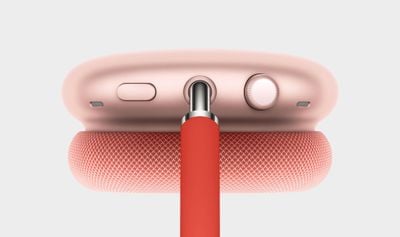
If you press the noise control button when your AirPods Max aren't connected to power, the status light will turn green if the charge has more than 15 percent remaining, or amber if the charge has less than or equal to 15 percent remaining.
How to Check AirPods Max Charge Status on iPhone or iPad
When you take AirPods Max out of the Smart Case, their charge status should appear on your iPhone's or iPad's screen. You can also check the charge status of your AirPods Max using the Batteries widget in your iPhone or iPad's Today View, accessed by swiping right on the Lock screen or on your Home screen's first screen of apps.
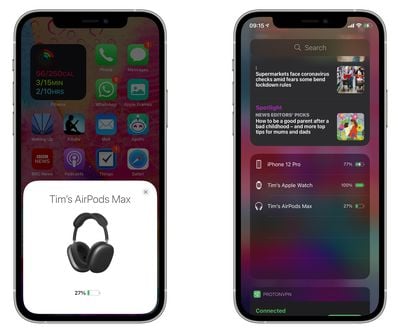
If you don't have it installed already, you can add the Batteries widget manually. To do so, enter the Today view, scroll to the bottom of the column of widgets and press the Edit button. Then simply tap the green plus button in the list next to Batteries and tap Done in the upper right of the screen.
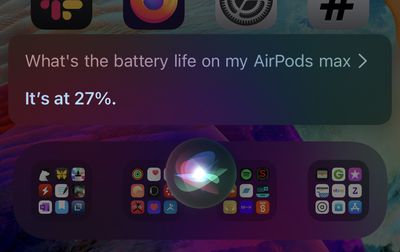
If you're a fan of Siri and you're wearing your AirPods Max, you can always ask the virtual assistant "How is the battery life of my AirPods Max?" and you should get an answer.
How to Check AirPods Max Charge Status on Apple Watch
You can check the battery level of your AirPods Max from your wrist, whether they're paired with your iPhone or directly with your Apple Watch.
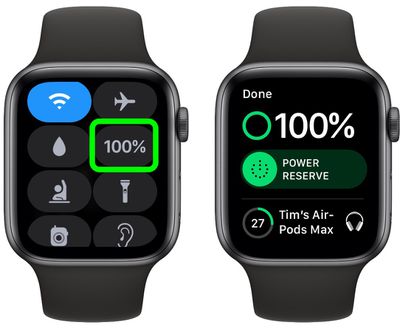
To do so, bring up the Control Center on your Apple Watch: Swipe up on a watch face, or when in an app, press the bottom edge of the screen then drag up the Control Center. Then tap the Apple Watch battery icon, indicated by a percentage. The battery level of AirPods Max will be displayed as a ring below the Apple Watch battery percentage.