

How to Check iCloud Keychain Password Security - MacRumorsOpen MenuShow RoundupsShow Forums menuVisit ForumsOpen Sidebar
Skip to Content

How to Check iCloud Keychain Password Security

by

Using iCloud Keychain, Apple's Safari browser stores and syncs all the passwords you use for different websites and apps through ‌iCloud‌. And in iOS 14 and later, Apple provides security recommendations that warn you if a password you're using is putting your accounts at risk.
safari macos icon banner
Safari securely monitors your saved passwords using strong cryptographic techniques, and regularly checks derivations of your passwords against a list of breached passwords in a secure and private way that doesn’t reveal your password information to anyone, including Apple. If Safari discovers a breach, it will alert you and can automatically generate a new secure password.
password
Examples of security alerts that you might see include:

  • Many people use this password, which makes it easy to guess.
  • This password is easy to guess.
  • This password uses a sequence. Using common patterns makes passwords easy to guess.
  • You're using this password on other websites, which increases the risk to this account if one of those other accounts is compromised.
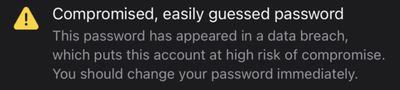
  • This password has appeared in a data breach, which puts this account at high risk of compromise. You should change your password immediately.

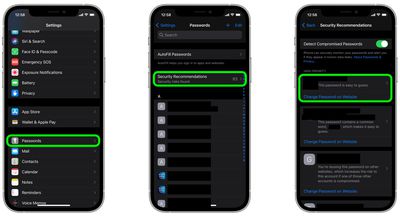
To check your passwords for security recommendations generated by Safari in iOS, simply follow the steps below.

  1. Launch the Settings app on your iPhone or iPad.
  2. Scroll down and tap Passwords.
  3. Tap Security Recommendations.
  4. Check the list of recommendations under "High Priority." Tap a recommendation for more details, or tap Change Password on Website to open a browser window and change your password.
settings
If you're using Safari on Mac, you can find the same security recommendations available in the Passwords tab in Safari -> Preferences....


Popular Stories

Instagram Feature 2

PSA: Instagram Encrypted Messaging Ends on Friday, May 8

Tuesday May 5, 2026 8:24 am PDT by
Instagram will remove end-to-end encryption for direct messages between users from May 8, 2026. When the date comes around, Meta will potentially be able to see the contents of all messages between users on the social media platform. Encrypting messages has been an optional feature in Instagram since 2023, but in March of this year the social media platform quietly updated a help page to say ...
Apple Card iPhone 16 Pro Feature

Apple Card Promo to Offer Free AirPods Pro 3

Friday May 15, 2026 8:59 am PDT by
Starting as early as next week, customers who sign up for an Apple Card at Apple's retail stores in the U.S. will receive $249 cash back when they purchase AirPods Pro 3, according to Bloomberg's Mark Gurman. The promotion has yet to be officially announced by Apple, so exact terms and conditions are not available at this time. AirPods Pro 3 are priced at $249 in the U.S., so customers who...
Apple WWDC25 iOS 26 CarPlay Light mode 250609

Six Popular iPhone Apps Now Available on CarPlay

Thursday May 14, 2026 9:10 am PDT by
Apple's CarPlay system for accessing iPhone apps on a vehicle's dashboard screen has received six popular apps in recent weeks: ChatGPT, Perplexity, Grok, Google Meet, WhatsApp, and the indie artist streaming platform Audiomack. Make sure you have the latest version of each app and they will automatically appear on CarPlay. ChatGPT Starting with iOS 26.4, CarPlay supports voice-based...













