How to Check Your Mac's Battery Cycles - MacRumorsOpen MenuShow RoundupsShow Forums menuVisit ForumsOpen Sidebar
Skip to Content

How to Check Your Mac's Battery Cycles

by

Apple's latest MacBooks offer some of the most impressive battery life seen on any notebook, with the company's adoption of Apple silicon taking power efficiency to a whole new level.
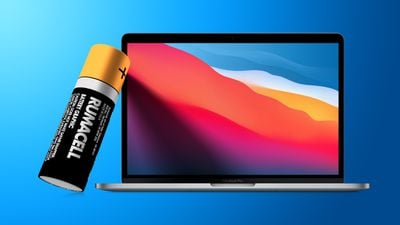
big sur battery feature blue
But like all rechargeable batteries, the actual lifespan of a battery is dictated by the number of charge cycles it's been through. Keep reading to learn how to check the battery cycle count on your MacBook.

Whenever you use your MacBook, its battery goes through charge cycles. A charge cycle completes when you use all of the battery's power, but a cycle doesn't need to occur over the course of a single charge.

For example, if you recharge your notebook fully after only using 50% of the battery, then do the same the next day, this counts as one cycle rather than two. Given how cycles are recorded, it could take several days to complete a cycle.

MacBook batteries have a limited amount of charge cycles before their performance is likely to diminish, but the good news is that most modern Apple notebooks are capable of functioning through 1,000 charge cycles before a battery replacement is required.

Here's how you can check the battery cycle count on your MacBook.

  1. Click the Apple () symbol in the top-left corner of your Mac's menu bar.
  2. Click About This Mac.
    Mac

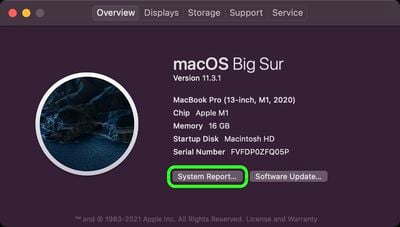
  3. With the "Overview" tab selected, click System Report....
    Mac

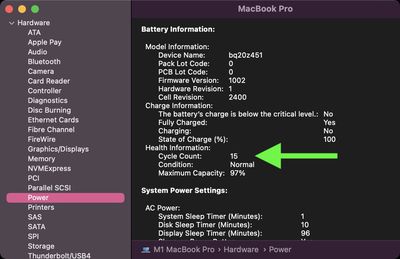
  4. Click Power in the window's side column.
  5. Look for the Cycle Count under "Health Information."

    Mac system info

Under the "Health Information" section, the condition of your Mac's battery is also shown. As noted above, most modern Macs have a maximum cycle count of 1,000. If your Mac wasn't made in the last decade, it's worth checking Apple's official cycle count limit table for your specific computer's battery.


Popular Stories

macOS 27 on MacBook Pro

Apple Says macOS 27 Won't Be Compatible With These Macs

Wednesday June 3, 2026 8:29 am PDT by
During WWDC 2025, Apple revealed that macOS 26 Tahoe would be the final major macOS version for Intel-based Macs. macOS 27 will be compatible with Apple silicon Macs only, meaning that you will need a Mac with an M-series chip or a MacBook Neo with an A18 Pro chip in order to install the software update. Apple will unveil macOS 27 during its WWDC 2026 keynote this Monday, June 8, and the...
MacBook Neo on Yellow Feature

MacBook Neo is So Popular That Apple Reportedly Doubled Production

Wednesday June 3, 2026 9:24 am PDT by
On an earnings call in late April, Apple's CEO Tim Cook said that customer response to the MacBook Neo was "off the charts," and the popularity of the laptop has reportedly led the company to significantly boost production. Apple supply chain analyst Ming-Chi Kuo this week said he believes that MacBook Neo shipments to Apple were doubled from an initial target of 5 million units to 10...
iphone 18 pro blue%402x

iPhone 18 Pro: Dark Cherry, Light Blue, and Dark Gray Chassis Leaked [Update]

Thursday June 4, 2026 5:18 am PDT by
Update: Since publication, new information has come to light suggesting the images have been AI-manipulated and are not in fact iPhone 18 Pro chassis parts. The original article follows. The color options Apple is reportedly planning for the upcoming iPhone 18 Pro and ‌iPhone 18 Pro‌ Max have appeared online today in the form of images of chassis parts of unknown authenticity....