In macOS Sonoma 14.1 and later, it's easy to find up-to-date information about your Mac's warranty or AppleCare plan, as well as the warranty status of any AirPods and/or Beats headphones that you own and have paired to the Mac. You can check whether your device is covered and see what kinds of repair and support are included with your cover. You can also find your agreement number, proof of purchase and expiry date.

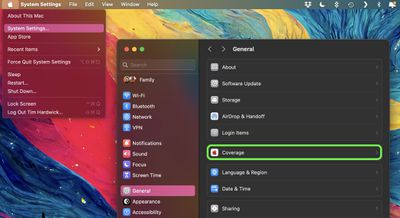
To get information on your Mac's warranty status and/or AppleCare+ plan, first make sure your Mac's software is updated to macOS Sonoma 14.1 or later (System Settings ➝ General ➝ Software Update) then follow these steps:
- Click the Apple symbol () in the menu bar and select System Settings....
- Select General in the side column
- Select Coverage.
- Click the option under "This Device" to see your Mac warranty information, or click the options under "More Devices" for selected Bluetooth-paired devices.
Apple includes a minimum one-year limited warranty with all hardware and up to 90 days of technical support, so if a manufacturing defect arises within this period, you're automatically covered. If your Mac still comes under Apple's Limited Warranty, you'll see the time remaining before it runs out.
AppleCare+ for Mac provides unlimited incidents of accidental damage protection every 12 months, each subject to a service fee of $99 for screen damage or external enclosure damage, or $299 for other damage. Customers with an active AppleCare+ plan also have 24/7 priority access to Apple's technical support representatives by online chat or phone. If you have purchased AppleCare+, the length of your plan will appear on the left of the window.
To get further information on your Mac's coverage, click the Details... button in the device information window. This will take you to mysupport.apple.com, where you can see details about the support that you're eligible for, including hardware repairs and technical support.
For chat and phone support, click the Get Support... button in the device information window. This will take you to mysupport.apple.com, where you can search troubleshooting topics or connect to Apple Support by phone, chat, or email.
Apple allows AppleCare+ coverage for Macs to be extended indefinitely in the United States. After paying upfront for an AppleCare+ plan for a Mac, the initial coverage period remains three years, but customers now have the option to purchase additional coverage that automatically renews annually until canceled. The new coverage must be purchased within 30 days of the end date of the original coverage, according to Apple.
Previously, there was no way to extend AppleCare+ coverage for a Mac once the initial three-year coverage window elapsed. Note that AppleCare+ coverage for Mac remains capped at three years outside of the United States.