How to Check if Rosetta Is Installed on Your Apple Silicon Mac - MacRumorsOpen MenuShow RoundupsShow Forums menuVisit ForumsOpen Sidebar
Skip to Content

How to Check if Rosetta Is Installed on Your Apple Silicon Mac

by

Rosetta 2 is the translation layer that enables a Mac with Apple silicon to use apps built for an Intel-based Mac. It works in the background whenever you use an app built only for Mac computers with an Intel processor, and automatically translates the app for use with Apple silicon the first time the app is run.
rosetta 2
Rosetta 2 isn't included with a standard macOS installation, and has to be installed separately. On the plus side, you don't have to go searching for it to download, because macOS asks you if you want to install it on the first occasion that you attempt to launch an app with Intel-based features.

Simply double-click an app built for an Intel-based Mac and then click Install at the dialog prompt that appears on the screen. Enter your username and password to allow the Rosetta 2 installation to proceed, and once installation is complete, Rosetta will be available for any older apps that need it.
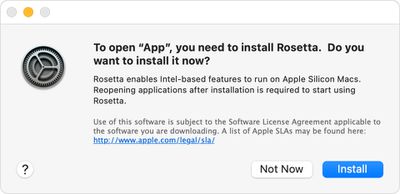
rosetta
The translation process runs the first time the app is opened, and may cause the app's icon to bounce for a few seconds before it launches, but after that you likely won't see any performance hit. Indeed, in some cases, apps built with x86-64 will even run faster in Rosetta than they do on Intel Macs.

To learn which Mac apps are already optimized for Apple silicon, check out our dedicated how-to article.
Popular Stories

rosetta 2

macOS 27 Golden Gate Is the Last to Support Intel Apps via Rosetta 2

Wednesday June 10, 2026 5:39 am PDT by
macOS 27 Golden Gate is the final version of macOS to feature full Rosetta 2 support, meaning the translation layer that keeps Intel-built apps running on Apple silicon Macs is set to disappear entirely with next year's major macOS release. Golden Gate is the first macOS release limited to Apple silicon Macs and marks the end of the road for Intel-based hardware, but the implications reach...
iCloud iPhone 17 Pro

iPhone Users Who Pay for iCloud Storage Get Two New Perks on iOS 27

Thursday July 2, 2026 6:10 am PDT by
If you pay for certain iCloud+ storage plans beyond the 5GB that Apple offers for free, you will receive two more perks on iOS 27 at no additional cost. A summary of the two new iCloud+ perks on iOS 27:Increased daily usage limits for some new Apple Intelligence features, including image generation in the revamped Image Playground app. HomeKit Secure Video cameras receive generated video...
iPhone 4 on Black Feature

Apple Facing One of Its Worst Leaks Since the iPhone 4

Thursday July 2, 2026 9:53 am PDT by
Apple supplier Tata Electronics recently suffered a cyberattack that resulted in thousands of confidential files being published on the dark web, and this reportedly included some photos and documents related to the upcoming iPhone 18 Pro. We have elected not to share any of the leaked photos in this story due to the illegal nature in which they were obtained, but they can easily be found...