

 Apple News keeps track of all the articles you read within the news app's interface to create a personal reading history. This provides you with a handy way of returning to a story, and avoids you having to trawl through the news to look for it.
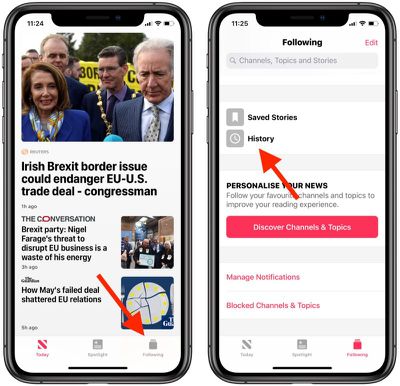
To access your reading history in the Apple News app on iPhone or iPad, simply tap the Following tab, scroll down, and then tap History. In Apple News on Mac, you can find the same option by scrolling to the bottom of the sidebar.
Like the browsing history in a web browser app, you can clear your Apple News reading history. Here's how it's done.
How to Clear Apple News Reading History on iOS
- Launch the Apple News app on your iPhone or iPad.
- Tap the Following tab in the lower right corner of the screen.

- Scroll down and tap History.
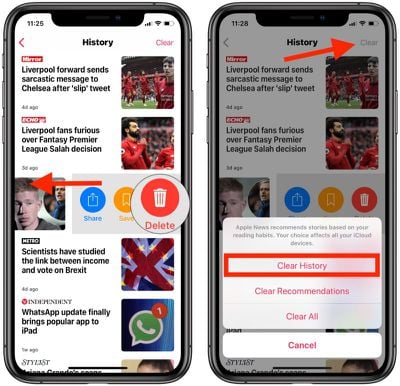
- To remove an individual story from your reading history, swipe left across it and then tap Delete.
- To clear your entire reading history, tap Clear in the upper right corner of the screen and then tap Clear History.
How to Clear Apple News Reading History on Mac
You can perform a similar action on your Mac by following the steps below.
- Launch the Apple News app.
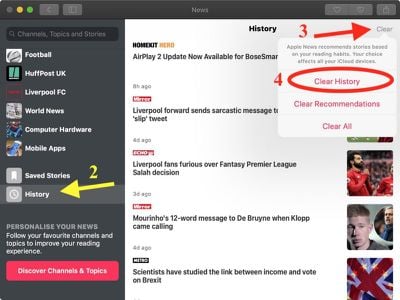
- Scroll down to the bottom of the sidebar and click History.
- Click Clear in the upper right corner of the window.
- Click Clear History.
It's an odd quirk, but currently there's no way to remove individual stories from your reading history in the Apple News Mac app. Apple has a number of inconsistencies across its stock Mac and iOS apps that need addressing, and this is one of them.















