

How to Close Apps on iPhone 12, 11, XS, XR and X - MacRumorsOpen MenuShow RoundupsShow Forums menuVisit ForumsOpen Sidebar
Skip to Content

How to Close Apps on iPhone 12, 11, XS, XR and X

by

When Apple launched iPhones without Home buttons, a whole new set of gestures were introduced, changing the way that we were used to interacting with our iPhones.

One of these changes involved the App Switcher and the way open apps are found, with Apple introducing a gesture to reach the App Switcher on devices with a Home button.
closing apps on iPhone

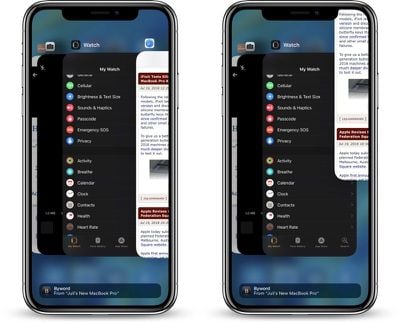
How to close an app on iPhone X, XS, XS Max, XR, iPhone 11, 11 Pro, or 11 Pro Max, iPhone 12, 12 Mini, 12 Pro, or 12 Pro Max

  1. At the Home screen of the iPhone, or while in an app, swipe up from the bottom of the screen and pause while still pressing the screen.
  2. When the App Switcher comes up, swipe left and right through the different app cards to find the app that you want to close.
  3. Use a quick swipe upwards to close the app.

Using this gesture exits out of an app and effectively closes it, which is useful if you need to restart an app for some reason. There's generally no need to close your apps to improve performance, though, as Apple has built-in management systems for dealing with all of the apps that you have open on your device.

Most apps that are not active are in a suspended state and are not using up any resources, but some apps can run in the background for a period of time if background refresh is activated.

According to Apple, force quitting an app will not improve your battery life, and it's possible that doing so can actually drain battery because it causes the iPhone to load it all over again.


Related Forums: iOS 11, iOS 12, iOS 13

Top Rated Comments

shamino Avatar
104 months ago
Here's proof right from Craig Federighi:

https://www.macrumors.com/2016/03/10/force-quitting-apps-doesnt-help-battery/
Apple has been saying that for years, but it doesn't change the fact that some apps (especially Facebook) are notorious for running in the background and draining your battery when (according to Apple press releases) they are supposed to be suspended.

Killing the offending app is the only way to make it stop. And since you have no way of knowing which apps are good and which are bad, it's far easier to just kill them all when you're done with a session.
Score: 15 Votes (Like | Disagree)
dynAdZ Avatar
104 months ago
iPhone X user here. It was never necessary to press the red minus. Once it appears, swiping up to close apps works as well. This just eliminates one step in between which is welcomed!
Score: 6 Votes (Like | Disagree)
jclo Avatar
104 months ago
Interesting...

Quitting apps used to be a thing which folks weren’t really aware off. As a somehow geek person, I used to advise people to do so. It became an act that showed that someone knew the logic of background activity draining battery performance, especially apps that were using GPS, or that were constantly connected to the internet to receive push updates.

I am somehow sceptical about the text in the OP, since perhaps the OS is smarter att handling performance, but ... some principles must pertain with regards to battery performance and awareness of apps, with regards to being able to log your online presence or your location or whatnot.

Can we take the statements above with a grain of salt, or do I really need to rethink my understanding on the matter?
Here's proof right from Craig Federighi:

https://www.macrumors.com/2016/03/10/force-quitting-apps-doesnt-help-battery/

Edit: More documentation from Apple.

https://developer.apple.com/library/archive/documentation/iPhone/Conceptual/iPhoneOSProgrammingGuide/TheAppLifeCycle/TheAppLifeCycle.html#//apple_ref/doc/uid/TP40007072-CH2-SW1
Score: 5 Votes (Like | Disagree)
jclo Avatar
104 months ago
Thanks for the references. I can conclude that my scepticism belongs to those threads instead.

Nevertheless: users should use common sense and close apps as they feel for doing. The principle of the oposite being true (it would more drain your battery than preserve it) is a long shot. If you relaunch an app, you are intentionally adding load to the processor and therewith asking for battery power. I can never believe that the loss of power trough intentional processes would be higher than the gain of battery by not doing so for a good while.

Off course, if you pick up the phone every minute, open an app and close it, it would not be so smart for battery life.

My point being: we as a user should be fully entitled to close apps to our likings, as you never know what happens when they are lurking in the background.

For macrumors to pertinently stress on a statement by Frederigi, is quite off the hook. Commons sense will prevail amongst us users.
Of course, that's why the feature exists. You can close apps, and there are absolutely valid reasons to do. In the post, I'm just saying that you don't *need* to for reasons like preserving battery life because it is a common myth that if you don't close apps they're constantly running in the background or eating up too much memory.
[doublepost=1532119816][/doublepost]
EXACTLY.

You absolutely do and can save battery by closing the apps that use background battery (aka, facebook and instagram among others, but those are the two worst offenders). They are 100% NOT in a frozen state and they 100% use resources.
I'd argue that it's ultimately more efficient to turn off background refresh on these apps rather than to worry about closing them each time you use them. I have background refresh off for Facebook and some other apps that are notorious for using system resources.
Score: 4 Votes (Like | Disagree)
iapplelove Avatar
104 months ago
Apple has been saying that for years, but it doesn't change the fact that some apps (especially Facebook) are notorious for running in the background and draining your battery when (according to Apple press releases) they are supposed to be suspended.

Killing the offending app is the only way to make it stop. And since you have no way of knowing which apps are good and which are bad, it's far easier to just kill them all when you're done with a session.
I don’t care what anyone says, I usually kill all the apps running each morning,pretty much from the day before and start clean..

Why keep apps running if they don’t need to be.
Score: 4 Votes (Like | Disagree)
bob122989 Avatar
104 months ago
Killing the offending app is the only way to make it stop. And since you have no way of knowing which apps are good and which are bad, it's far easier to just kill them all when you're done with a session.
Restarting the device, in my opinion, does much more towards system resource recovery than force closing all apps, with the added benefit of not losing the recently used order of apps in the switcher.

I can agree with you on a per-app basis, I close certain offending apps such as YouTube and Safari, they both tend to hog RAM longer than they should. But I only close them if I don’t intend to reopen them for several hours.

Why waste the battery life completely reopening all apps all the time?
Score: 3 Votes (Like | Disagree)

Popular Stories

iCloud iPhone 17 Pro

iPhone Users Who Pay for iCloud Storage Get Two New Perks on iOS 27

Thursday July 2, 2026 6:10 am PDT by
If you pay for certain iCloud+ storage plans beyond the 5GB that Apple offers for free, you will receive two more perks on iOS 27 at no additional cost. A summary of the two new iCloud+ perks on iOS 27:Increased daily usage limits for some new Apple Intelligence features, including image generation in the revamped Image Playground app. HomeKit Secure Video cameras receive generated video...
iPhone 4 on Black Feature

Apple Facing One of Its Worst Leaks Since the iPhone 4

Thursday July 2, 2026 9:53 am PDT by
Apple supplier Tata Electronics recently suffered a cyberattack that resulted in thousands of confidential files being published on the dark web, and this reportedly included some photos and documents related to the upcoming iPhone 18 Pro. We have elected not to share any of the leaked photos in this story due to the illegal nature in which they were obtained, but they can easily be found...
American Express Gold Apple Pay Feature

American Express Announces New Apple Pay Feature

Tuesday June 30, 2026 10:27 am PDT by
American Express today announced that you can now redeem Membership Rewards points when checking out with Apple Pay on the web and in apps on the iPhone and iPad. When checking out with Apple Pay on iOS 18 or iPadOS 18 or later, tap on your eligible American Express card (Platinum, Gold, Green, and others) and select the Membership Rewards points option. You can use points to cover all or...













