How to Control Apple TV Using Your Apple Watch - MacRumorsOpen MenuShow RoundupsShow Forums menuVisit ForumsOpen Sidebar
Skip to Content

How to Control Apple TV Using Your Apple Watch

by

admin ajaxThe Siri Remote that comes with the Apple TV certainly has its critics. Some users find the glass Touch surface over-sensitive in the way it registers directional taps and swipes, which can make navigating onscreen menus a slalom-like experience where you're constantly having to correct for overshoot.

Not only that, the minimalist design of the Siri Remote isn't very tactile and there's no button backlighting, which means once you've dimmed the lights it's almost impossible to know whether you're even holding it the right way round.

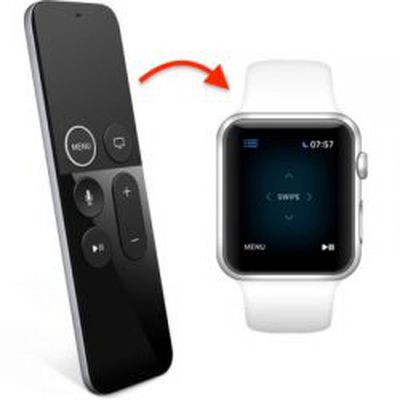
Thankfully, there are alternative (and easier) ways to control your Apple TV. One solution is to use your iPhone, which we've written about previously. Another is to use an Apple Watch. Here's how it's done.

How to Link Your Apple Watch to your Apple TV

The steps below assume your Apple Watch is running watchOS 5 and that your Apple TV has tvOS 12 installed.

Before you start, make sure your Apple TV and Apple Watch are on the same Wi-Fi network. To do this on Apple TV, launch the Settings app and navigate to Network -> Wi-Fi. Similarly on Apple Watch, launch the Settings app and tap Wi-Fi.

  1. Make sure you're in the same room as your Apple TV, your Apple TV is on, and you can see the screen on your TV output.
  2. On your Apple Watch, launch the Remote app.
    apple watch remote apple tv 1

  3. Tap Add Device.
  4. On your Apple Watch, enter the passcode that appears on your Apple TV's display.
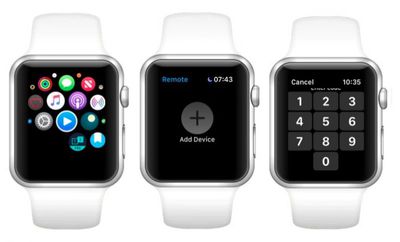
You should now see the Remote interface for controlling your Apple TV on your Apple Watch screen.

How to Control Apple TV Using Your Apple Watch

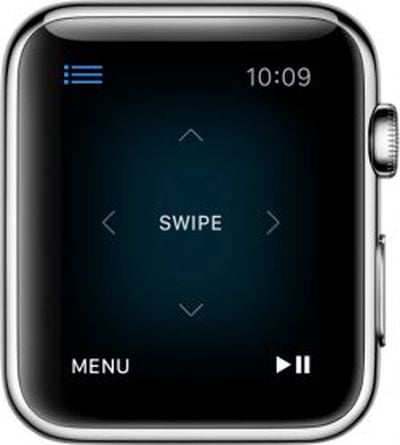
    remote app apple tv 2

  • Swipe up, down, left, or right to move through the Apple TV menu.
  • Tap to choose the selected item.
  • Tap Menu to go back.
  • Touch and hold Menu to return to the Home screen.
  • Swipe left or right to scrub through media.
  • Tap to pause or resume playback.

If you're anything like us, you'll find that swiping your Apple Watch to navigate Apple TV menus is much easier than using the Siri Remote – and you'll be able to see what you're doing in the dark. Just remember that as long as your Apple TV is on, you can return to the remote interface on your Apple Watch at any time simply by launching the Remote app.


Related Roundups: Apple Watch 11, Apple TV

Top Rated Comments

99 months ago
ANYTHING is better than the stock Apple remote, even a potato with buttons. Did the intern not test it in a darkened room?

I appreciate the minimalism but the current remote has horrible ergonomics. A classic example of aesthetics before function.
Score: 6 Votes (Like | Disagree)
99 months ago
I’m just here to say that I like the current remote. The raised ring was enough of a change that I don’t have trouble orienting the device.
Score: 5 Votes (Like | Disagree)
spellnight Avatar
99 months ago
I wish there was a combination to lock the remote so when you are watching something and accidentally touch it, it won't fast forward, rewind, go back to the main menu, etc. Am I the only one with this problem? :mad:
Score: 4 Votes (Like | Disagree)
robotica Avatar
99 months ago
I love this feature! Really nice integration.
Score: 4 Votes (Like | Disagree)
rdowty Avatar
99 months ago
If they would only add volume control...
Score: 3 Votes (Like | Disagree)
99 months ago
i wish there was some automatic "now playing" icon on the watch face like for the iPhone. would make it much easier and faster to access the remote.
Score: 2 Votes (Like | Disagree)

Popular Stories

General visionOS watchOS and tvOS Betas Feature Redux

Apple Releases Third watchOS 26.5, tvOS 26.5 and visionOS 26.5 Betas

Monday April 20, 2026 10:03 am PDT by
Apple today provided developers with the third betas of upcoming watchOS 26.5, tvOS 26.5, and visionOS 26.5 betas for testing purposes. The software comes a week after Apple released the second betas for each platform. The software updates are available through the Settings app on each device, and because these are developer betas, a free developer account is required. There's no word on ...
apple tv plus the savant

Apple TV Series 'The Savant' Set for July Premiere After Delay

Monday April 20, 2026 1:00 pm PDT by
Apple is finally planning to release The Savant, an Apple TV series that it delayed following the assassination of Charlie Kirk. The Savant is set to air in July 2026, according to Variety. The Apple TV show was supposed to come out on Friday, September 26, 2025, but Apple decided not to release it due to the topic and the political climate. When the series was pulled, star Jessica...
Apple TV Silo

Apple TV's Hit Show 'Silo' is Returning Soon: Release Date and Trailer

Tuesday April 21, 2026 1:29 pm PDT by
Apple today announced that its hit sci-fi series "Silo" is returning for a third season starting Friday, July 3, and it shared a teaser trailer. "Silo" follows the lives of 10,000 people living in an underground bunker to escape the seemingly toxic wasteland outside. The people are unaware of why the silo was built, and those who seek the truth face deadly consequences. Rebecca Ferguson...