

On Apple Watch models running watchOS 7 and later, Apple includes a Battery Health feature that's similar to the one found on iPhones and iPads running iOS 11.3 and later.

In basic terms, Battery Health provides information about the state of the device's battery and includes an option called "Optimized Battery Charging," which is designed to extend the total battery life of your Apple Watch.
When enabled, Optimized Battery Charging learns from your personal device habits and waits to finish charging all the way up until you need your Apple Watch.
For example, if you regularly charge up your watch at night while you're asleep, the device may opt to limit its charging to the 80 percent mark, and then wait for an hour or so before you wake up to charge the remaining 20 percent.
This keeps your watch at an optimal capacity for battery health by reducing the amount of time that it's sat on the charger at 100 percent charged, which can reduce its life over time.
Optimized charging is designed to activate only in locations where you spend the most time, such as your home and place of work. The feature doesn't turn on when your usage habits are more variable, such as when you travel.
Make Your Watch Fully Charge Before It's Scheduled to Do So
You can make your watch charge to full before it's scheduled to do so by following these steps.
- Make sure your Apple Watch is connected to its charger.
- Tap your watch to show the charging screen, then tap the circle with the green or yellow charging icon.
- Tap Charge to Full Now.
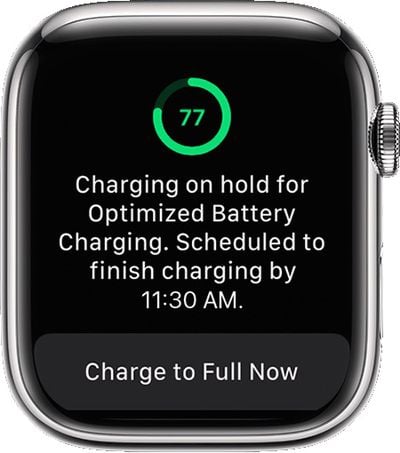
How to Turn Off Optimized Battery Charging
Optimized Battery Charging is enabled by default on an Apple Watch running watchOS 7. If you need your Apple Watch fully charged sooner than normal and you want to disable Optimized Battery Charging, follow these simple steps.
- Press the Digital Crown on your Apple Watch to bring up the App View.
- Select the Settings app.
- Scroll down and select Battery.

- Scroll down and select Battery Health.
- Tap the switch next to Optimized Battery Charging to turn it to the grey OFF position.
- Tap Turn Off or Turn Off Until Tomorrow.
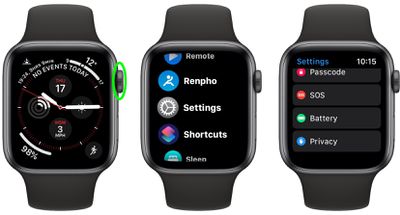
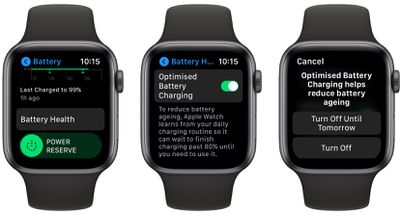
To re-enable Optimized Battery Charging on your Apple Watch at any time, simply repeat the above steps and toggle the switch to the green ON position.
Checking the Health of Your Apple Watch Battery
Notice that the Battery Health screen contains useful additional information about the status of your Apple Watch battery, which you can use to decide if it needs replacing.
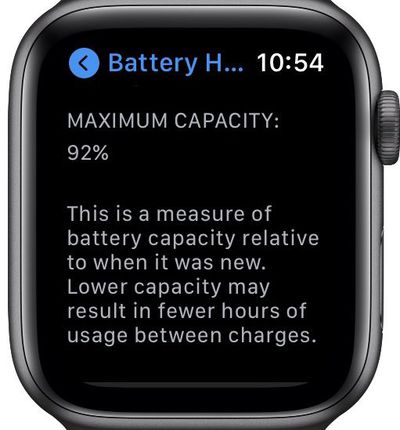
The "Maximum Capacity" percentage gives you a measure of battery capacity compared to when your battery was brand new. If the maximum capacity percentage falls, you'll likely get less usage out of your Apple Watch between charges. In other words, it's an indicator of how your battery is performing overall and directly correlates with how long your watch will last on a single charge.
Help Optimized Charging Identify Locations
Optimized charging is designed to activate only in locations where you spend the most time, such as your home and place of work. The feature doesn't turn on when your usage habits are more variable, such as when you travel.
To help Optimized Battery Charging identify situations where it shouldn't be used, turn on the following location settings in the Settings app on your Apple Watch:
- Privacy -> Location Services -> Location Services
- Privacy > Location Services > System Services > System Customization
- Privacy > Location Services > System Services > Significant Locations > Significant Locations
The location information for this feature remains on your watch and none of it is sent to Apple.
















Top Rated Comments