iOS 17: How to Control Which Apps Have Access to Your Photos - MacRumorsOpen MenuShow RoundupsShow Forums menuVisit ForumsOpen Sidebar
Skip to Content

iOS 17: How to Control Which Apps Have Access to Your Photos

by

In iOS 17, Apple offers much more control over what apps can see in terms of your photos. Keep reading to learn how to manage app access on a per-app basis.
icloud photos
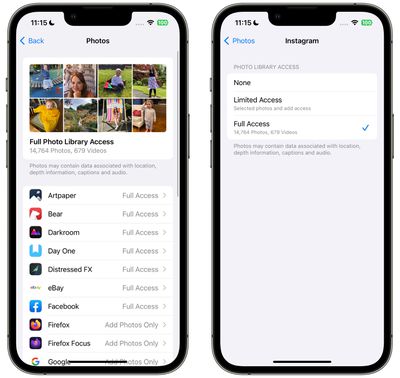
In iOS, Apple's in-app photos picker lets you share specific photos with apps while the rest of your Photo Library stays private. Apps must ask to access your entire photo library, and you can choose to give apps the following access:

  • Limited Access - Apps can see only the images that you can select, and you can review the selected images anytime either in the app or by going to Settings > Privacy & Security > ‌Photos‌.
  • Full Access - Apps can see all of the images and videos in your Photo Library, and your device will tell you exactly how many photos and videos you're giving access to.
  • None - No access to the Photo Library at all.
  • Add ‌Photos‌ Only - The app can add images to your library, but not view them. This setting depends on the app, and is not available for all apps.

In iOS 17, Apple has made managing app access to your photos a lot simpler by adding a settings menu where you can adjust permissions on a per-app basis. Here's how to get to it and manage individual apps.

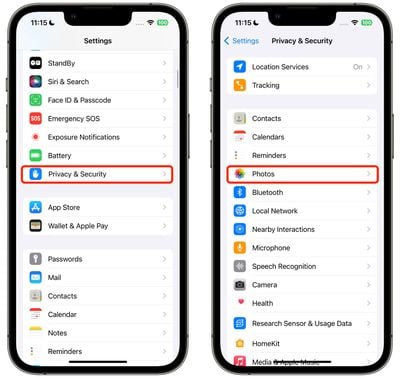
  1. Open the Settings app.
  2. Tap Privacy & Security.
  3. Tap Photos.
    settings

  4. Tap the app that you want to change access for.
  5. Choose from None, Add Photos Only (where applicable), Limited Access, and Full Access.
    settings

That's all there is to it. When you download a new app that wants Photo Library access, you will be prompted to choose from the same three options, and the app will be added to the same Photos list in Settings, allowing you to change access at any time in the future.

Your ‌iPhone‌ will also periodically remind you about apps that have access to your full Photo Library, offering up the option to change access to limited.


Popular Stories

meta instants

Meta Launches 'Instants' App for Sharing Disappearing Photos on Instagram

Wednesday May 13, 2026 11:32 am PDT by
Meta today announced the launch of Instants, a new image sharing option on the Instagram social network. Instants are ephemeral photos that disappear from Instagram after they're viewed by a user's friends or after a 24-hour period. Reactions and replies to Instants images show up in DMs instead of on the post. Instants photos are only displayed for a short period, but they are saved to a...
sweeping AI driven upgrades feature

First Look at AI Camera and Photos Features in iOS 27 Revealed

Thursday May 28, 2026 6:32 am PDT by
Apple is planning sweeping AI-driven upgrades to its Camera and Photos apps in iOS 27, Bloomberg's Mark Gurman reports. Image via Bloomberg. The report offers a first look at the appearance of several major iOS 27 features that Apple plans to announce at its Worldwide Developers Conference on June 8. The images are based on information viewed by Bloomberg and people said to be familiar with ...
apple lock security bug vulnerability fix privacy

Apple Warns Canada's Bill C-22 Could Force Encryption Backdoors

Friday May 8, 2026 4:22 am PDT by
Apple and Meta have opposed a Canadian bill that the companies say could force them to create backdoor access to encrypted user data, should it pass through the country's parliament. Proposed by Canada's ruling Liberal Party, Bill C-22 contains provisions that could be similar ​to a UK data access provision order sent to Apple last year, depending on how they are implemented. Back in Feb...