

How to Copy and Paste Edits to Photos in macOS - MacRumorsOpen MenuShow RoundupsShow Forums menuVisit ForumsOpen Sidebar
Skip to Content

How to Copy and Paste Edits to Photos in macOS

by

In macOS Ventura, Apple has brought some notable improvements to the Photos app, one of which is the ability to copy edits you make to an image and then paste them to other pictures. Keep reading to learn how it's done.

Ventura Macs Feature Yellow
If you have multiple photos that you want to edit in the same way, or if you've made changes to one photo that you want to replicate in another photo, you can use the new copy and paste edits tools in the ‌Photos‌ app in macOS 13.

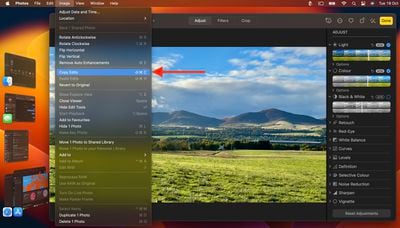
To use the new option in the ‌Photos‌ app, first open an image, then click Edit and make the adjustments to it that you want. When you're finished, click Done, and then select Image -> Copy Edits from the menu bar.
photos
Return to the main image library view, then select the image you want to paste them to. (Alternatively, select multiple images while holding down the Command key.) Finally, choose Image -> Paste Edits from the menu bar to apply the changes to all selected images.


Popular Stories

apple intelligence photos tools

Apple to Bring AI Reframing and Editing Tools to Photos App

Monday June 8, 2026 11:16 am PDT by
Apple today announced new AI-powered photo editing tools coming to the Photos app as part of Apple Intelligence, including an upgraded Clean Up tool, a new Extend tool, and a new Spatial Reframing feature. Spatial Reframing allows users to reposition the virtual camera angle of a photo after it has already been taken. By touching and dragging, users can adjust the framing and perspective of...
iOS 26 Glass Photos Feature

Apple Photos Finally Gets a Slideshow Maker

Monday June 8, 2026 5:04 pm PDT by
Apple today announced new slideshow features coming to the Photos app, allowing users to play any set of photos and videos as a slideshow. There are options to set the slide duration, transition style, and music. iOS 27 also lets users save any slideshow directly as a video to their Photos library for easy playback later. Additional new features include the ability to save individual...
iCloud iPhone 17 Pro

iPhone Users Who Pay for iCloud Storage Get Two New Perks on iOS 27

Thursday July 2, 2026 6:10 am PDT by
If you pay for certain iCloud+ storage plans beyond the 5GB that Apple offers for free, you will receive two more perks on iOS 27 at no additional cost. A summary of the two new iCloud+ perks on iOS 27:Increased daily usage limits for some new Apple Intelligence features, including image generation in the revamped Image Playground app. HomeKit Secure Video cameras receive generated video...












