Create a Custom Pass in the Wallet App on iPhone - MacRumorsOpen MenuShow RoundupsShow Forums menuVisit ForumsOpen Sidebar
Skip to Content

Create a Custom Pass in the Wallet App on iPhone

by

In iOS 27, Apple's Wallet app lets you create custom passes for things like event tickets, gift cards, loyalty cards, and more. Here's how it works.
wallet app create a pass
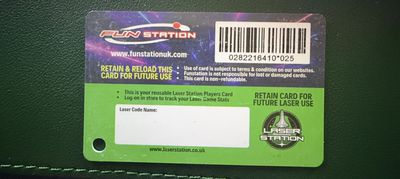
If you have a ticket for an event and there's not a digital version available for the Wallet app, you can create one using the physical pass you have. The same goes for other cards, like a membership card, for example.

The Wallet app can use ‌Visual Intelligence‌ to scan your card, and it will match it to a template with corresponding fields that you can tweak before adding it to your Wallet.

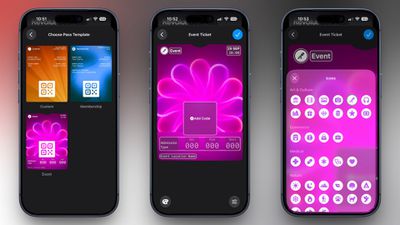
Alternatively, you can create the pass manually, choose a template ("Membership," "Event," or "Custom") and then adjust the color and other details. All you need to do then is scan the barcode or QR code from your physical pass.

Each template includes relevant information like name, location, or admission type. There are 12 background colors to choose from, or seven custom backgrounds for categories like theater, music, sports, and movies.

Fields can be added or removed when creating a custom pass, with options like label, date, membership, contact, coupon code, VIN, insurance, and more, so most physical cards should be able to be stored digitally.

Here's how you create a pass with ‌Visual Intelligence‌:

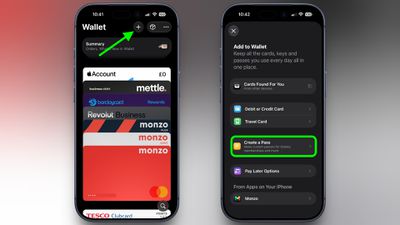
  1. Open the Wallet app on your iPhone and tap the + button at the top.
  2. Choose Create a Pass.
    wallet

  3. To let Visual Intelligence scan the pass, tap Continue, then take a photo of it in the next screen.
    pass example scaled

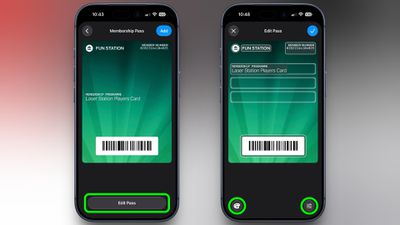
  4. After Visual Intelligence matches the pass to a template, tap Edit Pass.
  5. Use the palette icon in the bottom-left corner to change the look of the pass – you can the background colour, or use an image from your Photos library. Tap the icon in the bottom-right corner to add or remove fields.
    wallet

  6. Tap the blue checkmark at the top when you're done.
Your custom pass will now be added to your Wallet, ready for use. To edit it at any time, simply select it in Wallet, tap the three dots in the top-right corner of the screen, then tap Edit Pass.
Top Rated Comments

Rockanrolero Avatar
1 day ago at 06:16 am
What everyone wants to know is how to do their Costco card… show us that and done 👍🏻
Score: 7 Votes (Like | Disagree)
adrianlondon Avatar
1 day ago at 04:13 am

Why would any venue or business accept a modified document?
It's just a way to put an email / pdf containing a QR code or barcode into the wallet.

Of course, for things which regularly regenerate the code in its own app, this won't work. Or if the ticket requires someone to actually look at it rather than just scan it, it also won't work, as you say.
Score: 7 Votes (Like | Disagree)
NightFox Avatar
1 day ago at 05:15 am

Finally! I was taking photos of these until now. The time has come to finally have my Tesco clubcard in the Wallet app and get discounts on cheap wine.
I've had my Clubcard in my Wallet for years - can't remember how though!


Attachment Image
Score: 6 Votes (Like | Disagree)
1 day ago at 04:33 am
This is definitely a nice feature to have although maybe a bit bitter-sweet for me.

I really longed for this feature 5 years ago, even more so 10 years ago, but at least in the UK most reasonable-sized businesses have now got much better about making it possible to add their loyalty cards, event tickets etc into Apple Wallet.

I'm sure that I'll still find it useful but I wish it had been introduced years ago.
Score: 6 Votes (Like | Disagree)
dannys1 Avatar
1 day ago at 05:01 am
I remember I created custom passes a couple of years ago for going on holiday to Dominican Republic - everything that had a QR code on I created - I put in the address so it'd come on local screen automatically.

I had my little QR immigration form and my fast track through security ticket.

The queue staff at the airport didn't accept my immigration pass as proof i'd filled it in, so I had to get up the PDF anyway - and at the other end in the actual country it was for - they don't even scan the QR code, it's all linked to your passport number so you don't even need it!

The fast track staff gate keeper wouldn't accept my QR pass to get into the line, despite it working fine at the actual turn style, so I had to show her the PDF as well.

The normal person isn't ready for custom made QR code passes - they only know what they see 100 times and most of the time they don't even scan the code. It's really annoying.
Score: 5 Votes (Like | Disagree)
CLS9 Avatar
1 day ago at 04:44 am
Well, that was a complete waste of time. There is no prompt to take a photo of my gym pass and when I tried to enter it manually, it wouldn't recognized the QR code and that's what they scan at the gym.
Score: 4 Votes (Like | Disagree)

Popular Stories

bmw car key photo

iPhone Car Keys in Apple Wallet Expanding to Three More Vehicle Brands

Tuesday September 15, 2026 6:35 am PDT by
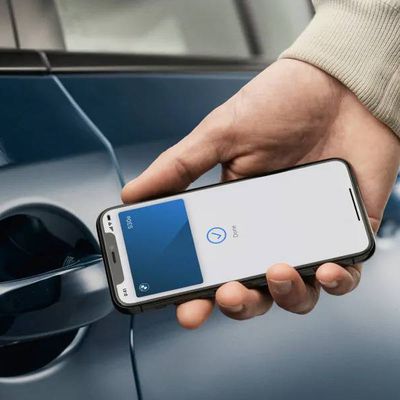
Apple Wallet car keys are coming to three more vehicle brands, including Lincoln, Lucid Motors, and China's Freelander, according to code uncovered by MacRumors contributor Aaron Perris. However, the code does not provide a timeframe for availability. The digital key feature allows you to lock, unlock, and start a compatible vehicle with an iPhone or Apple Watch. It is already offered by...


apple wallet drivers license feature iPhone 15 pro

iPhone Driver's License Feature in Apple Wallet Launches in Oklahoma

Wednesday September 2, 2026 6:38 am PDT by
Starting today, Oklahoma residents can add a digital version of their driver's license to the Apple Wallet app on the iPhone and Apple Watch. The digital ID can be used to display proof of identity or age at TSA checkpoints in select airports, at select businesses, and in select apps, but the number of places where it is accepted is still quite limited. Oklahoma is the 16th state to...
Apple TV Sans Remote Feature

New Apple TV 4K Leaked

Friday September 25, 2026 8:16 am PDT by
MacRumors contributor Aaron Perris has uncovered an image file from Apple for an unreleased Apple TV 4K, suggesting that a new model will finally be released soon. The image is specifically for an "Apple TV 4K (4th generation)" model. Apple TV 4K (4th generation) image (on a gradient) The image reveals that the Apple TV will have the same external design as the current model, with all of its...
Latest Stories
Top Stories: Apple Leaks, Siri AI Settlement, and More
1 hour ago
watchOS 27: 12 New Things To Check Out on Your Apple Watch
7 hours ago
Banks and Credit Unions to Team Up Against Apple Pay Fees
19 hours ago
Apple Finally Shares tvOS 27 Release Notes With List of New Features
19 hours ago
Amazon's $199 Discount on Apple Watch Ultra 3 Returns to Help Clear Stock
20 hours ago
MacRumors Giveaway: Win an Apple Watch Ultra 4 From Lululook
20 hours ago
Apple Code Confirms iPad 12 Specs: A19, 8GB RAM, N1, C1X Modem
21 hours ago
Some iPhone 18 Pro Max Users Experiencing AT&T Cellular Issues
21 hours ago
Launch Week Deals Hit Latest Macs, Apple Watch Ultra 4, and Apple Accessories
21 hours ago
The MacRumors Show: Tyler Stalman Talks iPhone 18 Pro's Camera
22 hours ago
iPad Mini With A20 Pro, New HomePod Mini Colors, and New Apple TV 4K All Just Leaked
23 hours ago
iPad Mini 8 Leaked: A20 Pro Chip, Landscape Camera, and More
23 hours ago
Exclusive: First Look at HomePod Mini 2 in Three New Colors
23 hours ago
New Apple TV 4K Leaked
23 hours ago
Create a Custom Pass in the Wallet App on iPhone
1 day ago
How to Check Your Mac's Manufacture Date in macOS 27
1 day ago
What's Gone in macOS Golden Gate and What's Next in macOS 28
2 days ago
TestFlight App Gets New iOS 27 Features
2 days ago
Google Photos Wardrobe Feature Comes to iOS
2 days ago
Apple Music to Host Free Head Trip Festival Livestream
2 days ago
watchOS 27.2 Code Hints at iPhone-Style Screenshot Previews
2 days ago
Beats 360 Headphones Now Available in Apple Stores
2 days ago
Apple Shares New Video Promoting iOS 27 Parental Controls
2 days ago
Apple Has Announced 12 New Products in the Past Month
2 days ago
Apple Watch Ultra 2 vs. Ultra 4 Buyer's Guide: Should You Upgrade?
2 days ago
Here's When Apple TV is Airing Free 'Peanuts' Holiday Specials This Year
2 days ago
Square Announces Apple Business Integration
2 days ago
AirPods Pro 3 on Sale for $199 This Week on Amazon
2 days ago
Qualcomm Announces Renewed Agreement With Apple
2 days ago
Apple Confirms iPhone 18 Pro Bug Fix Update is Coming Next Week
2 days ago