How to Create a More Secure Passcode on Your iPhone or iPad - MacRumorsOpen MenuShow RoundupsShow Forums menuVisit ForumsOpen Sidebar
Skip to Content

How to Create a More Secure Passcode on Your iPhone or iPad

by

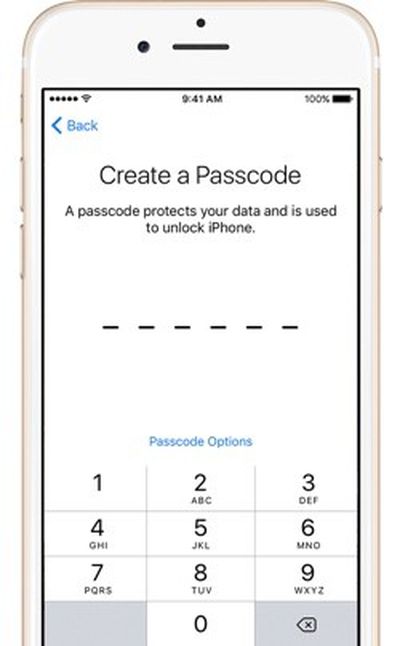
iphonecreateapasscodeApple's iPhones have long been protected by numeric passcodes, giving iOS users a way to protect keep their devices safe from hackers and prying eyes. Over the years, passcodes have been supplemented by Touch ID, Apple's fingerprint recognition system, but the passcode is still the iPhone's main line of defense.

A passcode is required to set up Touch ID, and Touch ID is automatically disabled after 48-hours until a passcode is input by an iPhone or iPad's owner. In the United States, passcodes are especially important because the law suggests that while law enforcement officers can require you to provide a fingerprint to unlock a device, the same is not true of a passcode.

For a long time, passcodes were four-digit numeric codes by default, but with iOS 9, Apple began using a six-digit passcode as the default option. Six-digit passcodes offer 1 million possible combinations instead of 10,000, making a passcode harder to crack.

Apple doesn't advertise it, but the iOS operating system offers an option to make your passcode even more secure through the use of an alphanumeric passcodes or custom length numeric passcodes. Alphanumeric passcodes contain letters and numbers. Both alphanumeric and custom numeric passcodes can be much longer than four or six digits.

Passcodes are currently in the spotlight because of an ongoing security debate between Apple and the FBI. Apple has been ordered to help the FBI access data on the iPhone 5c owned by one of the shooters involved in the 2015 San Bernadino attacks.

To do so, the FBI has asked Apple to create software that would eliminate the iOS feature that erases an iPhone after 10 failed passcode attempts, removes the time limits between passcode entries, and allows passcodes to be input electronically. Apple is opposing this order and it's not clear how the issue will play out, but should the FBI gain a tool to access iPhones in this manner, it would take just upwards of a half an hour to break into a phone with a 4-digit passcode. With an alphanumeric passcode, such a tool would be next to useless because of the sheer amount of time it would take to guess a passcode with millions of possible combinations.

Creating an Alphanumeric Passcode

Creating an alphanumeric passcode is a process that can be done with a few taps and about five minutes of your time.
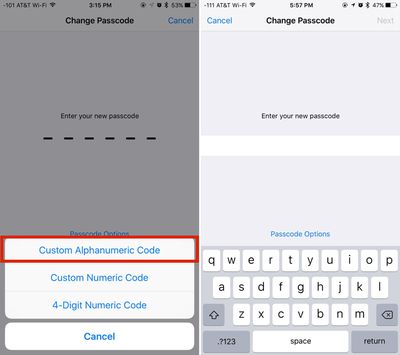
creatinganalphanumericpasscode

  1. Open the Settings app on your iPhone or iPad.
  2. Scroll down to "Touch ID & Passcode" and tap on it.
  3. If you already have a passcode enabled, you will need to enter it to access the passcode options.
  4. Select "Change Passcode" and enter your existing passcode again.
  5. At the screen where you're asked to enter a new passcode, tap on "Passcode Options" located just above the numbered.
  6. Choose "Custom Alphanumeric Code." You can also select "Custom Numeric Code" for a number-only passcode.
  7. Enter your chosen passcode. It can include numbers, letters, and symbols.
  8. Tap "Next."
  9. You'll be prompted to enter the same passcode again to verify the spelling. Enter it again and tap "Done."

After entering an alphanumeric passcode or changing your passcode, Apple will prompt you to use the new passcode as your iCloud Security Code, which is used to protect passwords stored in iCloud Keychain. Click on "Use Same Code" to change it or "Don't Change Security Code" to continue using your old passcode.
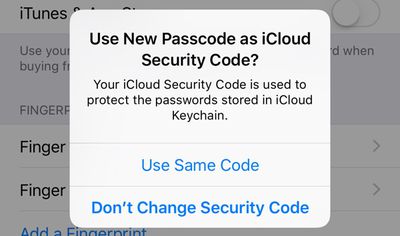
passcodeicloudsecuritycode
With an alphanumeric passcode set on an iPhone, instead of a number pad to enter a numeric passcode, you'll see a full QWERTY keyboard complete with access to numbers, letters, and symbols.
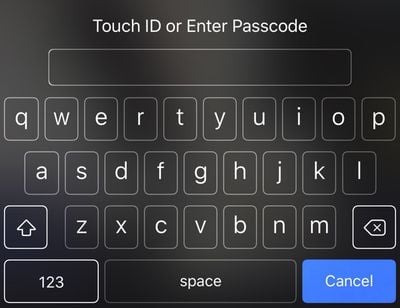
alphanumericpasscode
While not as convenient as a simple number code, an alphanumeric password can be harder to crack and just as easy to remember if you use randomly generated combinations of words. For example, "sarcasm-blacken-guilder-epilepsy" or "stitch-quasi-peppery-tuneless," two password phrases generated by 1Password, aren't difficult to remember because they're simple words, but with upwards of 29 characters, they're impossible to guess or brute force. Using an alphanumeric passcode will be more of a hassle than a standard passcode, but with Touch ID, a passcode doesn't need to be entered too often.

Any alphanumeric code used to protect an iPhone should be unique set of words or numbers that are not used for other products, services, or websites, which will make it impossible to obtain through social engineering or phishing attempts.


Top Rated Comments

140 months ago
Doesn't matter when the FBI gets their way and gets the backdoor they have been itching for.
That is up to you and I. Apple has stuck their neck out. Now the government is quietly trying to cut their head off. They only way they, the government win, is if you an I are silent and don't say anything. Now is the time to call and write and tweet, and make whatever noise can be made because next month will too late.
Score: 6 Votes (Like | Disagree)
140 months ago
For it to be effective, against the FBI, NSA etc. tryimg to brute force your phone (assuming they get through the courts) you would need to not be iCloud enabled with anything you don't want the Feds to have (Apple can give them access to all that via a warrant) and be backing up locally (not in iCloud) as well as synching locally on your computer via iTunes.

Not to mention that the local backups of the phone would need to be encrypted. iTunes offers encryption for them as an option.

Another alternative would be to encrypt the whole disk with something like FileVault 2 (built into OS X), but then you'd also need to encrypt any backups of your computer you maintain - on a TimeCapsule, for instance. They remain unencrypted even if the computer's disk is encrypted, unless you specifically encrypt the backups too.
Score: 3 Votes (Like | Disagree)
140 months ago
I'd love an app that when I removed my Apple Watch, it turned off thumbprint on all my devices and required the passcode.
Score: 3 Votes (Like | Disagree)
dwaltwhit Avatar
140 months ago
I was not aware that I could be compelled to unlock my phone via fingerprint but not passcode.
Score: 3 Votes (Like | Disagree)
BeefCake 15 Avatar
140 months ago
It is easy to force your fingerprint onto the sensor. So that way they have the ability to force you to unlock your phone.
They cannot "force" a passcode out of your brain.
MacRumors content image
Score: 2 Votes (Like | Disagree)
140 months ago
I don't see why the doubt. For me, article from credible website is "good enough" for this type of thing. Here's another source:

https://twitter.com/fmanjoo/status/700092451348942849
https://twitter.com/fmanjoo/status/700092718114975744
From what I can tell from the trail of assertions, this IS the source. And if you read the replies to his tweet, you'll see several challenges, asking for attribution. He has provided no answer, other than "Apple". I won't claim he made it up, but I'll ask if he was talking to someone in Apple who can't be considered an authoritative source.

And the reason for my doubt? The media, "credible" or not, gets things wrong. Frequently. Nearly every time I read an article about something about which I have personal knowledge, I see errors. So, I've learned to question un-sourced assertions. And if the source is cited, I sometimes check out the source itself. Not so often, I find the source is mis-quoted, or quoted out-of-context.

If I'm wrong, I'll accept that. But at this time, I don't see anything to support this assertion that has been repeated by Techcrunch and others.


Sorry, I can't get Tim Cook to meet you personally to tell you it's true. :)
Frankly, I wouldn't expect Cook to make a statement about this to anyone. But, I'll wait until someone with the authority to speak for Apple on-the-record, and the knowledge to provide a complete answer, before I'll accept it as confirmed.
Score: 2 Votes (Like | Disagree)

Popular Stories

apple pro tell logo

Apple Launching Five New Products Today

Thursday November 5, 2026 12:59 am PST by
Apple is launching five new products on Friday, November 6, following pre-orders that opened last week, including its first touchscreen MacBook Pro models. The following new products will be available from today: iPad mini with OLED display and A20 Pro chip iMac with M6 chip 14-inch MacBook Pro with M6 chip 14-inch MacBook Pro with OLED touchscreen 16-inch MacBook Pro with OLED...
duo aquarium

More Fun iPhone Duo Apps: 30 New Picks to Try

Friday November 6, 2026 3:27 pm PST by
When the iPhone Duo launched, we shared a list of some of the fun apps developers created for the new form factor. Two weeks out, developers are continuing to come up with fresh ideas, so we thought we'd share some of our favorites. Games Marbles Unhinged ($2.99) - Marbles Unhinged is a marble maze designed for the Duo. When you fold it, the floor turns into a ramp. If you stand the top...
silver iphone 18 pro

Apple Rumored to Drop the iPhone's Action Button Next Year

Friday November 6, 2026 6:07 am PST by
Apple plans to merge the iPhone's Action button with the Camera Control starting next year, according to the leaker known as "Instant Digital." In a new post on Weibo, the leaker claimed that a single press of the combined button would open the camera, while a long press would trigger the function assigned to the Action button. They explicitly clarified that the dedicated Action button would ...
Latest Stories
Early Apple Black Friday Deals on Apple Watch, MacBook Air, and More
15 hours ago
'Backglow' Lets You Customize New MacBook Pro's Glowing Apple Logo
15 hours ago
Top Stories: Apple Product Launches, iOS 27.3 Beta, and More
22 hours ago
More Fun iPhone Duo Apps: 30 New Picks to Try
2 days ago
Hands-On With Apple's New OLED Touchscreen MacBook Pro
2 days ago
Apple Store With All-New Design Opening Soon in Southern California
2 days ago
Control the Glowing Apple Logo on Your New MacBook Pro
2 days ago
Apple Shares New 'Apple Card: Apply and Use in Minutes' Ad
2 days ago
Apple Says More Than 100,000 Apps Optimized for iPhone Duo, Here's What's Still Missing
2 days ago
Early Black Friday Deals Kickoff With Steep Discounts on Apple Watch Ultras and More
2 days ago
The MacRumors Show: iOS 27.3 Looks Like a Huge Update
2 days ago
Best Buy's Black Friday Event Begins With Sitewide Savings on Apple, TVs, More
2 days ago
Apple Releasing Yet Another Two New Products Next Week
2 days ago
MacBook Air Drops to Lowest Price in Months With Amazon's $250 Discount
2 days ago
Apple Rumored to Drop the iPhone's Action Button Next Year
2 days ago
Apple's Extended Return Policy Now in Effect for 2026 Holiday Season
2 days ago
Apple Music Classical Updated With New Icon and Refreshed Design
2 days ago
OLED iPad Mini, M6 iMac, and New MacBook Pros Available From Today
2 days ago
Apple Surveys iPhone Duo Buyers About Crease and Camera
2 days ago
Apple's First Touchscreen Mac is Now Arriving to Customers
3 days ago
Claude Gets Personal Finance Feature With Bank Account Linking
3 days ago
Apple Arcade Adds Crossy Road Rush and NBA 2K27
3 days ago
Apple's New HomeView Smart Home Hub: Here's How Much RAM It Has
3 days ago
iPad Mini vs. iPad Air Buyer's Guide: Now Just $50 Apart
3 days ago
First iOS 27.3 and macOS Golden Gate 27.3 Public Betas Now Available
3 days ago
Apple Announces a New Mac Sales Record
3 days ago
Paid $200 for Logic Pro? Apple Says You Won't Get This New Feature
3 days ago
Instagram's Edits Video Editor is Now Available on Mac
3 days ago
Prevent Siri and Search From Accessing Specific iPhone Apps
3 days ago
Best Early Black Friday Deals on iPhone 18 Pro and iPhone Duo
3 days ago








































