How to Create an Archived iTunes Backup - MacRumorsOpen MenuShow RoundupsShow Forums menuVisit ForumsOpen Sidebar
Skip to Content

How to Create an Archived iTunes Backup

by

Regularly creating iCloud or iTunes backups should be routine for every iOS user, but if you want to upgrade to a beta version of iOS or if you think you might want to downgrade shortly after installing a new iOS update, you'll want to make sure create an archived iTunes backup beforehand.

An archived iTunes backup is essential because it saves the current state of your iOS device and prevents it from being accidentally overwritten by subsequent backups. Apple recommends all public beta testers create an archived backup before installing a beta in case something goes wrong and a restore is needed. Here's how to do it.

Create an Encrypted Backup
encryptedbackup

  1. Connect your iPhone or iPad to a Mac with the latest version of iTunes installed and click on the device icon in iTunes.
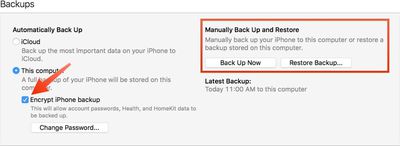
  2. Under backups, choose "This computer." Select "Encrypt iPhone backup" and set a password. An encrypted backup includes account passwords, Health, and HomeKit data. A non-encrypted backup will wipe all of this data if it's used for a restore.
  3. Click "Back Up Now" and wait for the backup process to finish. It will take approximately five minutes to complete depending on what's installed on your iPhone.

Archive the Backup
archivedbackup

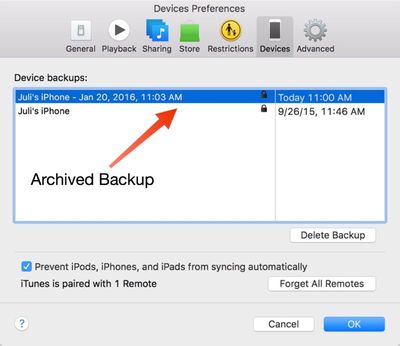
  1. To archive the backup, choose "Preferences" from the iTunes menu and select the "Devices" tab. Choose the fresh backup and right click to bring up the "Archive" option.
  2. Once archived, a backup will be marked with the date and the exact time that it was archived.

Your archived backups are always visible in the Preferences section of iTunes, even when a device is not plugged in. Deleting one of your archived backups can be done from the same menu, by selecting a backup and choosing the "Delete Backup" option.

This guide is applicable to iTunes users on the Mac. Windows iTunes users are not able to create archived iTunes backups using the same method and will instead need to rename their iTunes backup folder or move it to another location to prevent it from being overwritten.

Creating an archived backup is one of the key steps in our how to that walks users through installing a beta version of iOS, which is available here.


Top Rated Comments

jclo Avatar
140 months ago
I realize this how to may be something that a lot of people already know and creating an archived backup is nothing new, but we're publishing it now to fill in some gaps in our existing how to coverage.

It'll be useful to people who aren't familiar with creating archived backups and it's specifically being added for future use in other how tos where an archived backup is a requirement, like this one: https://www.macrumors.com/how-to/how-to-download-ios-beta/

You'll see a few other how tos like this here and there with the same disclaimer.
Score: 5 Votes (Like | Disagree)
naeS1Sean Avatar
140 months ago
I realize this how to may be something that a lot of people already know and creating an archived backup is nothing new, but we're publishing it now to fill in some gaps in our existing how to coverage.

It'll be useful to people who aren't familiar with creating archived backups and it's specifically being added for future use in other how tos where an archived backup is a requirement, like this one: https://www.macrumors.com/how-to/how-to-download-ios-beta/

You'll see a few other how tos like this here and there with the same disclaimer.
I love this article and all the articles you do like it. Even though it's often basic stuff, it's nice to affirm and also see if I missed some obvious things. Thank you!
Score: 2 Votes (Like | Disagree)
jack daniels Avatar
140 months ago
Thanks for clarifying that the instructions don't work on a PC. However, at the beginning of the article it mentions that the instructions are for Mac adn PC, so could you please clear this up.

Could you please also give us more complete instructions on how to archive a backup on a PC? For example, the location of the backup folder and/or how to rename it (e.g. do you just rename the folder or change a setting in iTunes)?

I'm not entirely sure that archived backups aren't possible on a PC. I have an archived backup on my PC together with a date and time, and some non archived backups. Perhaps this happens automatically if you restore your device to an earlier state then back up (e.g. if you back up a new iPhone, then restore it from an older iPhone, does the new iPhone backup gets archived).
iTunes for Windows doesn't contain anything in the UI for archiving iTunes backups, which is why it's not included in this guide. You can manually archive backups on Windows by moving the backup itself to somewhere other than the default directory. Depending on your version of Windows, this varies.

Find and Manage your iTunes backups
https://support.apple.com/en-us/HT204215

The backups in the default directory will be named the UDID of the device that created them. Simply drag the folder to an external drive or wherever you back up your files, and when it's time to restore, move them back into the default directory and it will be available in iTunes to restore from.
Score: 2 Votes (Like | Disagree)
140 months ago
Thanks for clarifying that the instructions don't work on a PC. However, at the beginning of the article it mentions that the instructions are for Mac adn PC, so could you please clear this up.

Could you please also give us more complete instructions on how to archive a backup on a PC? For example, the location of the backup folder and/or how to rename it (e.g. do you just rename the folder or change a setting in iTunes)?

I'm not entirely sure that archived backups aren't possible on a PC. I have an archived backup on my PC together with a date and time, and some non archived backups. Perhaps this happens automatically if you restore your device to an earlier state then back up (e.g. if you back up a new iPhone, then restore it from an older iPhone, does the new iPhone backup gets archived).
Score: 1 Votes (Like | Disagree)
jclo Avatar
140 months ago
Is this something that can be used to revert back to the iOS version you archived at if you're subsequently unhappy with an upgrade?

e.g. My iPad 2 is on iOS 6. Can I archive backup now, upgrade to iOS 9, and then if I find the performance hit unacceptable revert back to iOS 6 via the archived backup?
Only so long as Apple is signing the update. Apple doesn't sign software for very long following a new version of iOS so the window for downgrading is pretty small.
Score: 1 Votes (Like | Disagree)
Carvensno Avatar
140 months ago
Is this something that can be used to revert back to the iOS version you archived at if you're subsequently unhappy with an upgrade?

e.g. My iPad 2 is on iOS 6. Can I archive backup now, upgrade to iOS 9, and then if I find the performance hit unacceptable revert back to iOS 6 via the archived backup?
Nope because Apple isn't signing iOS 6 anymore. Backup is only for your stuff on the phone, ie... Texting, contacts, music, pics, apps, and etc...not the OS.


Score: 1 Votes (Like | Disagree)

Popular Stories

apple pro tell logo

Apple Launching Five New Products Today

Thursday November 5, 2026 12:59 am PST by
Apple is launching five new products on Friday, November 6, following pre-orders that opened last week, including its first touchscreen MacBook Pro models. The following new products will be available from today: iPad mini with OLED display and A20 Pro chip iMac with M6 chip 14-inch MacBook Pro with M6 chip 14-inch MacBook Pro with OLED touchscreen 16-inch MacBook Pro with OLED...
duo aquarium

More Fun iPhone Duo Apps: 30 New Picks to Try

Friday November 6, 2026 3:27 pm PST by
When the iPhone Duo launched, we shared a list of some of the fun apps developers created for the new form factor. Two weeks out, developers are continuing to come up with fresh ideas, so we thought we'd share some of our favorites. Games Marbles Unhinged ($2.99) - Marbles Unhinged is a marble maze designed for the Duo. When you fold it, the floor turns into a ramp. If you stand the top...
silver iphone 18 pro

Apple Rumored to Drop the iPhone's Action Button Next Year

Friday November 6, 2026 6:07 am PST by
Apple plans to merge the iPhone's Action button with the Camera Control starting next year, according to the leaker known as "Instant Digital." In a new post on Weibo, the leaker claimed that a single press of the combined button would open the camera, while a long press would trigger the function assigned to the Action button. They explicitly clarified that the dedicated Action button would ...
Latest Stories
Early Apple Black Friday Deals on Apple Watch, MacBook Air, and More
14 hours ago
'Backglow' Lets You Customize New MacBook Pro's Glowing Apple Logo
15 hours ago
Top Stories: Apple Product Launches, iOS 27.3 Beta, and More
21 hours ago
More Fun iPhone Duo Apps: 30 New Picks to Try
2 days ago
Hands-On With Apple's New OLED Touchscreen MacBook Pro
2 days ago
Apple Store With All-New Design Opening Soon in Southern California
2 days ago
Control the Glowing Apple Logo on Your New MacBook Pro
2 days ago
Apple Shares New 'Apple Card: Apply and Use in Minutes' Ad
2 days ago
Apple Says More Than 100,000 Apps Optimized for iPhone Duo, Here's What's Still Missing
2 days ago
Early Black Friday Deals Kickoff With Steep Discounts on Apple Watch Ultras and More
2 days ago
The MacRumors Show: iOS 27.3 Looks Like a Huge Update
2 days ago
Best Buy's Black Friday Event Begins With Sitewide Savings on Apple, TVs, More
2 days ago
Apple Releasing Yet Another Two New Products Next Week
2 days ago
MacBook Air Drops to Lowest Price in Months With Amazon's $250 Discount
2 days ago
Apple Rumored to Drop the iPhone's Action Button Next Year
2 days ago
Apple's Extended Return Policy Now in Effect for 2026 Holiday Season
2 days ago
Apple Music Classical Updated With New Icon and Refreshed Design
2 days ago
OLED iPad Mini, M6 iMac, and New MacBook Pros Available From Today
2 days ago
Apple Surveys iPhone Duo Buyers About Crease and Camera
2 days ago
Apple's First Touchscreen Mac is Now Arriving to Customers
3 days ago
Claude Gets Personal Finance Feature With Bank Account Linking
3 days ago
Apple Arcade Adds Crossy Road Rush and NBA 2K27
3 days ago
Apple's New HomeView Smart Home Hub: Here's How Much RAM It Has
3 days ago
iPad Mini vs. iPad Air Buyer's Guide: Now Just $50 Apart
3 days ago
First iOS 27.3 and macOS Golden Gate 27.3 Public Betas Now Available
3 days ago
Apple Announces a New Mac Sales Record
3 days ago
Paid $200 for Logic Pro? Apple Says You Won't Get This New Feature
3 days ago
Instagram's Edits Video Editor is Now Available on Mac
3 days ago
Prevent Siri and Search From Accessing Specific iPhone Apps
3 days ago
Best Early Black Friday Deals on iPhone 18 Pro and iPhone Duo
3 days ago








































