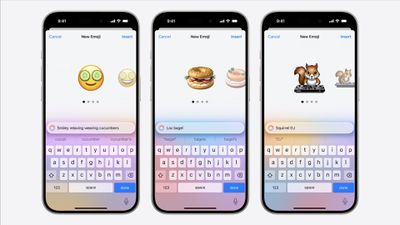
In iOS 18.2 and later, Apple's Genmoji feature lets you create personalized emoji that aim to perfectly match what you want to express, going far beyond the limitations of standard Unicode emoji. Want an emoji of a break-dancing astronaut or a dog playing bagpipes? With Genmoji, you can make it happen.

Unlike standard emoji that are fixed Unicode characters, Genmoji are dynamically generated using on-device AI. They work seamlessly in text, appearing as inline emoji characters in supported apps like Messages and Notes. You can even create Genmoji based on people in your Photos app, making them more personal and expressive.
Requirements and Availability
Genmoji is available in iOS 18.2 and later. The feature requires Apple Intelligence, which is limited to iPhone 15 Pro/Pro Max and iPhone 16 series models. Note that Apple Intelligence (enabled in Settings ➝ Apple Intelligence & Siri) is only available when your iPhone and Siri are set to the same language.
Compatibility
While Genmoji work best between iOS 18.2 and later devices, they're also viewable on devices running iOS/iPadOS 18.1 and later, as well as Macs running macOS Sequoia 15.1 and later.
On older Apple devices or Android phones, Genmoji appear as regular images rather than inline emoji characters. Third-party apps need to specifically add Genmoji support to enable creation and proper display of these custom emoji.
Creating Custom Emoji in Messages
- In Messages, start a conversation or choose an existing one.
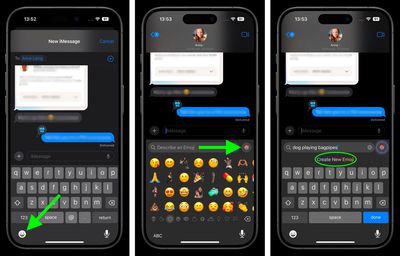
- Tap the emoji symbol in the bottom-left corner of the keyboard.
- In the emoji search field, describe your desired emoji (alternatively, tap the colored smiling emoji at the far right, then enter your description).
- Tap Create New Emoji.

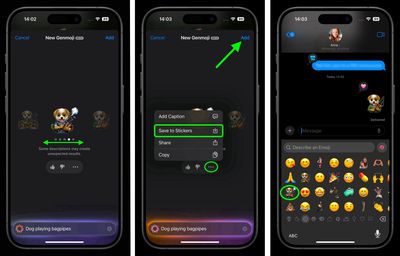
- On the New Genmoji screen, wait a moment for the amorphous blob to transform into your new emoji.
- When the navigational symbols appear below the emoji, swipe left to preview alternative versions of your creation.
- Tap the ellipsis button to add a caption to your emoji or save it as a sticker. You can also provide feedback to Apple using the thumbs up/down buttons.
- Tap Add when you're happy with your selection, then tap the blue arrow button to send your new Genmoji.
With Genmoji, emoji finally become as limitless as your imagination. Having said that, Apple does maintain content restrictions similar to Image Playground to keep things appropriate. Regardless, once you start creating custom emoji, you might find standard emoji feeling a bit limited in comparison.