How to Create Your Own GIFs in the Twitter iOS App - MacRumorsOpen MenuShow RoundupsShow Forums menuVisit ForumsOpen Sidebar
Skip to Content

How to Create Your Own GIFs in the Twitter iOS App

by

Twitter has updated its iOS app with a new in-app camera feature that lets users create their own animated GIFs for posting to the social media platform. The following steps show you how it's done.

Twitter Feature

  1. In Twitter, hit the big blue plus button to start composing a tweet.
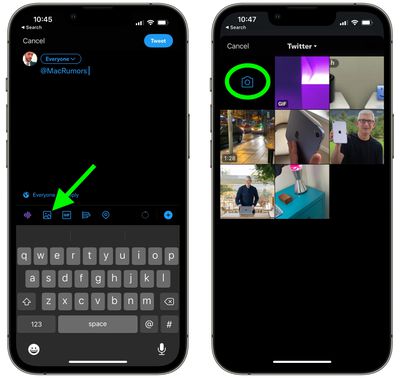
  2. Tap the picture icon in the compose window, just above the virtual keyboard.
  3. Tap the camera icon.
    twitter

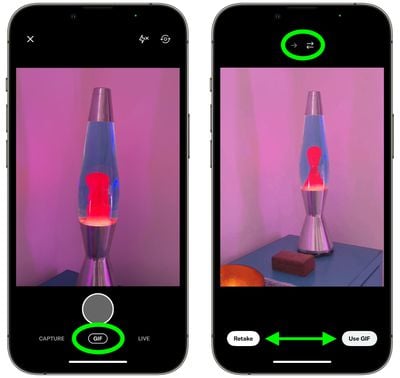
  4. Make sure GIF is selected below the shutter button.
  5. Tap the shutter button to create a short GIF or long press the button to record a longer one.
  6. Use the arrow icons above the viewfinder to set the GIF to repeat from the start or to continually invert the direction of playback for a "boomerang" effect.
  7. If you're happy with the outcome, tap Use GIF and then tweet your creation. If you'd like to start over, tap Retake.
    twitter

Note that the feature is iOS-only as of writing, and GIFs created in this way can't be saved to your iPhone – they can only be tweeted.

Tag: Twitter

Popular Stories

iCloud iPhone 17 Pro

iPhone Users Who Pay for iCloud Storage Get Two New Perks on iOS 27

Thursday July 2, 2026 6:10 am PDT by
If you pay for certain iCloud+ storage plans beyond the 5GB that Apple offers for free, you will receive two more perks on iOS 27 at no additional cost. A summary of the two new iCloud+ perks on iOS 27:Increased daily usage limits for some new Apple Intelligence features, including image generation in the revamped Image Playground app. HomeKit Secure Video cameras receive generated video...
American Express Gold Apple Pay Feature

American Express Announces New Apple Pay Feature

Tuesday June 30, 2026 10:27 am PDT by
American Express today announced that you can now redeem Membership Rewards points when checking out with Apple Pay on the web and in apps on the iPhone and iPad. When checking out with Apple Pay on iOS 18 or iPadOS 18 or later, tap on your eligible American Express card (Platinum, Gold, Green, and others) and select the Membership Rewards points option. You can use points to cover all or...
series 10 apple watch titanium digital crown

Report: Apple Watch Redesign Coming Next Year With New Band System

Tuesday June 30, 2026 8:45 am PDT by
A "major overhaul" of the Apple Watch's design is due to arrive next year with a new system for connecting bands, according to a known Weibo leaker. In a set of recent posts, the leaker known as "Instant Digital" linked the new claim to older rumors about an "Apple Watch X" model, which was said to introduce a fresh design and break compatibility with the existing watch band system. Citing...