iOS 15: How to Create a 'Hide My Email' Private Address - MacRumorsOpen MenuShow RoundupsShow Forums menuVisit ForumsOpen Sidebar
Skip to Content

iOS 15: How to Create a 'Hide My Email' Private Address

by

With iOS 15 and Hide My Email, you can create unique, random email addresses that forward to your personal inbox whenever you want to keep your personal email address private.
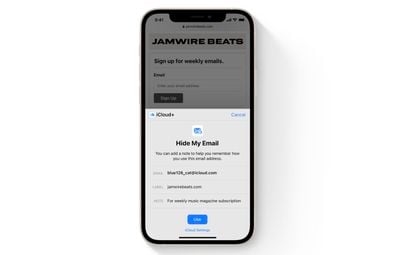
hide my email safari demo
This is especially useful if you think that a business or website is likely to share your email address with ad agencies or other third-parties for marketing purposes. Providing them with a dummy address means you can delete the address at any time, ensuring any unsolicited emails don't reach your inbox.

How to Create an Email Address Using Hide My Email

The following steps show you how to create a new dummy email address with Hide My Email, for use in Safari and Mail. Make sure your iOS device is running iOS 15 or later.

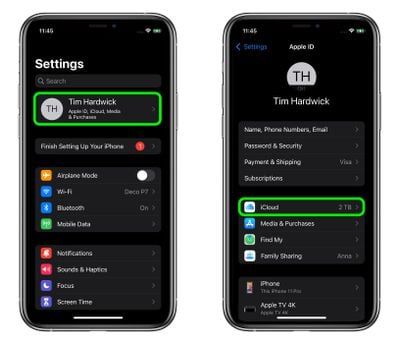
  1. Launch the Settings app on your iPhone or iPad
  2. Tap your Apple ID name at the top of the main settings menu.
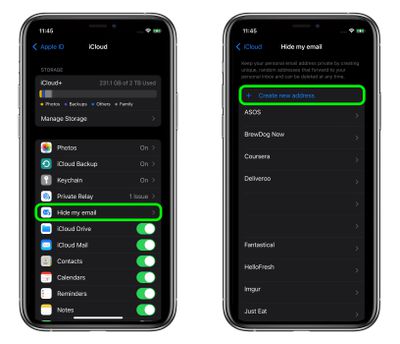
  3. Tap iCloud.
    settings

  4. Tap Hide My Email.
  5. Tap Create new address.
    settings

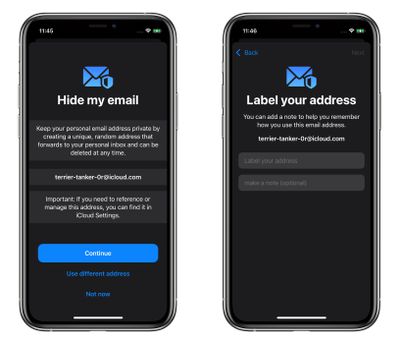
  6. Tap Continue, then give your address an identifying label. You can also optionally make a note about it.

  7. Tap Next, then tap Done.
    settings

You can now use the random email address when you send emails in Mail, or when you're asked to enter your email address on a website in Safari.

You can also deactivate or delete addresses generated by Hide My Email, and change your forwarding address at a later date. See the links for details.


Popular Stories

iCloud General Feature Redux

iCloud+ Subscribers Get Higher Apple Intelligence Usage Limits in iOS 27

Tuesday June 9, 2026 6:05 am PDT by
Certain Apple Intelligence features in iOS 27 will carry daily usage limits, with iCloud+ subscribers receiving higher allowances than free users. The company reiterated the details in its press release accompanying yesterday's Apple Intelligence announcements. Apple said the limits apply to features that rely on "powerful server models," with image generation cited as the primary example....
iCloud iPhone 17 Pro

iPhone Users Who Pay for iCloud Storage Get Two New Perks on iOS 27

Thursday July 2, 2026 6:10 am PDT by
If you pay for certain iCloud+ storage plans beyond the 5GB that Apple offers for free, you will receive two more perks on iOS 27 at no additional cost. A summary of the two new iCloud+ perks on iOS 27:Increased daily usage limits for some new Apple Intelligence features, including image generation in the revamped Image Playground app. HomeKit Secure Video cameras receive generated video...
iCloud General Feature Redux

Apple's New Hide My Email Domain Makes It Easier to Block iCloud Aliases

Wednesday June 17, 2026 7:41 am PDT by
Apple's decision to move Hide My Email to a dedicated "private.icloud.com" domain appears to have the consequence of making it easier for platforms that want to block iCloud aliases to do so. Apple is unifying the email domains used by Sign in with Apple and iCloud+ Hide My Email under a single private.icloud.com domain later this summer. Sign in with Apple currently uses...