

 In iOS, Apple's stock Reminders app can be set to remind you about something specific when you arrive at or leave a location. It achieves this using a feature called geofencing, which triggers the reminder notification when your whereabouts change.
A location-based reminder can come in useful in a range of contexts. Perhaps you need to remember to buy something for dinner when you leave the office. Or maybe you need a nudge to feed the cat or water the plants when you get home from work in the evening.
Whatever your use case involves, here's how to set up a location-based reminder on an iPhone or iPad running iOS 13 and later.
Adding a reminder to a list can be done by tapping into a list and then tapping on the the New Reminder plus button. If you don't have a list, tap into the Today, Scheduled, All, or Flagged categories at the top of the app and then choose New Reminder at the bottom of the screen.
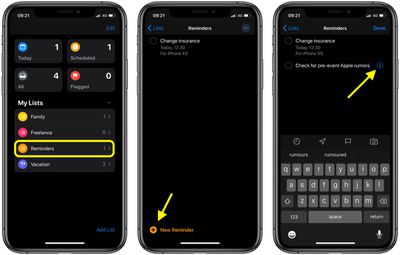
Once you've given your reminder a name, tap the info ("i") button next to it to open the Details screen, then tap the switch next to Remind me at a location to toggle it to the green ON position.
Tap Location, then search for or enter an address in the search field at the top of the screen. Tap a location in the results, then select Arriving or Leaving above the map that appears.
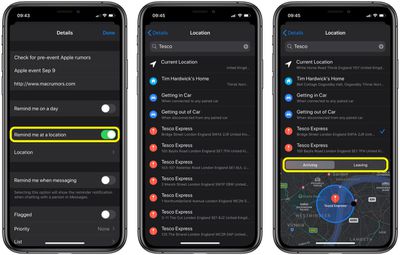
Alternatively, you can choose to be reminded at your predefined home or place of work in Maps, or when getting in or out of your car. Whatever you choose, tap back to the Details screen, then tap Done, and your location-based reminder is set up and ready to go.















