How to Customize Favorite Contacts in iOS - MacRumorsOpen MenuShow RoundupsShow Forums menuVisit ForumsOpen Sidebar
Skip to Content

How to Customize Favorite Contacts in iOS

by

2013 08 26 09 38 25  Phone iOS7 App Icon RoundedOn iPhone, Apple has a neat way to organize your favorite contacts and even access them quickly, thanks to its Home screen widget system. In addition to adding one-tap phone calling icons, you can customize whether each contact icon will call, FaceTime, text, or email the person you tap on.

Note that the basic communication preferences stored within each contact card on your iPhone will come into play when customizing your new favorites widget, so be sure to add in any phone numbers and email addresses before you start if you haven't done so already.

Customize Favorites in the Phone App

Follow these steps to navigate through the new way you can customize favorites in the phone app.

  1. Launch the Phone app on your iPhone.
  2. The app should open on the Favorites tab, but if not tap to it.
  3. Tap the "+" button in the top-left corner of the screen.
  4. Search for the contact you want to add and tap it.
    phone app

  5. Choose between Message, Call, Video, or Mail as your shortcut.
  6. To pick a number or email other than the one shown as default, tap the small down arrow to the right of Message, Call, Video, or Mail to pick from any number/email already stored in your phone for this contact.
  7. Return to the Favorites tab and your new quick access contact will be at the bottom of your Favorites list.
  8. Tap Edit in the top-right corner to delete or reprioritize contacts. You can also swipe left on a favorite in your Favorites list and tap Delete to remove it.
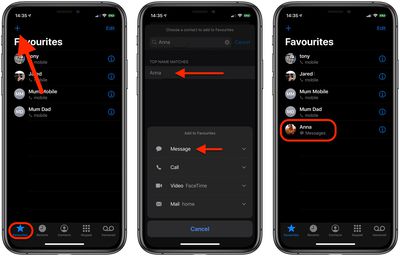
When organizing your new favorite contacts, be sure to note that the first four contacts will receive top billing in the favorites widget, but a total of eight can fit.

Setting Up the Favorites Widget

The favorites list's granular settings allow you to jump into the contacts you only text with, while still accommodating those people you more often speak with on the phone. The personalization doesn't stop there, however. Follow the next few steps to get your favorites widget up and running.

  1. Navigate to the widgets screen by swiping right on your iPhone's main Home screen, Notification Center, or Lock screen.
  2. Scroll all the way down to the bottom of your widgets and tap Edit.
  3. Find Favorites and tap the small green plus button to add it to your widgets.
    widgets

  4. Use the triple bar or "hamburger" icon on the right side of the screen to move favorites further up or down the list.
  5. Hit Done to save your changes.
  6. You'll see your favorite contacts as a widget, with the top four contacts getting premium placement.
  7. Tap the little chevron in the top-right corner of the widget to expand it for a total of eight contacts.
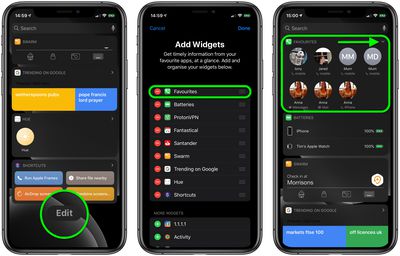
Since the favorites widget can show up to eight contacts, you can return to the phone app to add and rearrange your most important friends, family members, and co-workers to see the changes reflected in the widget.

Your customization options include: adding multiple methods of communication for one person (all four if you contact one person multiple ways frequently), removing the default phone call options for message-focused contacts, and setting your top four most used contacts to save room on the widgets screen, without needing to use the "Show More" option.


Top Rated Comments

insomniac86 Avatar
132 months ago
The widget is a better idea, but it just needs 3D Touch support so you don't have to pin multiple of the same person. It should also keep the functionality to pin the same contact multiple times for people that do not have 3D Touch. Better yet, why not just allow it so that non-3D Touch users can just hold for two seconds to see other choices.
Score: 3 Votes (Like | Disagree)
132 months ago
Ah speed dial is back after 9 years
The Favorites have been in the Phone app for a long time.
[doublepost=1474143244][/doublepost]
Thanks. I've noticed the emergency bypass, but that makes the phone ring, even when you have silent switched on, so only a true emergency option.

So it doesn't just bypass DND but even the silent/vibrate setting and always rings for calls and plays a tone for messages even if the phone is on silent/vibrate?
[doublepost=1474143285][/doublepost]
I thought iOS 10 was going to bring other messaging/calling ways into the fold in this area. For instance, we would have the ability to select What's App instead of iMessage. What am I missing?
Updated calling apps can have their calls show up as normal calls would (rather than as just an app notification).
Score: 2 Votes (Like | Disagree)
132 months ago
Does this then allow all these favourites through the DND feature regardless of the method of contact, or just favourites where phone is selected?
Depends on the setup of your DND, of course!

If you haven't checked out the supplementary new feature in the Contact app buried under the Ringtone toggle option named "Emergency Bypass", one can turn off "Favorites" in DND and still designate one or more people to get through by toggling on that Bypass for each relevant Contact.
Score: 1 Votes (Like | Disagree)
132 months ago
Does this then allow all these favourites through the DND feature regardless of the method of contact, or just favourites where phone is selected?
Score: 1 Votes (Like | Disagree)
insomniac86 Avatar
132 months ago
Yeah Apple software has really gone downhill with its inconsistency. I will say iOS 10 as a whole is pretty dam good though. Whoever designed the new maps app deserves a medal. It's super simple and clutter free. Yet it retains all its power and adds more. That app is an example of something well designed. Knowing my luck they will re-design it in iOS 11 to become a turd. Lol
Score: 1 Votes (Like | Disagree)
chriscl Avatar
132 months ago
As I have an iPhone 6 - no 3d Touch - the "Favourites" widget method is going to be a useful time saver for me.
Score: 1 Votes (Like | Disagree)

Popular Stories

duo aquarium

More Fun iPhone Duo Apps: 30 New Picks to Try

Friday November 6, 2026 3:27 pm PST by
When the iPhone Duo launched, we shared a list of some of the fun apps developers created for the new form factor. Two weeks out, developers are continuing to come up with fresh ideas, so we thought we'd share some of our favorites. Games Marbles Unhinged ($2.99) - Marbles Unhinged is a marble maze designed for the Duo. When you fold it, the floor turns into a ramp. If you stand the top...
apple pro tell logo

Apple Launching Five New Products Today

Thursday November 5, 2026 12:59 am PST by
Apple is launching five new products on Friday, November 6, following pre-orders that opened last week, including its first touchscreen MacBook Pro models. The following new products will be available from today: iPad mini with OLED display and A20 Pro chip iMac with M6 chip 14-inch MacBook Pro with M6 chip 14-inch MacBook Pro with OLED touchscreen 16-inch MacBook Pro with OLED...
iOS 28 AI

Apple Taking New Approach to Developing iOS 28 and macOS 28

Sunday November 8, 2026 7:42 am PST by
Apple has made a change to its development process for iOS 28, macOS 28, and corresponding software updates, according to Bloomberg's Mark Gurman. In his Power On newsletter today, he said Apple separates development of each year's new operating systems into three major stages. Typically, he said each stage consists of four weeks of coding followed by a four-week "convergence" period where...


Latest Stories
Apple Store Subscription Sign-Up Controversy Exposed
4 hours ago
Siri AI Rumored to Become 'More Like an Agent' as Early as Next Year
14 hours ago
Apple Taking New Approach to Developing iOS 28 and macOS 28
15 hours ago
Early Apple Black Friday Deals on Apple Watch, MacBook Air, and More
1 day ago
'Backglow' Lets You Customize New MacBook Pro's Glowing Apple Logo
1 day ago
Top Stories: Apple Product Launches, iOS 27.3 Beta, and More
2 days ago
More Fun iPhone Duo Apps: 30 New Picks to Try
2 days ago
Hands-On With Apple's New OLED Touchscreen MacBook Pro
2 days ago
Apple Store With All-New Design Opening Soon in Southern California
2 days ago
Control the Glowing Apple Logo on Your New MacBook Pro
2 days ago
Apple Shares New 'Apple Card: Apply and Use in Minutes' Ad
3 days ago
Apple Says More Than 100,000 Apps Optimized for iPhone Duo, Here's What's Still Missing
3 days ago
Early Black Friday Deals Kickoff With Steep Discounts on Apple Watch Ultras and More
3 days ago
The MacRumors Show: iOS 27.3 Looks Like a Huge Update
3 days ago
Best Buy's Black Friday Event Begins With Sitewide Savings on Apple, TVs, More
3 days ago
Apple Releasing Yet Another Two New Products Next Week
3 days ago
MacBook Air Drops to Lowest Price in Months With Amazon's $250 Discount
3 days ago
Apple Rumored to Drop the iPhone's Action Button Next Year
3 days ago
Apple's Extended Return Policy Now in Effect for 2026 Holiday Season
3 days ago
Apple Music Classical Updated With New Icon and Refreshed Design
3 days ago
OLED iPad Mini, M6 iMac, and New MacBook Pros Available From Today
3 days ago
Apple Surveys iPhone Duo Buyers About Crease and Camera
3 days ago
Apple's First Touchscreen Mac is Now Arriving to Customers
3 days ago
Claude Gets Personal Finance Feature With Bank Account Linking
3 days ago
Apple Arcade Adds Crossy Road Rush and NBA 2K27
3 days ago
Apple's New HomeView Smart Home Hub: Here's How Much RAM It Has
3 days ago
iPad Mini vs. iPad Air Buyer's Guide: Now Just $50 Apart
3 days ago
First iOS 27.3 and macOS Golden Gate 27.3 Public Betas Now Available
4 days ago
Apple Announces a New Mac Sales Record
4 days ago
Paid $200 for Logic Pro? Apple Says You Won't Get This New Feature
4 days ago







































