

 In Apple's Safari browser for iPhone and iPad, every new window or tab you open automatically displays the start page, giving you convenient one-touch access to your favorite websites and any other sites you frequently visit, as well as Siri Suggestions and websites recommended to you by friends and family.
Your favorite websites appear at the top under Favorites, and you can customize these bookmarks right from the start page. Tap and hold a folder or an individual site's favicon to reveal the start page's preview screen and contextual menu, where you'll find options to Edit or Delete the item.
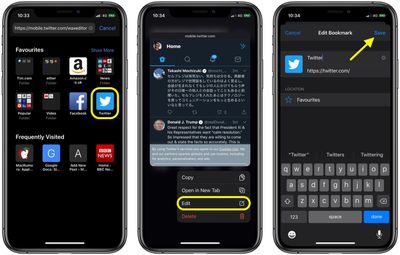
If you tap Edit, you'll be able to change the site's name as it appears in your Favorites. You can also edit the URL (to point to a more specific part of the site, for example) and change the location of the bookmark.
Note that if you move a site out of your starred Favorites folder, it becomes a regular bookmark and will no longer appear in Safari's start page.
The only other thing to keep in mind is that if you have Safari turned on in your iCloud settings, any changes you make will be synced to any other Apple devices linked to the same Apple ID.
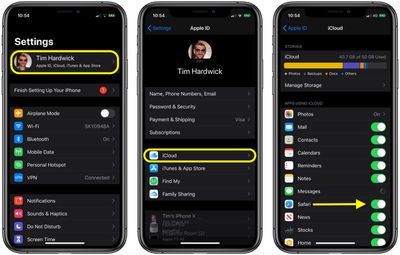
If you don't want these changes to sync, launch the Settings app, tap your Apple ID banner at the top, then tap iCloud and switch off the toggle next to Safari.



















