How to Customize the Force Sensor Gesture Functions on AirPods Pro - MacRumorsOpen MenuShow RoundupsShow Forums menuVisit ForumsOpen Sidebar
Skip to Content

How to Customize the Force Sensor Gesture Functions on AirPods Pro

by

This article explains how to customize the functions assigned to AirPods Pro gestures. Bear in mind that iOS devices need to be running iOS 13.2 in order to support AirPods Pro. You can check that your device is updated by launching the Settings app and going to General -> Software Update.
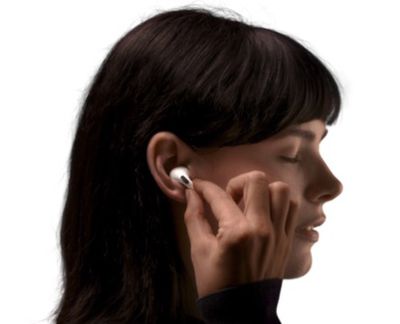
AirPods Pro
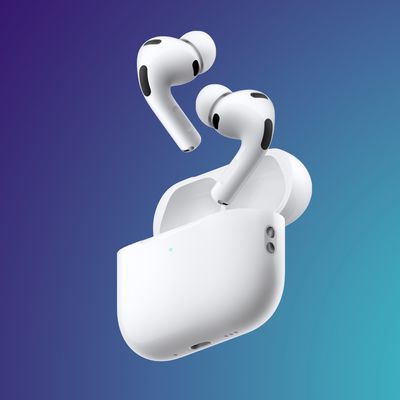
Apple's AirPods Pro wireless earbuds feature a new, innovative force sensor on each stem that responds to gestures which you can use to play/pause and skip tracks, answer and hang up phone calls, and switch between Active Noise Cancellation and Transparency modes.

By default, you can press and hold either AirPod Pro stem to cycle between the Noise Cancellation and Transparency modes (you'll hear a tone when switching between the two functions). You can also customize the press-and-hold gestures by accessing onscreen menus on your connected iOS device. Here's how it works.

  1. Allow your AirPods to connect to your iPhone or iPad in the usual way, by opening the case next to your device and inserting the buds in your ears.
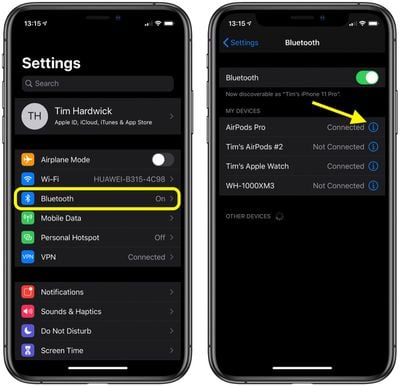
  2. Launch the Settings app on your iOS device.
  3. Tap the name of your AirPods Pro, just under your Apple ID banner. Alternatively, tap Bluetooth, then tap the information icon (the circled "i") next to AirPods Pro in the list.
    AirPods Pro settings

  4. Under "Press and Hold AirPods," tap Left or Right, depending on which AirPod you want customize.
    AirPods Pro gesture settings

  5. To activate Siri with a press-and-hold gesture, tap Siri.
  6. To change the Noise Control features that are activated via a press-and-hold gesture, tap Noise Control so that it's ticked, then tap the functions below that you want to assign to it: The options are Noise Cancellation, Transparency, and Off (which disables noise cancellation and transparency mode).
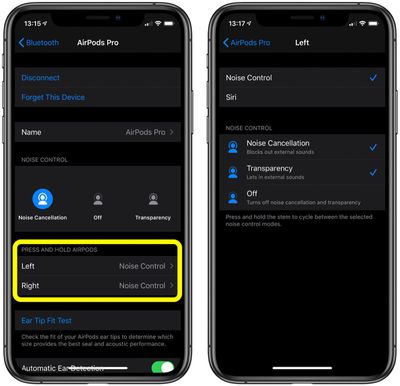
Note that you can assign more than one noise control feature to the press-and-hold gesture on either earbud – pressing and holding the stem will cycle between the selected modes.
Related Roundup: AirPods Pro 3
Buyer's Guide: AirPods Pro (Neutral)
Related Forum: AirPods

Top Rated Comments

Weaselboy Avatar
87 months ago

I cannot really change the settings. First, I set the left one to cycle through TRANSPARENCY and OFF and the right one to cycle through NC and OFF. Then I wanted to change the setting the other way around (left: NC/OFF and right: TRANSPARENCY/OFF), which does not work. When I set it on either one, the other one copies the setting.

I think this is a bug. Can anyone replicate this behavior?
Just got home and tested a little and mine is the same and I think that is intended. The Noice Control setting allows you to pick which of the three settings you want it to cycle through, and that is set to both sides if you have both set to Noise Control. Or you can set one side to Noise Control and the other to Siri.

So you cannot have one side cycle through Noise Cancellation/Transparency/Off and the other to cycle through Noise Cancellation/Off.
Score: 1 Votes (Like | Disagree)
Force332 Avatar
87 months ago

No volume control still ?
If you have an Apple Watch you can enable the option to have music controls display when you turn your wrist to wake. You can then just turn the digital crown to adjust the volume. I actually find this quicker and easier than touching the earbuds to adjust.

However I can totally understand the desire for direct volume controls on the earbuds if the Apple Watch thing isn't an option for someone. The button presses added to the AirPods Pro resolved my main complaint about the AirPods. I've been missing the ability to quickly adjust things with the old buttons that used to be on the wired earpods. The tapping on the original AirPods to attempt this was more limited.
Score: 1 Votes (Like | Disagree)

Popular Stories

airpods eq

Apple to Bring Custom EQ to AirPods

Monday June 8, 2026 10:29 am PDT by
Apple today announced that AirPods will gain a custom EQ (equalizer) feature, allowing users to further personalize how their AirPods sound. The new capability is part of Apple's next-generation software platform updates, which the company unveiled today. Custom EQ lets listeners adjust audio output to match their personal preferences, going beyond the fixed audio profiles AirPods have...
AirPods Pro 3 Heart Rate Tracking Feature

Apple Expands GymKit to iPhone and AirPods Pro 3

Tuesday June 9, 2026 2:26 am PDT by
Apple expands GymKit support to the iPhone and AirPods Pro 3 with iOS 27, extending the gym equipment connectivity feature beyond Apple Watch for the first time. GymKit originally launched in 2017 and has, until now, been exclusive to the Apple Watch feature, requiring users to wear the watch and tap it against compatible equipment to pair. The expansion means that iPhone and AirPods Pro 3...
AirPods Pro Beta Firmware 2

Apple Releases New AirPods Beta Firmware With iOS 27 Features

Tuesday June 9, 2026 11:31 am PDT by
Apple today released new beta firmware for the AirPods 4, AirPods Pro 2, and AirPods Pro 3. The firmware is limited to developers at the current time, and it has a build number of 9A5292e. In iOS 27, iPadOS 27, and macOS Golden Gate, Apple is adding a new AirPods interface and support for custom EQ. AirPods are also compatible with the new Siri AI. With iOS 26, iPadOS 26, and macOS Tahoe, ...