

How to Customize Grouped Notifications in iOS 12 - MacRumorsOpen MenuShow RoundupsShow Forums menuVisit ForumsOpen Sidebar
Skip to Content

How to Customize Grouped Notifications in iOS 12

by

iOS 12 introduces Notification Grouping, a long-awaited feature that groups all of the notifications from a single app together in one neat bundle that prevents the Lock screen from becoming overly cluttered.

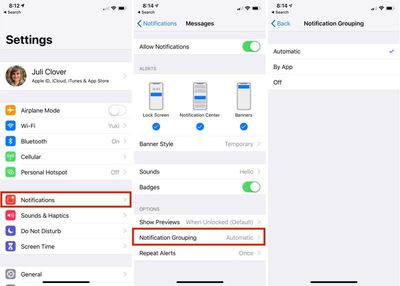
By default, all apps have an "Automatic" grouped notification setting, which groups up notifications by app, but does so intelligently. For example, if you have multiple iMessage conversations going on with people, the notifications might be grouped by app (Messages) but separated by person.
notificationgrouping
You can adjust your Notification Grouping settings to turn off grouped notifications entirely or to force your iOS device to sort all incoming notifications by app, regardless of whether or not certain notifications are coming from different people.

  1. Open up the Settings app.
  2. Choose "Notifications" from the main list of options.
  3. Find the app with the notifications you want to modify from the list, such as Messages, and tap it.
  4. Scroll down to Notification Grouping and tap it.
  5. Automatic is enabled by default. Select "By App" or "Off" to change it.

As mentioned above, selecting "By App" instead of "Automatic" will make sure that all incoming notifications from a specific app are grouped together rather than sometimes being intelligently separated out.

Selecting the "Off" option will disable Notification Grouping for the selected app entirely, which means your incoming notifications for that app will all come in individually, like they did in iOS 11.

There is no option to turn off Notification Grouping for all apps at once, so it's something that needs to be enabled on an app-by-app basis.

For more on all of the new notification features Apple is introducing in iOS 12, make sure to check out our iOS 12 Notifications guide.


Related Forum: iOS 12

Top Rated Comments

midkay Avatar
102 months ago
Stacks are great but I don’t like the “n more notifications” toggle. Let me pull down to fan them out and let go to spring them back into a stack. Or maybe force touch a stack to fan them. The toggle is narrow, sometimes too opaque and I often miss it.
I'm confused, you mean the '2 more notifications' text at the bottom of a notification group? You don't actually have to press on that text specifically, you can press anywhere on the card to expand the stack. Then there's a nice big 'show less' button to re-collapse the stack.
Score: 2 Votes (Like | Disagree)
twistedpixel8 Avatar
102 months ago
I'm confused, you mean the '2 more notifications' text at the bottom of a notification group? You don't actually have to press on that text specifically, you can press anywhere on the card to expand the stack. Then there's a nice big 'show less' button to re-collapse the stack.
How embarrassing... I thought you had to tap the text or it would launch the app. Thanks for clearing that up for me!
Score: 1 Votes (Like | Disagree)
SegPip Avatar
102 months ago
Grouped notifications is the shining light of iOS 12
Score: 1 Votes (Like | Disagree)

Popular Stories

macOS 27 on MacBook Pro

Apple Says macOS 27 Won't Be Compatible With These Macs

Wednesday June 3, 2026 8:29 am PDT by
During WWDC 2025, Apple revealed that macOS 26 Tahoe would be the final major macOS version for Intel-based Macs. macOS 27 will be compatible with Apple silicon Macs only, meaning that you will need a Mac with an M-series chip or a MacBook Neo with an A18 Pro chip in order to install the software update. Apple will unveil macOS 27 during its WWDC 2026 keynote this Monday, June 8, and the...
MacBook Neo on Yellow Feature

MacBook Neo is So Popular That Apple Reportedly Doubled Production

Wednesday June 3, 2026 9:24 am PDT by
On an earnings call in late April, Apple's CEO Tim Cook said that customer response to the MacBook Neo was "off the charts," and the popularity of the laptop has reportedly led the company to significantly boost production. Apple supply chain analyst Ming-Chi Kuo this week said he believes that MacBook Neo shipments to Apple were doubled from an initial target of 5 million units to 10...
iphone 18 pro blue%402x

iPhone 18 Pro: Dark Cherry, Light Blue, and Dark Gray Chassis Leaked [Update]

Thursday June 4, 2026 5:18 am PDT by
Update: Since publication, new information has come to light suggesting the images have been AI-manipulated and are not in fact iPhone 18 Pro chassis parts. The original article follows. The color options Apple is reportedly planning for the upcoming iPhone 18 Pro and ‌iPhone 18 Pro‌ Max have appeared online today in the form of images of chassis parts of unknown authenticity....















