iOS 15.4: How to Customize iPadOS Corner Gestures - MacRumorsOpen MenuShow RoundupsShow Forums menuVisit ForumsOpen Sidebar
Skip to Content

iOS 15.4: How to Customize iPadOS Corner Gestures

by

In iPadOS 15, Apple introduced a new productivity feature called Quick Notes that provides a quicker way to jot down things on your iPad without you having to go in and out of the Notes app.
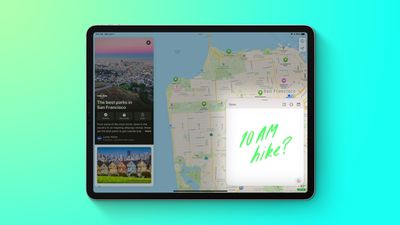
Quick Notes Feature
Whether you're on the Home Screen or within any app, you can bring up a floating Quick Note window at any time using your finger or an Apple Pencil, by swiping diagonally up from the bottom-right corner of the screen.

In iOS 15.4, currently in beta, Apple has made it possible to change the corner of the screen that you swipe from to invoke Quick Notes, or to add the same gesture to the bottom-left corner of the screen.

Not only that, it has also made it possible to add a second corner gesture that takes an instant screenshot, and it has added an option turn off corner gestures completely. Here's how to customize your corner gestures.

  1. Launch the Settings app on your ‌iPad‌.
  2. Scroll down and tap Notes.
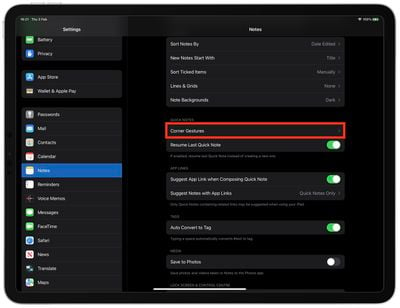
  3. Under the section "Quick Notes," tap Corner Gestures.
    settings

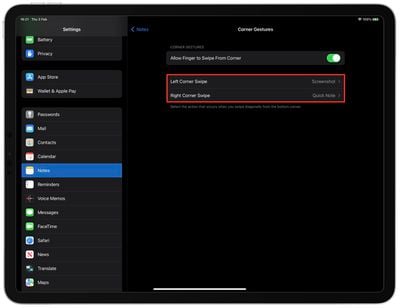
  4. Tap Left Corner Swipe or Right Corner Swipe.
  5. Choose Quick Note or Screenshot to add that action to the selected bottom-corner gesture, or choose Off to disable the corner gesture completely.
    settings

Note that the Corner Gestures menu in Settings has an on/off toggle to Allow Finger to Swipe From Corner in case you want to disable them altogether.


Tag: iPadOS

Popular Stories

iCloud iPhone 17 Pro

iPhone Users Who Pay for iCloud Storage Get Two New Perks on iOS 27

Thursday July 2, 2026 6:10 am PDT by
If you pay for certain iCloud+ storage plans beyond the 5GB that Apple offers for free, you will receive two more perks on iOS 27 at no additional cost. A summary of the two new iCloud+ perks on iOS 27:Increased daily usage limits for some new Apple Intelligence features, including image generation in the revamped Image Playground app. HomeKit Secure Video cameras receive generated video...
Apple Event Logo

Apple Just Released a New Product

Thursday July 2, 2026 8:04 am PDT by
Apple's first product release of summer 2026 occurred this week, but do not get too excited, as it is merely the Beats Solo Buds in a new color. Beats Solo Buds are now offered in orange through Best Buy in the U.S., with availability set to expand to 7-Eleven stores in Japan on July 4. Apple already offered orange Solo Buds in India for free with the purchase of an iPhone 15 or iPhone 15 ...
iphone 17 ceramic shield

iPhone 18 With 9GB RAM Still Won't Support Two New iOS 27 Features

Friday July 3, 2026 12:10 pm PDT by
The lower-end iPhone 18 and iPhone 18e will be equipped with 9GB of RAM, up from 8GB in the iPhone 17 and iPhone 17e, according to supply chain analyst Ming-Chi Kuo. In a social media post, Kuo said the 1GB increase in RAM will ensure that Apple Intelligence features continue to run smoothly on the pair of devices. The higher-end iPhone 18 Pro, iPhone 18 Pro Max, and foldable "iPhone Ultra...