How to Customize Your iPhone's Status Bar With an Emoji - MacRumorsOpen MenuShow RoundupsShow Forums menuVisit ForumsOpen Sidebar
Skip to Content

How to Customize Your iPhone's Status Bar With an Emoji

by

Apple in iOS 15 introduced a Focus feature that's designed to let you set up your device to help you be in the moment and zone in on a single thing. When a Focus mode is active, it displays a little customizable emoji/icon in the status bar of your iPhone, next to the time. Setting up a Focus mode can be complicated, but if all you want is to see a symbol in the status bar, it's easy to do once you know how.

iphone status bar emoji
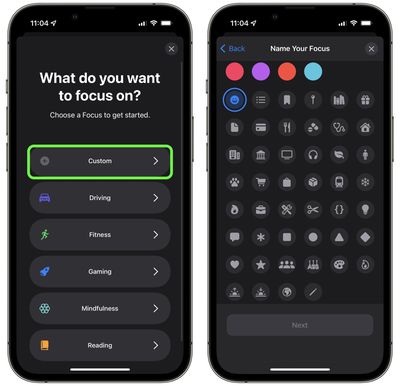
There are over 25 emoji/icons that you can use, including a smiley face, a flame, and a paw print, but to use Focus, your iPhone needs to be running iOS 15. (If you have an iPad, it needs to be running iPadOS 15.) You can check what iOS version you have and update if necessary by going to Settings -> General -> Software Update.

Here are the steps to follow to get a customized emoji/icon in your iPhone's status bar.

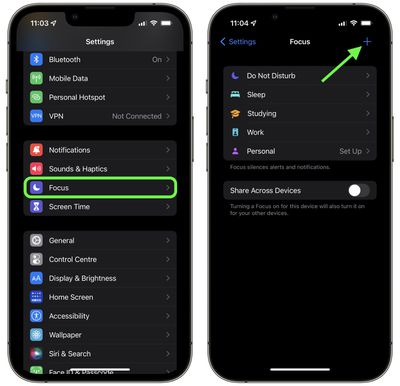
  1. Launch the Settings app.
  2. Scroll down and tap Focus.
  3. Tap the + button in the top-right corner of the screen.
    settings

  4. Tap Custom.
  5. Give your Focus a name.
  6. Select the emoji/icon you want to use, then tap Next.
    focus

  7. Select who can send you notifications (you can choose all of your contacts), then tap Allow.
  8. Select all the apps that can show you notifications, then tap Allow.
  9. Tap Done.
  10. Now toggle the switch to enable your Focus mode.
The emoji/icon you selected should now be visible next to the clock in your iPhone's status bar. If you want to change the emoji at any time, simply go into your Focus mode's options and select a different one.

iphone status bar emoji
Note that if you have Location Services on and an app uses your current location, your icon/emoji will temporarily disappear as there won't be room for it in the status bar. If something is using your location all the time (a weather widget, for example) then it won't appear at all, in which case you'll have to go into Settings -> Privacy and toggle off Location Services.


Related Forum: iOS 15

Popular Stories

Apple Card iPhone 16 Pro Feature

Apple Card Promo to Offer Free AirPods Pro 3

Friday May 15, 2026 8:59 am PDT by
Starting as early as next week, customers who sign up for an Apple Card at Apple's retail stores in the U.S. will receive $249 cash back when they purchase AirPods Pro 3, according to Bloomberg's Mark Gurman. The promotion has yet to be officially announced by Apple, so exact terms and conditions are not available at this time. AirPods Pro 3 are priced at $249 in the U.S., so customers who...
Apple WWDC25 iOS 26 CarPlay Light mode 250609

Six Popular iPhone Apps Now Available on CarPlay

Thursday May 14, 2026 9:10 am PDT by
Apple's CarPlay system for accessing iPhone apps on a vehicle's dashboard screen has received six popular apps in recent weeks: ChatGPT, Perplexity, Grok, Google Meet, WhatsApp, and the indie artist streaming platform Audiomack. Make sure you have the latest version of each app and they will automatically appear on CarPlay. ChatGPT Starting with iOS 26.4, CarPlay supports voice-based...
ipad mini 7 blue

OLED iPad Mini: Release Date, Pricing, and What to Expect

Thursday May 14, 2026 5:08 am PDT by
According to the latest rumors, Apple is close to launching its next-generation iPad mini. So what should we expect from the successor to the iPad mini 7 that Apple released over a year ago? Read on to find out. Processor and Performance Apple is working on a next-generation version of the iPad mini (codename J510/J511) that features the A19 Pro chip, according to information found in code...