

Customize Widgets in Your iPhone's StandBy Mode - MacRumorsOpen MenuShow RoundupsShow Forums menuVisit ForumsOpen Sidebar
Skip to Content

Customize Widgets in Your iPhone's StandBy Mode

by

StandBy mode on iPhone is a customizable Lock Screen mode introduced in iOS 17 that activates when an ‌iPhone‌ is charging and positioned on its side. Think of it as a kind of smart display for your ‌iPhone‌ that offers fast access to different screens of glanceable information that can be viewed at a distance, when your device is charging on a kitchen, desk, or nightstand, for example.

Customizing StandBy Widgets

StandBy is made up of three screens that can be accessed by swiping horizontally on your iPhone's display. The first screen is where your interactive widgets live, while swiping left reveals the second and third screens which show photos from your Photos library and a large clock display, respectively.

standby
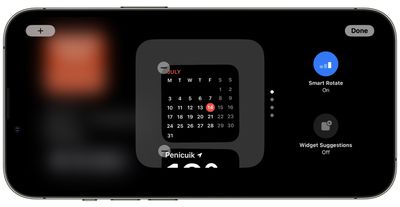
The widgets screen is comprised of two interactive widget stacks displayed side by side that you can swipe through up and down independently. The stacks are like blown-up versions of Home Screen widget stacks, and even include the same options like Smart Rotate and Widget Suggestions.
standby
Since many widgets have interactive elements, you can, for example, tick off to-do items in a Reminders list. If you tap on a widget that isn't interactive, such as the Calendar, an arrow indicator appears on the screen. Tapping the arrow takes you to the associated app, which helps to avoid accidentally launching the app.
standby
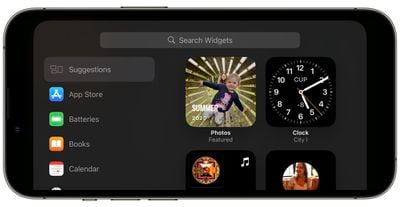
To customize a widget stack, long press on it. After Face ID has unlocked your iPhone, the stack will center on the screen in jiggle mode. You can add widgets to the stack using the + button in the top left, and turn Smart Rotate and Widget Suggestions on and off using the buttons on the right.


Popular Stories

Apple Wallet

iOS 27 Will Add Two New Apple Wallet Features to Your iPhone

Monday June 1, 2026 12:15 pm PDT by
Apple is set to unveil iOS 27 during its WWDC 2026 keynote on Monday, June 8, and the update will reportedly include two new Apple Wallet features. First, iOS 27 will reportedly let users create their own digital passes by scanning items like movie tickets, concert passes, and gym membership cards. Many apps already offer Apple Wallet passes, but now users will be able to create a custom...
Dynamic Island iPhone 18 Pro Feature

iPhone 18 Pro Battery Capacities Allegedly Leaked

Tuesday June 2, 2026 1:54 am PDT by
Battery capacities for Apple's upcoming iPhone 18 Pro have allegedly surfaced, and the numbers suggest only a modest increase over the iPhone 17 Pro. According to prolific Weibo-based leaker Digital Chat Station, Apple is testing the iPhone 18 Pro with different battery capacities for the China and U.S. versions of the device, similar to last year's iPhone 17 Pro models. The Chinese model is ...
macOS 27 on MacBook Pro

Apple Says macOS 27 Won't Be Compatible With These Macs

Wednesday June 3, 2026 8:29 am PDT by
During WWDC 2025, Apple revealed that macOS 26 Tahoe would be the final major macOS version for Intel-based Macs. macOS 27 will be compatible with Apple silicon Macs only, meaning that you will need a Mac with an M-series chip or a MacBook Neo with an A18 Pro chip in order to install the software update. Apple will unveil macOS 27 during its WWDC 2026 keynote this Monday, June 8, and the...













