How to Delete Cookies in Safari - MacRumorsOpen MenuShow RoundupsShow Forums menuVisit ForumsOpen Sidebar
Skip to Content

How to Delete Cookies in Safari

by

When you browse the web on your devices, websites will often leave cookies on your system so that they can remember you and what your preferences are.
safari macos icon banner
Some cookies are genuinely useful, as they allow sites to save your personal information (such as your login credentials) so that you don't have to keep entering it every time you visit.

However, for the same reason, cookies can pose a privacy risk because of the information they hold about you, which is why you may want to remove them from your computer every so often.

The following steps show you how to delete cookies from Apple's Safari browser on Mac, iPhone, and iPad.

How to Delete Cookies in Safari on iOS

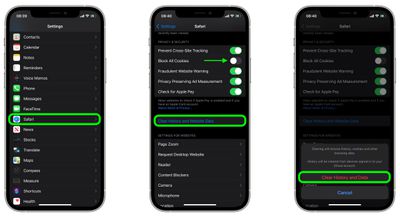
Note that the following steps clear all history, cookies and website data on your device, regardless of when the sites were accessed.

  1. Launch the Settings app on your iOS device.
  2. Scroll down and select Safari.
  3. Scroll down and select Clear History and Website Data.
  4. Tap Clear History and Data in the pop-up menu to confirm.
    settings

How to Delete Cookies in Safari on macOS

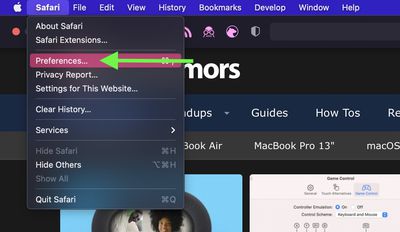
  1. Launch Safari browser on your Mac.
  2. Select Safari -> Preferences....
    safari

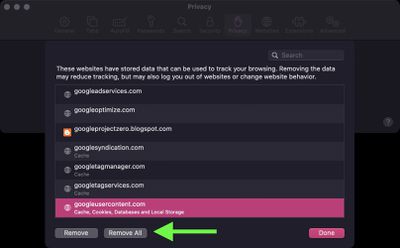
  3. Click the Privacy tab and select Manage Website Data....
    safari

  4. Select a website that is listed as using cookies, then click Remove. To remove all website data from Safari, click Remove All.
    safari

Note that you can opt to block all cookies in future by selecting Block all cookies in Safari's settings (Settings -> Safari on iOS, and in the Privacy tab of Safari's Preferences on macOS). However, bear in mind that some websites use cookies to improve your browsing experience – by remembering your login details, for example – so think twice before you select this option.

Popular Stories

MacBook Pro Low Angle Wide Lens

macOS 27: Two More Changes Leaked Ahead of WWDC Next Month

Sunday May 10, 2026 9:45 am PDT by
macOS 27 will have a "slight redesign" compared to macOS Tahoe, according to the latest word from Bloomberg's Mark Gurman. In his Power On newsletter today, Gurman said the design changes will help to improve the readability of macOS Tahoe's Liquid Glass interface:If you've used Tahoe, you're likely familiar with some of the quirks — particularly the transparency effects and shadows that...
apple lock security bug vulnerability fix privacy

Apple Warns Canada's Bill C-22 Could Force Encryption Backdoors

Friday May 8, 2026 4:22 am PDT by
Apple and Meta have opposed a Canadian bill that the companies say could force them to create backdoor access to encrypted user data, should it pass through the country's parliament. Proposed by Canada's ruling Liberal Party, Bill C-22 contains provisions that could be similar ​to a UK data access provision order sent to Apple last year, depending on how they are implemented. Back in Feb...
Apple Card iPhone 16 Pro Feature

Apple Card Promo to Offer Free AirPods Pro 3

Friday May 15, 2026 8:59 am PDT by
Starting as early as next week, customers who sign up for an Apple Card at Apple's retail stores in the U.S. will receive $249 cash back when they purchase AirPods Pro 3, according to Bloomberg's Mark Gurman. The promotion has yet to be officially announced by Apple, so exact terms and conditions are not available at this time. AirPods Pro 3 are priced at $249 in the U.S., so customers who...