iPhone 14 Pro: How to Disable the Always-on Display - MacRumorsOpen MenuShow RoundupsShow Forums menuVisit ForumsOpen Sidebar
Skip to Content

iPhone 14 Pro: How to Disable the Always-on Display

by

The newly launched iPhone 14 Pro and iPhone 14 Pro Max come with some advanced features not included in the rest of the iPhone 14 series, including an always-on display.
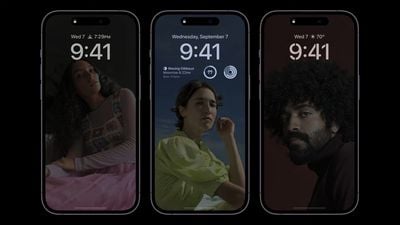
iphone 14 pro always on display
The always-on display is essentially a non-customizable, tinted version of your iPhone's Lock Screen wallpaper, widgets, and any Live Activities that are running.

Apple has been able to bring the always-on display to the iPhone 14 Pro models without having a major impact on battery life thanks to a more power-efficient OLED panel, which has a variable refresh rate as low as 1Hz. In addition to this, the always-on display also pre-renders individual frames for content elements that predictably change, such as the time, and only updates them when appropriate.

Apple has outlined some scenarios where the always-on display will intelligently turn itself off, such as if your iPhone is lying face down, the handset is in your pocket or bag, the Sleep Focus mode is on, or if you're wearing an Apple Watch and leave the room where your iPhone is. Apple says the always-on display uses multiple coprocessors in the A16 Bionic chip to refresh the display using "minimal power," making the display "incredibly power efficient."

But despite Apple implementing the above solutions, some iPhone 14 Pro reviewers have reported the always-on display having a marginal but noticeable impact on battery life. Quite how much of an impact the feature has on battery is still hard to quantify, but if you're concerned about maximizing battery life on your iPhone, or if you just find an always-on display distracting, here's how to disable the feature.

How to Disable the iPhone 14 Pro Always-on Display

  1. Launch the Settings app.
  2. Scroll down and tap through to Display & Brightness.
  3. Scroll down and toggle off the switch next to Always On.
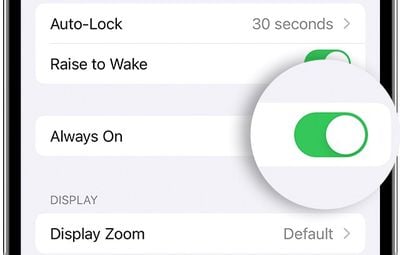
settings

That's all there is to it. Your iPhone will now turn off when you press the Side button and remain off until you press it again or pick up the device.


Related Forum: iPhone

Top Rated Comments

54 months ago
iPhone 14 Pro, how phone calls work and how to turn them off
Score: 11 Votes (Like | Disagree)
54 months ago
How about an always-off display? An iPhone Shuffle, it calls a random person in your contact list when you press the only button on it.
Score: 9 Votes (Like | Disagree)
54 months ago
Why is this not implemented like how Samsung does it? Just turn off the rest of the display and just show me notification badges, date and time in a dimmed view. That way the phone does not look distracting when on the desk. What use do I have for looking at my wallpaper in AOD?

On iPhone, it constantly looks like the screen is turned on which is irritating. It seems like Apple did not want to look like they were ripping off Samsung so they came up with this dimmed lockscreen view as their AOD.
Score: 5 Votes (Like | Disagree)
54 months ago
Tentpole feature unique to the most expensive iPhone model sucks too much battery life, so here's how turn it off. Priceless. Vintage post-jobs Apple.

Score: 5 Votes (Like | Disagree)
54 months ago
Just spent a ton of money on 14Pro, but how do I turn off the AOD, crash detection, satellite calls, dynamic island, and the new camera system? All that stuff will drain my battery!!
Score: 4 Votes (Like | Disagree)
54 months ago
I said it before and I'll say it again. I think a lot of people are underestimated how useful the AOD can be.

Score: 4 Votes (Like | Disagree)

Popular Stories

duo aquarium

More Fun iPhone Duo Apps: 30 New Picks to Try

Friday November 6, 2026 3:27 pm PST by
When the iPhone Duo launched, we shared a list of some of the fun apps developers created for the new form factor. Two weeks out, developers are continuing to come up with fresh ideas, so we thought we'd share some of our favorites. Games Marbles Unhinged ($2.99) - Marbles Unhinged is a marble maze designed for the Duo. When you fold it, the floor turns into a ramp. If you stand the top...
apple pro tell logo

Apple Launching Five New Products Today

Thursday November 5, 2026 12:59 am PST by
Apple is launching five new products on Friday, November 6, following pre-orders that opened last week, including its first touchscreen MacBook Pro models. The following new products will be available from today: iPad mini with OLED display and A20 Pro chip iMac with M6 chip 14-inch MacBook Pro with M6 chip 14-inch MacBook Pro with OLED touchscreen 16-inch MacBook Pro with OLED...
iOS 28 AI

Apple Taking New Approach to Developing iOS 28 and macOS 28

Sunday November 8, 2026 7:42 am PST by
Apple has made a change to its development process for iOS 28, macOS 28, and corresponding software updates, according to Bloomberg's Mark Gurman. In his Power On newsletter today, he said Apple separates development of each year's new operating systems into three major stages. Typically, he said each stage consists of four weeks of coding followed by a four-week "convergence" period where...
Latest Stories
Apple Store Subscription Sign-Up Controversy Exposed
6 hours ago
Siri AI Rumored to Become 'More Like an Agent' as Early as Next Year
16 hours ago
Apple Taking New Approach to Developing iOS 28 and macOS 28
18 hours ago
Early Apple Black Friday Deals on Apple Watch, MacBook Air, and More
2 days ago
'Backglow' Lets You Customize New MacBook Pro's Glowing Apple Logo
2 days ago
Top Stories: Apple Product Launches, iOS 27.3 Beta, and More
2 days ago
More Fun iPhone Duo Apps: 30 New Picks to Try
2 days ago
Hands-On With Apple's New OLED Touchscreen MacBook Pro
2 days ago
Apple Store With All-New Design Opening Soon in Southern California
2 days ago
Control the Glowing Apple Logo on Your New MacBook Pro
3 days ago
Apple Shares New 'Apple Card: Apply and Use in Minutes' Ad
3 days ago
Apple Says More Than 100,000 Apps Optimized for iPhone Duo, Here's What's Still Missing
3 days ago
Early Black Friday Deals Kickoff With Steep Discounts on Apple Watch Ultras and More
3 days ago
The MacRumors Show: iOS 27.3 Looks Like a Huge Update
3 days ago
Best Buy's Black Friday Event Begins With Sitewide Savings on Apple, TVs, More
3 days ago
Apple Releasing Yet Another Two New Products Next Week
3 days ago
MacBook Air Drops to Lowest Price in Months With Amazon's $250 Discount
3 days ago
Apple Rumored to Drop the iPhone's Action Button Next Year
3 days ago
Apple's Extended Return Policy Now in Effect for 2026 Holiday Season
3 days ago
Apple Music Classical Updated With New Icon and Refreshed Design
3 days ago
OLED iPad Mini, M6 iMac, and New MacBook Pros Available From Today
3 days ago
Apple Surveys iPhone Duo Buyers About Crease and Camera
3 days ago
Apple's First Touchscreen Mac is Now Arriving to Customers
3 days ago
Claude Gets Personal Finance Feature With Bank Account Linking
3 days ago
Apple Arcade Adds Crossy Road Rush and NBA 2K27
3 days ago
Apple's New HomeView Smart Home Hub: Here's How Much RAM It Has
3 days ago
iPad Mini vs. iPad Air Buyer's Guide: Now Just $50 Apart
4 days ago
First iOS 27.3 and macOS Golden Gate 27.3 Public Betas Now Available
4 days ago
Apple Announces a New Mac Sales Record
4 days ago
Paid $200 for Logic Pro? Apple Says You Won't Get This New Feature
4 days ago








































