

macOS: How to Disable Apple Mail URL Link Previews - MacRumorsOpen MenuShow RoundupsShow Forums menuVisit ForumsOpen Sidebar
Skip to Content

macOS: How to Disable Apple Mail URL Link Previews

by

In macOS Ventura, Apple's Mail app automatically adds a rich link preview in your email when you paste in a web address. Keep reading to learn how to disable them.
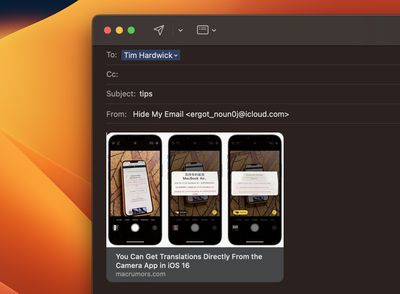
rich links mail
When you paste a web link into a Mail message in macOS Monterey, only the web address is shown in the message content, providing the recipient with no information about what's being linked to beyond what's included in the URL.

By contrast, macOS Ventura inserts rich link previews in emails. Link previews convert the web address into a visual snapshot of the linked content, so recipients can see what's on the other side of the link before choosing to click it.

If you prefer not to include a link preview in your email when sharing a link, here are a couple of simple ways to avoid them.

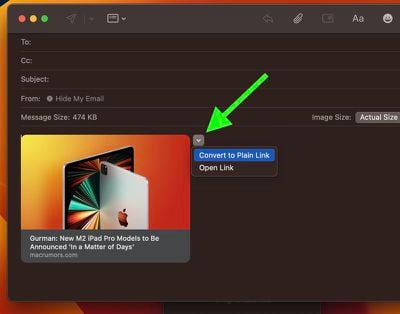
One way of removing the link preview is to paste the URL directly into the body of the email and then click the small chevron at the top-right corner of the preview. This will display a dropdown menu that includes an option to Convert to Plain Link. Click that, and the preview will disappear leaving just the URL address.
mail
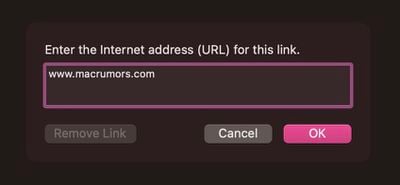
Alternatively, instead of pasting the link into the body of your email, click Edit in the Mail app's menu bar and select Add Link.... This opens a dialog with an input field where you can enter your link.
mail
After clicking OK, the link will appear in your email without the preview. You can also access this option using the keyboard shortcut Command-K.


Popular Stories

General macOS Mail Feature

Apple Hide My Email Vulnerability Exposes Real Email Addresses

Wednesday July 1, 2026 6:20 am PDT by
A flaw in Apple's Hide My Email service can reportedly allow almost anyone to uncover the real email address behind a generated alias, and Apple has failed to address it for more than a year since it was first reported. 404 Media is withholding the technical specifics of the vulnerability because it remains exploitable, but the publication verified the issue this week using one of its own...
iCloud iPhone 17 Pro

iPhone Users Who Pay for iCloud Storage Get Two New Perks on iOS 27

Thursday July 2, 2026 6:10 am PDT by
If you pay for certain iCloud+ storage plans beyond the 5GB that Apple offers for free, you will receive two more perks on iOS 27 at no additional cost. A summary of the two new iCloud+ perks on iOS 27:Increased daily usage limits for some new Apple Intelligence features, including image generation in the revamped Image Playground app. HomeKit Secure Video cameras receive generated video...
iPhone 4 on Black Feature

Apple Facing One of Its Worst Leaks Since the iPhone 4

Thursday July 2, 2026 9:53 am PDT by
Apple supplier Tata Electronics recently suffered a cyberattack that resulted in thousands of confidential files being published on the dark web, and this reportedly included some photos and documents related to the upcoming iPhone 18 Pro. We have elected not to share any of the leaked photos in this story due to the illegal nature in which they were obtained, but they can easily be found...













