How to Turn Off Battery Health Management in macOS Catalina 10.15.5 - MacRumorsOpen MenuShow RoundupsShow Forums menuVisit ForumsOpen Sidebar
Skip to Content

How to Turn Off Battery Health Management in macOS Catalina 10.15.5

by

Apple in the second macOS Catalina 10.15.5 beta added a new Battery Health Management feature for Macs, which is designed to prolong the battery life and battery health of modern Mac notebooks (aka those with Thunderbolt 3 ports) by reducing the rate of chemical aging.
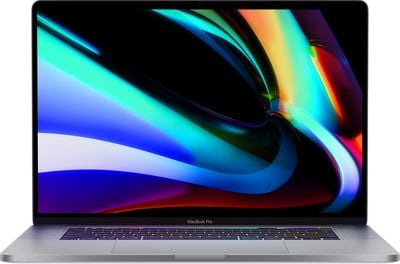
16inchmacbookpromain
Battery Health Management is an intelligent feature that analyzes the battery status of a Mac notebook and its charging pattern, and based on this information, it may preserve battery health by not charging a MacBook to full capacity.

Charging a MacBook to 100 percent and then letting it sit plugged in without draining the battery through use can lead to reduced battery life, which is what Apple is aiming to avoid. Macs that are often used plugged in and with the battery full may have the Battery Management feature kick in to stop charging short of a full charge.

Battery Health Management is entirely opt-in and can be disabled for those who do not want to use the feature. Protecting battery health will be useful for most Mac users, but there may be some situations where Battery Health Management is not ideal, such as if you're about to leave the house and need maximum battery life, so it's worth knowing how to turn it off and on.

All Battery Health Management controls can be found in the Energy Saver section of System Preferences, as outlined below.

  1. Open the System Preferences app.
  2. Choose the Energy Saver section, which is denoted by a light bulb.
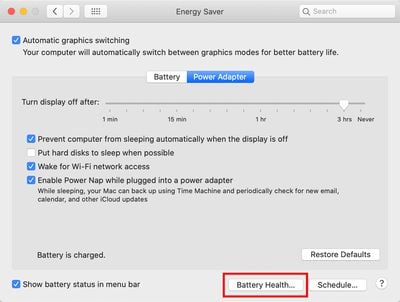
  3. Select the Battery Health section. batteryhealthmac1
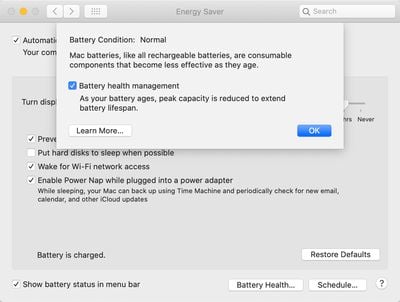
  4. Click the box next to Battery Health Management to deselect it. batteryhealthmac2
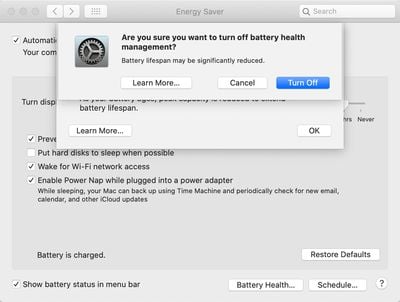
  5. Click Turn Off to confirm. batteryhealthmac3

When upgrading to macOS Catalina 10.15.5, Battery Health Management will be enabled by default and will need to be manually turned off by those who don't want to use it.

macOS Catalina 10.15.5 is limited to developers at the current time, but will see a public release in the not too distant feature, bringing Battery Health Management to all users with a 2016 or later MacBook Pro and 2018 or later MacBook Air.


Related Forum: macOS Catalina

Top Rated Comments

zorinlynx Avatar
86 months ago
Why the hell are they limiting this to 2016 and newer Macs? Older Macs can benefit from this too.
Score: 10 Votes (Like | Disagree)
86 months ago

Perhaps I'm being dense, but what would be the benefit of turning it off?
Not being trolled in the media for forcing customers to update their machines when their batteries naturally degrade. Providing the choice mitigates the perception of control and is probably more of a sociopolitical decision than a technical one.
Score: 7 Votes (Like | Disagree)
_torgo_ Avatar
86 months ago
Perhaps I'm being dense, but what would be the benefit of turning it off?
Score: 4 Votes (Like | Disagree)
86 months ago
More battery life? I got 5 years on my first one without it
Score: 4 Votes (Like | Disagree)
Natzoo Avatar
86 months ago
I think I’ll just stick with Mojave
Score: 3 Votes (Like | Disagree)
Fusionskies Avatar
86 months ago

No need to do anything if it's excellent. Or just Option-click the battery in the menu bar and see what it says for the condition.
Condition: Normal

Crazy to think its 7 years old and still running fine.
Score: 3 Votes (Like | Disagree)

Popular Stories

iOS 28 AI

Apple Taking New Approach to Developing iOS 28 and macOS 28

Sunday November 8, 2026 7:42 am PST by
Apple has made a change to its development process for iOS 28, macOS 28, and corresponding software updates, according to Bloomberg's Mark Gurman. In his Power On newsletter today, he said Apple separates development of each year's new operating systems into three major stages. Typically, he said each stage consists of four weeks of coding followed by a four-week "convergence" period where...
duo aquarium

More Fun iPhone Duo Apps: 30 New Picks to Try

Friday November 6, 2026 3:27 pm PST by
When the iPhone Duo launched, we shared a list of some of the fun apps developers created for the new form factor. Two weeks out, developers are continuing to come up with fresh ideas, so we thought we'd share some of our favorites. Games Marbles Unhinged ($2.99) - Marbles Unhinged is a marble maze designed for the Duo. When you fold it, the floor turns into a ramp. If you stand the top...


apple pro tell logo

Apple Launching Five New Products Today

Thursday November 5, 2026 12:59 am PST by
Apple is launching five new products on Friday, November 6, following pre-orders that opened last week, including its first touchscreen MacBook Pro models. The following new products will be available from today: iPad mini with OLED display and A20 Pro chip iMac with M6 chip 14-inch MacBook Pro with M6 chip 14-inch MacBook Pro with OLED touchscreen 16-inch MacBook Pro with OLED...
Latest Stories
macOS 27.2.1 Fixes eMudhra Certificate Flaw in Command-Line Tools
22 minutes ago
Anthropic Launches Claude Fable 5.2 and Mythos 5.2
1 hour ago
Apple Releases macOS Golden Gate 27.2.1
3 hours ago
Apple Releases iOS 27.2.1 With Bug Fixes
3 hours ago
Apple Releases watchOS 27.2.1 and visionOS 27.2.1 With Security Fixes
3 hours ago
Apple Watch Ultra 4 Gets $99 Amazon Discounts, Starting at $699.99
3 hours ago
Apple Pay Ad Features Martial Arts Convenience Store Food Fight
3 hours ago
Apple Continues to Say Some AI Features Will Have Fees for Extra Usage
3 hours ago
Apple Announces Türkiye Expansion Plans as Tim Cook Visits
4 hours ago
Singapore Saved Apple $2.7 Billion in Taxes This Year
4 hours ago
Apple Music's 2026 Artist of the Year is Olivia Dean
5 hours ago
This Could Be Your Last Chance to Pre-Order the HomeView at a Discount
5 hours ago
Some HomePod Mini 2 Buyers Returning Units Over Mac Speaker Issues
5 hours ago
MacBook Pro With PROLED XDR Display: Details You Might Have Missed
5 hours ago
Satechi Offers MacRumors Readers 30% Off Select Accessories in Early Black Friday Sale
6 hours ago
Leaker Envisions a Shorter iPhone With a New iOS Layout
6 hours ago
Apple to Give You More Control Over When Your Mac Passwords Lock
7 hours ago
Siri Is Getting a Better Memory
8 hours ago
iPhone 18e Could Feature Bigger Display and Battery
8 hours ago
Apple's Siri Boss May Leave - Here's Who Could Take Over
8 hours ago
Apple Launching Two More New Products This Friday
8 hours ago
Apple Store Subscription Sign-Up Controversy Exposed
17 hours ago
Siri AI Rumored to Become 'More Like an Agent' as Early as Next Year
1 day ago
Apple Taking New Approach to Developing iOS 28 and macOS 28
1 day ago
Early Apple Black Friday Deals on Apple Watch, MacBook Air, and More
2 days ago
'Backglow' Lets You Customize New MacBook Pro's Glowing Apple Logo
2 days ago
Top Stories: Apple Product Launches, iOS 27.3 Beta, and More
2 days ago
More Fun iPhone Duo Apps: 30 New Picks to Try
3 days ago
Hands-On With Apple's New OLED Touchscreen MacBook Pro
3 days ago
Apple Store With All-New Design Opening Soon in Southern California
3 days ago