

How to Disable Macro Mode on iPhone 13 Pro and iPhone 13 Pro Max - MacRumorsOpen MenuShow RoundupsShow Forums menuVisit ForumsOpen Sidebar
Skip to Content

How to Disable Macro Mode on iPhone 13 Pro and iPhone 13 Pro Max

by

When Apple introduced the iPhone 13 Pro and Pro Max models, it debuted a new camera feature that enables macro photography, allowing users to take close-up photos of flowers, insects, and other objects that are as close as 2cm to the camera lens.
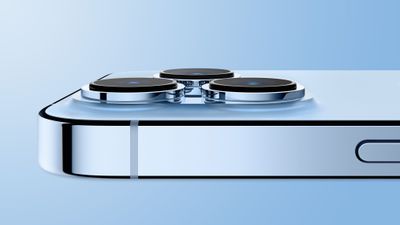
iPhone 13 Pro Light Blue Side Feature
When Macro Mode is enabled, the iPhone camera automatically switches from the Wide lens to the Ultra Wide lens when an object is placed within 5.5 inches of the rear camera. (The viewfinder still shows "1x" framing, but the camera relies on the Ultra Wide lens for autofocus.)

From the user's perspective, this results in the viewfinder jittering as it attempts to choose between a regular wide or wide-macro shot. While this automatic camera switching is intentional to help users better capture close-up details, it can be annoying because it can be difficult to get a shot with the camera constantly swapping back and forth.

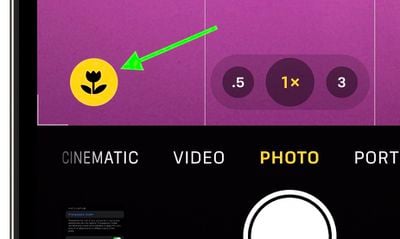
For that reason, in iOS 15.2, Apple added an optional manual toggle for macro mode, in the form of a flower icon that can be tapped to toggle Macro mode off when the camera is close to an object.
macro

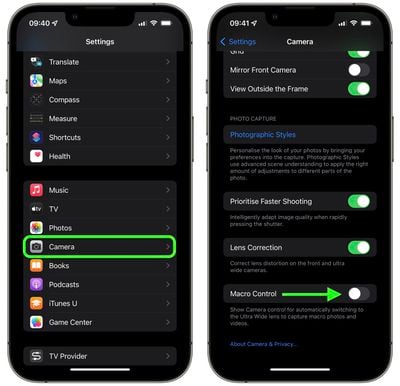
To turn on the option to see the toggle when taking close-up shots, follow these steps.

  1. Launch the Settings app on your iPhone.
  2. Scroll down and tap Camera.
  3. Scroll down and toggle the switch next to Macro Control so that it's in the green ON position.
settings

Now, when your iPhone's camera is close enough to an object, the flower icon will appear in the Camera app and can be tapped to enable or disable Macro mode.

Apple has also added a new Preserve Settings option for Macro Control (Settings -> Camera -> Preserve Settings -> Macro Control). If Macro Control is disabled, the Camera will automatically switch into Macro mode when close enough to an object, so this feature is meant to give users unhappy with that function more control over when Macro mode activates.
Related Forum: iPhone

Popular Stories

iPhone 18 Pro Burgundy

New Texture and Grain Controls Coming to Photographic Styles With iPhone 18 Pro

Wednesday September 9, 2026 12:45 pm PDT by
Apple today announced new texture and grain controls for Photographic Styles with the iPhone 18 Pro and iPhone 18 Pro Max. Photographic Styles are tone presets that adjust the color and warmth of a photo as it is captured, rather than as a filter applied afterward, while preserving skin tones. The iPhone 18 Pro and iPhone 18 Pro Max gain a redesigned computational imaging pipeline for the ...
iphone 18 pro photography

Apple Announces iPhone 18 Pro Photography Exhibition

Wednesday September 16, 2026 7:20 am PDT by
Apple today announced "What Holds Us," a photography exhibition featuring work shot exclusively on the iPhone 18 Pro by Alex Prager, Jack Davison, and Jimmy Chin. Curated by Kathy Ryan, the exhibition explores human connection through crowd scenes, portraits involving clay, and mountain photography. The exhibition will be on display in New York City from September 18 to 20, before traveling to ...
iOS 27 Next to iPhone

Here's When iOS 27 Rolls Out Today in Every Time Zone [Update: It's Out]

Sunday September 13, 2026 3:00 am PDT by
Update 10:04 a.m.: iOS 27 is rolling out now, though it may take a bit for all users to see it, so keep checking! Apple is about to release iOS 27, which will finally deliver more advanced Siri AI capabilities as well as a variety of other refinements, improvements, and new features to iPhones. It's Apple's biggest software update of the year, and Apple announced at Wednesday's iPhone event...













