How to Disable Memories Alerts in iOS 12 - MacRumorsOpen MenuShow RoundupsShow Forums menuVisit ForumsOpen Sidebar
Skip to Content

How to Disable Memories Alerts in iOS 12

by

photos iconHave you ever woken up to your iPhone or iPad alerting you to the fact that "You Have a New Memory" on this day, in the form of photos and videos you shot years ago? If the answer is yes, you've been the willing (or unwilling) recipient of a Photos feature notification called Memories.

In iOS 12, the Photos app automatically curates photos and videos that you've taken into specific memory collections. Essentially, these are homemade movies of past events like family gatherings or vacations which your device generates without any input required on your part (although you can edit them).

Despite Apple's good intentions, the risks inherent in its Memories feature are pretty obvious. So if you're less than enthusiastic about the idea of your iOS device digging up bygones from the annals of your Photo library, here's how to switch off those Memory alerts.

How to Disable Memories Alerts in iOS 12

  1. Launch the Settings app on your iPhone or iPad.
    how to disable memories alerts in ios 12 01

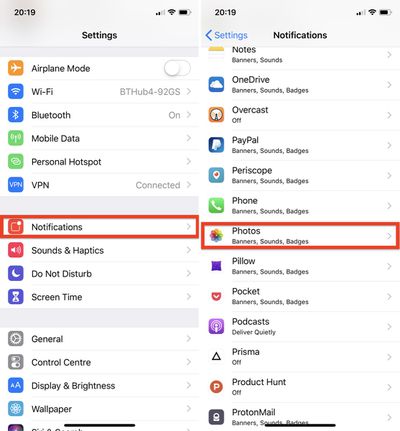
  2. Tap Notifications.
  3. Select Photos from the list of apps.
    how to disable memories alerts in ios 12 02

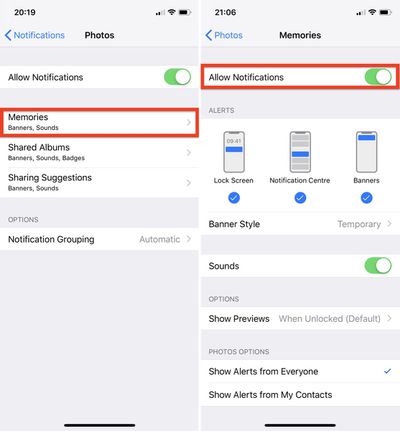
  4. Tap Memories.
  5. Toggle the Allow Notifications switch to the OFF position.
Note that this doesn't disable the automatic Memories feature, which will still appear in the Photos app's For You tab, but at least you won't receive unexpected reminders about events that you intentionally consigned to the history books long ago.

Related Forum: iOS 12

Top Rated Comments

Seoras Avatar
103 months ago
Memories has to be one of best things Apple has done for its users. My kids love seeing the Memories of themselves (I've tagged their faces and "it" finds them in my pictures and makes great videos with music).

As a parent you take 1000's of photos of your kids but you rarely take a chance to look back over them. Memories is a fabulous way to enjoy exactly that - memories. It's especially good if you have an Apple TV. Makes great family viewing once a month I find.

Yet there will be those who will gripe, especially here on MR, about interference, annoyance and just general negativity towards anything Apple does. I seriously doubt most of the posters on MR forums are genuine apple users. If they were they'd have moved off onto some other company's platform long ago where I'm sure they'll find it's all fluffy clouds and unicorns of tech goodies and empowerment and root access for their mother.
Score: 4 Votes (Like | Disagree)
sfobear Avatar
103 months ago
What would be even better is Apple letting me take care of my own photos.

Let me decide what albums I want to see, if I want collections of people created automatically, if I want to have albums by filters, and all the other stupid add ons they force on my content trying to make Photos "friendly" (or more accurately I suspect, demo-able).
Score: 4 Votes (Like | Disagree)
103 months ago
Are there any simple alternatives for the Photos app like iOS 5.0? I do not want “memories” or algorithms to analyze my photos for faces and objects and I sure as hell hate swiping up (or on that scrolling thing) and it showing photos I don’t want to show.
Score: 2 Votes (Like | Disagree)
Porco Avatar
103 months ago
‘You have a new memory’

Oh good, I’d forgotten. :rolleyes:
Score: 2 Votes (Like | Disagree)
iSayuSay Avatar
103 months ago
Did I miss something in iOS? Is there no DELETE button for photos if they make you that ***** miserable?

A lot of high and mighty retorts to my post with really little content other than the usual tripe from under a stoney bridge somewhere in neverland.

Memories is awesome.
If your life sucks that much it 'aint my problem or Apples.
Suck it up and sort it out instead of landing it on someone else as their responsibility to make you happy.
Or you can just comprehend and read the whole article to the point of sentence

“Despite Apple's good intentions, the risks inherent in its Memories feature are pretty obvious. So if you're less than enthusiastic about the idea of your iOS device digging up bygones from the annals of your Photo library, here's how to switch off those Memory alerts."

I don't need someone to make me happy, but **** happens and this is a good article for someone who FOR SOME REASON needs to disable Photo memories.
Those heartbreaking photos may not be the brightest moment of your life. But would you delete the last photos of deceased friend or family member? You might wanna keep it, but don't want to reflect back by the time it appears on Memories. Like I said, life is not just black and white moments.

Just because you think it's awesome doesn't mean everyone have to like it. Hey no need to be so bitter, you have a perfectly happy life and happy kids, remember? LOL
Score: 1 Votes (Like | Disagree)
Brien Avatar
103 months ago
Memories has to be one of best things Apple has done for its users. My kids love seeing the Memories of themselves (I've tagged their faces and "it" finds them in my pictures and makes great videos with music).

As a parent you take 1000's of photos of your kids but you rarely take a chance to look back over them. Memories is a fabulous way to enjoy exactly that - memories. It's especially good if you have an Apple TV. Makes great family viewing once a month I find.

Yet there will be those who will gripe, especially here on MR, about interference, annoyance and just general negativity towards anything Apple does. I seriously doubt most of the posters on MR forums are genuine apple users. If they were they'd have moved off onto some other company's platform long ago where I'm sure they'll find it's all fluffy clouds and unicorns of tech goodies and empowerment and root access for their mother.
Some of us don’t want or need all these smart features. I’d much prefer a barebones camera roll and nothing else.
Score: 1 Votes (Like | Disagree)

Popular Stories

iphone duo facetime

iPhone Duo's Hidden FaceTime Camera Takes 'Trash' Photos

Wednesday October 21, 2026 11:36 am PDT by
The iPhone Duo's inner screen has an under-display front camera that's largely hidden from view. It's the first time we've seen an under-display camera on an iPhone, and it turns out there's a reason Apple hasn't used the technology before. Apple said the camera offers 1080p video recording, but didn't mention photo quality. Gizmodo said it's a 4-megapixel camera and described the photos as...
homeview faces

HomeView's Faces Include Snoopy, Photos, and Interactive Artwork

Wednesday October 14, 2026 4:00 am PDT by
Apple's HomeView includes customizable faces for photos, animations, and smart home controls. Faces Apple has named so far include: Photos Flow Snoopy Calendar Weather Home Modular Home Camera Other clock and widget layouts appear in Apple's promotional images, but have not yet been named. Apple says that selected faces change throughout the day, with different appearances...
duo aquarium

More Fun iPhone Duo Apps: 30 New Picks to Try

Friday November 6, 2026 3:27 pm PST by
When the iPhone Duo launched, we shared a list of some of the fun apps developers created for the new form factor. Two weeks out, developers are continuing to come up with fresh ideas, so we thought we'd share some of our favorites. Games Marbles Unhinged ($2.99) - Marbles Unhinged is a marble maze designed for the Duo. When you fold it, the floor turns into a ramp. If you stand the top...


Latest Stories
Siri AI Rumored to Become 'More Like an Agent' as Early as Next Year
8 hours ago
Apple Taking New Approach to Developing iOS 28 and macOS 28
10 hours ago
Early Apple Black Friday Deals on Apple Watch, MacBook Air, and More
1 day ago
'Backglow' Lets You Customize New MacBook Pro's Glowing Apple Logo
1 day ago
Top Stories: Apple Product Launches, iOS 27.3 Beta, and More
1 day ago
More Fun iPhone Duo Apps: 30 New Picks to Try
2 days ago
Hands-On With Apple's New OLED Touchscreen MacBook Pro
2 days ago
Apple Store With All-New Design Opening Soon in Southern California
2 days ago
Control the Glowing Apple Logo on Your New MacBook Pro
2 days ago
Apple Shares New 'Apple Card: Apply and Use in Minutes' Ad
2 days ago
Apple Says More Than 100,000 Apps Optimized for iPhone Duo, Here's What's Still Missing
2 days ago
Early Black Friday Deals Kickoff With Steep Discounts on Apple Watch Ultras and More
2 days ago
The MacRumors Show: iOS 27.3 Looks Like a Huge Update
2 days ago
Best Buy's Black Friday Event Begins With Sitewide Savings on Apple, TVs, More
2 days ago
Apple Releasing Yet Another Two New Products Next Week
2 days ago
MacBook Air Drops to Lowest Price in Months With Amazon's $250 Discount
2 days ago
Apple Rumored to Drop the iPhone's Action Button Next Year
2 days ago
Apple's Extended Return Policy Now in Effect for 2026 Holiday Season
2 days ago
Apple Music Classical Updated With New Icon and Refreshed Design
3 days ago
OLED iPad Mini, M6 iMac, and New MacBook Pros Available From Today
3 days ago
Apple Surveys iPhone Duo Buyers About Crease and Camera
3 days ago
Apple's First Touchscreen Mac is Now Arriving to Customers
3 days ago
Claude Gets Personal Finance Feature With Bank Account Linking
3 days ago
Apple Arcade Adds Crossy Road Rush and NBA 2K27
3 days ago
Apple's New HomeView Smart Home Hub: Here's How Much RAM It Has
3 days ago
iPad Mini vs. iPad Air Buyer's Guide: Now Just $50 Apart
3 days ago
First iOS 27.3 and macOS Golden Gate 27.3 Public Betas Now Available
3 days ago
Apple Announces a New Mac Sales Record
3 days ago
Paid $200 for Logic Pro? Apple Says You Won't Get This New Feature
3 days ago
Instagram's Edits Video Editor is Now Available on Mac
3 days ago