

In macOS Monterey, Apple introduced a feature called Shared with You that takes content you've received in Messages and makes it available in the relevant app on your Mac. So when a friend shares content with you, such as a link to a news story or TV show, that content will show up in a dedicated Shared with You section in the corresponding app.
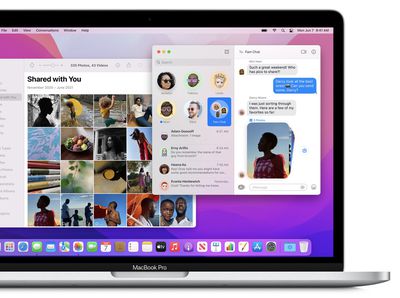
If you don't want content that's been shared with you in Messages appearing elsewhere on your Mac, you can disable Shared with You completely. Alternatively, you can turn it off for specific message conversations, or you can disable it just for specific apps. Keep reading to learn how.
How to Disable Shared With You for a Messages Thread
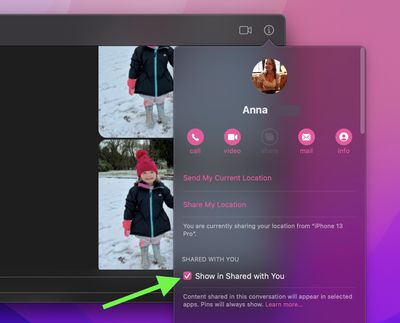
You may want to prevent content shared by a particular person in Messages from appearing in other apps, in which case you can turn it off for individual conversations. Here's how.
- In the Messages app, select a conversation thread.
- Click the info (the circled "i") button in the top-right corner of the Messages window.
- Click to uncheck the box next to Show in Shared With You.

How to Hide Shared With You in a Specific App
If you don't want Shared with You content to appear in a certain app, you can disable it for just that app. For example, you may not want webpage links shared with you in Messages appearing in Safari. Here's how to control Shared with You for particular apps on your Mac.
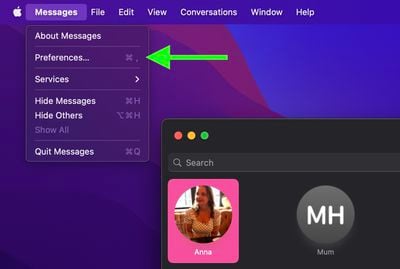
- In the Messages app, click Messages -> Preferences... in the menu bar.
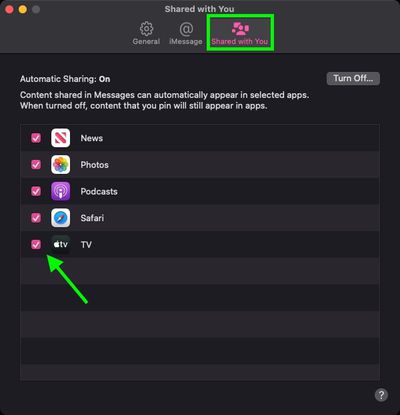
- Select the Shared with You preference tab.
- Click to uncheck the box next to the app that you want to turn off Shared With You content for.
Tip: If it's Safari you don't want shared content to appear in, you can actually turn it off in Safari. Open a new Safari tab to view your Start Page, then click the customize button in the bottom-right corner of the window and uncheck the box next to Shared with You.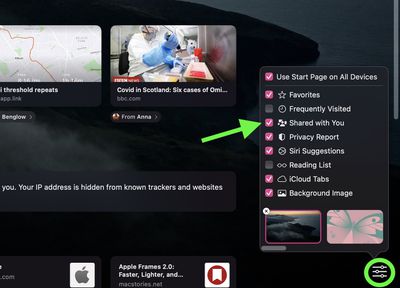
How to Disable Shared With You Completely
- In the Messages app, click Messages -> Preferences... in the menu bar.
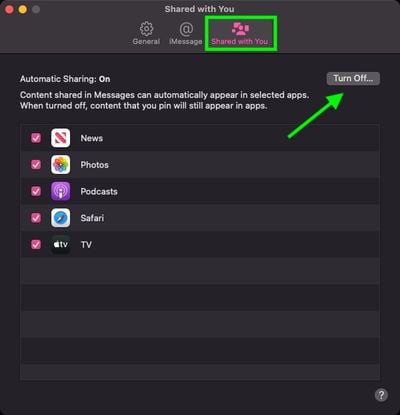
- Select the Shared with You preference tab.
- Click the Turn Off... button to disable the feature for all content and apps.
Did you know Shared with You is also a feature of iOS 15? Check out our Messages guide for all the details.



















