How to Disable Transparency Effects in macOS Mojave - MacRumorsOpen MenuShow RoundupsShow Forums menuVisit ForumsOpen Sidebar
Skip to Content

How to Disable Transparency Effects in macOS Mojave

by

In macOS, transparency – or more properly, translucency – is a visual effect many apps use to create a sense of depth by hinting at content residing in the background.
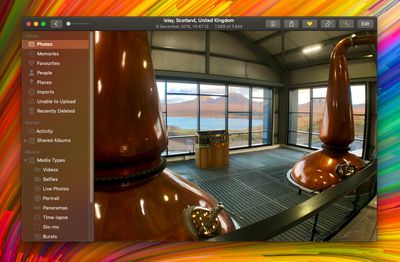
how to disable transparency in macos 00
An example of transparency is when content behind a window shows through in interface elements like menus and sidebars. It's evident in the screenshot above, for example, in which the colors of the desktop wallpaper bleed through the sidebar in the Photos app.

A similar effect is sometimes used within app interface elements that are windowed, allowing window content to show through other elements like toolbars. An instance of this can be seen below, where the folders are visible through Finder's toolbar as if through frosted glass.

how to disable transparency in macos 000

Transparency enabled (left); transparency disabled

The effect can look cool, but it can also be distracting if you're trying to focus on content, especially if you're editing photos. Fortunately, macOS lets you turn off transparency, but the way to do it isn't immediately obvious. The following steps show you how.

How to Disable Transparency in macOS Mojave

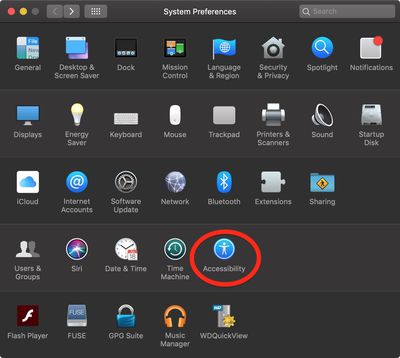
  1. Launch System Preferences from your Mac's Dock, from the Applications folder, or from the Apple menu bar ( -> System Preferences...).
    how to disable transparency in macos 01

  2. Select the Accessibility preference pane.
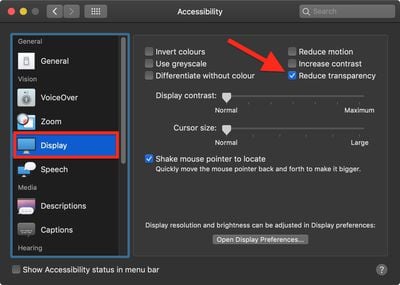
  3. In the sidebar, under Vision, click Display.
    how to disable transparency in macos 02

  4. Check the box next to Reduce transparency.
Related Forum: macOS Mojave

Top Rated Comments

101 months ago
Setting your Accent Colour to Greyscale also turns off wallpaper window tinting. Another tip to increase legibility.
[doublepost=1544791052][/doublepost]
Does this save resources at all? I used to do this on my iphones back in the day thinking I saved CPU cycles and ram.
None of this makes any difference on modern computers.
Score: 5 Votes (Like | Disagree)
101 months ago
There's no accent color called "Greyscale". It's called "Graphite".
You still knew which colour I was talking about.
I hope you realize that's an issue with whatever third-party browser and/or theme you're using.
I hope you realise they were being sarcastic.

Stop being obtusely fastidious.
Score: 2 Votes (Like | Disagree)
BigMcGuire Avatar
101 months ago
I still do this on my iPhone XR (started with the iPhone 5 and iOS 7). It’s less about resources at this stage, and more that I’ve come to prefer low transparency and reduced motion.
Same here! I thought I was the only one that did this. I am so happy to have found Reduced Motion for my MacBook thanks to this article, all these years I had no clue it existed (same for transparency for Mac OS). I've used both since my 6+ iPhone and prefer it.
Score: 2 Votes (Like | Disagree)
2499723 Avatar
101 months ago
Does this save resources at all? I used to do this on my iphones back in the day thinking I saved CPU cycles and ram.
I still do this on my iPhone XR (started with the iPhone 5 and iOS 7). It’s less about resources at this stage, and more that I’ve come to prefer low transparency and reduced motion.
Score: 2 Votes (Like | Disagree)
101 months ago
Setting your Accent Colour to Greyscale also turns off wallpaper window tinting. Another tip to increase legibility.
[doublepost=1544791052][/doublepost]
Recent betas remove the window tinting when using any accent color with reduce transparency enabled (I'm on 10.14.3 Beta (18D21c)). This is great. Tinting still remains in the dock, notification center, and alerts - no big deal, window tinting was the one that was really annoying.
Score: 2 Votes (Like | Disagree)
n-evo Avatar
101 months ago
You still knew which colour I was talking about.
Yeah, I did. However your instructions are meant for someone with less knowledge than me. "Greyscale" and "Graphite" are simply two wildly different things in the macOS landscape. If someone actually starts looking for "Greyscale" chances are they'll end up in Accessibility turning their entire screen black and white. Try to accept a well-meant correction with a little bit more grace. Especially when a fairly small textual difference makes a world of difference in practice.

I hope you realise they were being sarcastic.
Hah, I actually didn't catch it so I'll give you that. Truth be told it wouldn't be the first time around here someone doesn't know where the bug is actually coming from and thinks it's a macOS bug.
Score: 1 Votes (Like | Disagree)

Popular Stories

iOS 27 Next to iPhone

Here's When iOS 27 Rolls Out Today in Every Time Zone [Update: It's Out]

Sunday September 13, 2026 3:00 am PDT by
Update 10:04 a.m.: iOS 27 is rolling out now, though it may take a bit for all users to see it, so keep checking! Apple is about to release iOS 27, which will finally deliver more advanced Siri AI capabilities as well as a variety of other refinements, improvements, and new features to iPhones. It's Apple's biggest software update of the year, and Apple announced at Wednesday's iPhone event...
iOS 27 Icon iPhone

iOS 27 Available Now With These 8 New Features

Monday September 14, 2026 9:00 am PDT by
Update — 10 a.m. Pacific Time: Apple has released iOS 27. During its iPhone 18 Pro and iPhone Duo event last week, Apple announced that iOS 27 will be released widely on Monday, September 14. iOS 27 should be available around 10 a.m. Pacific Time / 1 p.m. Eastern Time today via the Settings app, under General → Software Update. Below, we have highlighted eight new features and...
Apple iCloud Plus expansion hero

iCloud+ Now Includes Apple TV, Apple Arcade, and Curated Apple Music Stations in Over 100 Countries

Tuesday September 15, 2026 1:43 am PDT by
Apple today announced a new subscription initiative that turns paid iCloud+ subscriptions into a broader services bundle in more than 100 countries. In select countries, Apple says every paid iCloud+ plan, including the cheapest 50GB tier, now includes Apple TV and Apple Arcade "at no additional cost," while family sharing extends the storage, TV and Arcade access to up to five people....