How to Use Do Not Disturb While Driving - MacRumorsOpen MenuShow RoundupsShow Forums menuVisit ForumsOpen Sidebar
Skip to Content

How to Use Do Not Disturb While Driving

by

Starting with iOS 11, Apple introduced a Do Not Disturb While Driving Feature that's designed to mute incoming calls, texts, and notifications while you're driving to cut down on accident-causing distractions.

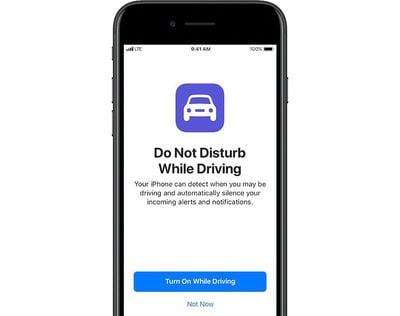
Do Not Disturb While Driving is not a feature that's enabled automatically, but you will see a popup prompting you to turn it on when Apple detects the motion of a car after installing iOS 11 or later for the first time. Despite the notification, you'll still need to choose how you want to use the feature if you miss the initial setup process.
donotdisturbdriving
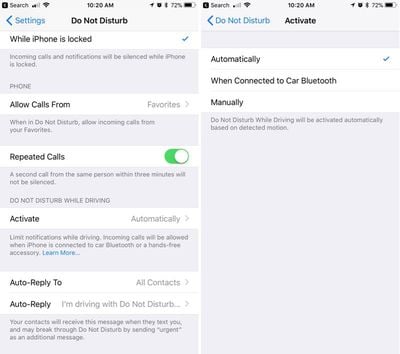
Do Not Disturb can be set to turn on manually, automatically when the iPhone detects a car's acceleration, or when an iPhone connects to a car's Bluetooth.

Enabling Do Not Disturb While Driving

  1. Open the Settings app.
  2. Tap Do Not Disturb.
  3. Scroll down to "Do Not Disturb While Driving." donotdisturbwhiledrivingsetup
  4. Tap on "Activate" to choose how you want Do Not Disturb While Driving to be turned on. If you don't want to use Do Not Disturb While Driving, set it to manual.
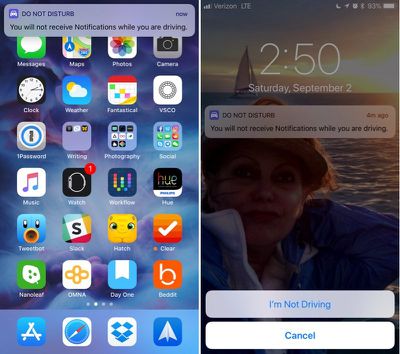
Whenever Do Not Disturb While Driving is activated, you'll see a bar at the top of the screen letting you know incoming notifications are being muted.

Do Not Disturb While Driving Control Center Toggle

If you don't want to have Do Not Disturb While Driving turn on automatically but still want to use it, there's a Control Center setting for activating it.

  1. Open the Settings app.
  2. Choose Control Center.
  3. Select Customize Controls. dndcontrolcenter
  4. Add Do Not Disturb While Driving, which has an image of a car.
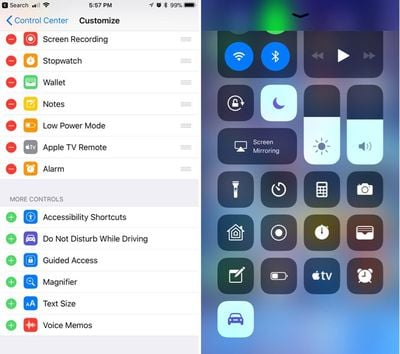
This adds the Do Not Disturb While Driving toggle to your Control Center. To turn it on or off, you just need to swipe to open the Control Center and tap it.

If You're a Passenger

When the automatic setting is enabled, Do Not Disturb While Driving will turn on whenever your iPhone detects the acceleration of a vehicle. This can be inconvenient if you're a passenger, so you'll need to turn it off through the Control Center or by tapping the persistent Do Not Disturb While Driving popup at the top of the display to let Apple know you're a passenger.
donotdisturbwhiledriving

Choosing Your Auto Reply Options

When you're driving, all of your incoming text messages are muted. You can choose an automatic text message that lets people know you're in the car and will text later, and you can customize who sees the message.
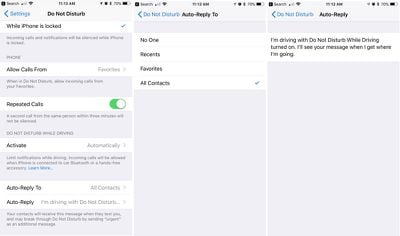
dndtextcustomization

  1. Open the Settings app.
  2. Choose Do Not Disturb.
  3. Scroll down to "Auto-Reply To" and tap it.
  4. You can choose for automatic texts to be sent to Recents, Favorites, All Contacts, or No one, if you would rather not have your phone send automatic replies.

Customizing Your Auto Reply

  1. Open the Settings app.
  2. Choose Do Not Disturb.
  3. Scroll down to "Auto-Reply" and tap it.

Apple sets a default message in this section, but you can change it to say whatever you want. This is the message people will receive when texting you when Do Not Disturb While Driving is enabled.

If there's an urgent issue and someone needs to get in contact with you immediately, they can break through Do Not Disturb While Driving by texting you "urgent." This will override your Do Not Disturb settings and will notify you of the text immediately.
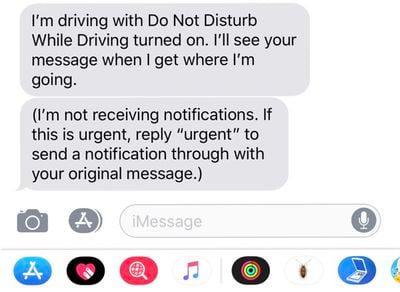
donotdisturbwhiledrivintext
An ideal setup is to set auto replies to your favorites, which likely translates to close friends and family. This will let them text you in an emergency situation, but will prevent other less urgent messages from being a distraction.

Phone Calls

If your iPhone is connected to your car's Bluetooth system, iOS is smart enough to know you have a hands-free calling method available. In this situation, calls will continue to come through even when Do Not Disturb While Driving is enabled. Texts and notifications from apps will continue to be muted, though.

If you're not connected to Bluetooth and have no hands-free accessory, calls will be blocked like text messages and notifications.

Parental Restrictions

For parents of teenagers, there's an option to enable a restriction that will prevent Do Not Disturb While Driving settings from being changed or toggled off, guaranteeing children are using the feature whenever they're in the car. Here's how to turn it on (iOS 12 or later):

  1. Open the Settings app.
  2. Choose Screen Time.
  3. Tap on Content & Privacy Restrictions.
  4. Tap on the Content & Privacy Restrictions toggle to turn on restrictions.
  5. Scroll down to Do Not Disturb While Driving and tap it.
  6. Choose Don't Allow.

On devices running an earlier version of iOS, there are different steps to follow to access device restrictions. Open the Settings app, choose General, scroll down to Restrictions and then tap it. Enter your passcode and then find the "Do Not Disturb While Driving" option and choose "Don't Allow Changes."


Top Rated Comments

soupcan Avatar
119 months ago
I have a way shorter version.

Step 1: put phone on silent.
Step 2: put phone in pocket and keep it there.
Step 2: ???
Step 3: profit.

And if you're the kind of person who can't keep his hands off of his phone and thinks it's more important than paying attention to the road then you shouldn't even have a drivers licence.
Score: 7 Votes (Like | Disagree)
Westside guy Avatar
119 months ago
This has happened to me twice now. You are not alone.
It makes me think of Microsoft Office back when they implemented Clippy.

"IT LOOKS LIKE YOU'RE DRIVING A CAR!" :confused:
Score: 4 Votes (Like | Disagree)
Peel Avatar
119 months ago
Do Not Disturb while Driving sounds good, but it's a bit infuriating. If I could decide which features to turn on it would be great, but as it is, it's all or nothing. I'm tired of getting in the car and saying "Hey Siri, open Waze", only to get a reply, "I'm sorry, I can't do that while you're driving." Well, if I can't open a navigation app while driving, that's pretty useless. I mean, when else would I want to open that app?

Score: 3 Votes (Like | Disagree)
sandman42 Avatar
118 months ago
I like the idea of this feature, but not the way that it now contradicts and completely invalidates using my phone for navigation once I’m underway, even hands-free. I access Siri hands-free, “give me directions to X”, and get the expected response “getting directions to X”, then... nothing happens. Why update navigation with lane guidance, etc, then do this? I hope they fix this with a setting. Seems like at the very least I should be able to get “eyes free” audio only directions.
Score: 2 Votes (Like | Disagree)
TheCannonator Avatar
119 months ago
I have a way shorter version.

Step 1: put phone on silent.
Step 2: put phone in pocket and keep it there.
Step 2: ???
Step 3: profit.

And if you're the kind of person who can't keep his hands off of his phone and thinks it's more important than paying attention to the road then you shouldn't even have a drivers licence.
Excuse me Mr. Perfect it lets people know you are driving so they don’t bother you.
Score: 2 Votes (Like | Disagree)
Westside guy Avatar
119 months ago
Brainless because it's something that various people have been asking for and will use?
I don't think "Do Not Disturb While Driving" is a bad idea. I don't necessarily even think enabling it by default is a bad idea.

I find current implementation, though, is rather... sub-optimal.
Score: 1 Votes (Like | Disagree)

Popular Stories

apple pro tell logo

Apple Launching Five New Products Today

Thursday November 5, 2026 12:59 am PST by
Apple is launching five new products on Friday, November 6, following pre-orders that opened last week, including its first touchscreen MacBook Pro models. The following new products will be available from today: iPad mini with OLED display and A20 Pro chip iMac with M6 chip 14-inch MacBook Pro with M6 chip 14-inch MacBook Pro with OLED touchscreen 16-inch MacBook Pro with OLED...
duo aquarium

More Fun iPhone Duo Apps: 30 New Picks to Try

Friday November 6, 2026 3:27 pm PST by
When the iPhone Duo launched, we shared a list of some of the fun apps developers created for the new form factor. Two weeks out, developers are continuing to come up with fresh ideas, so we thought we'd share some of our favorites. Games Marbles Unhinged ($2.99) - Marbles Unhinged is a marble maze designed for the Duo. When you fold it, the floor turns into a ramp. If you stand the top...
silver iphone 18 pro

Apple Rumored to Drop the iPhone's Action Button Next Year

Friday November 6, 2026 6:07 am PST by
Apple plans to merge the iPhone's Action button with the Camera Control starting next year, according to the leaker known as "Instant Digital." In a new post on Weibo, the leaker claimed that a single press of the combined button would open the camera, while a long press would trigger the function assigned to the Action button. They explicitly clarified that the dedicated Action button would ...
Latest Stories
Siri AI Rumored to Become 'More Like an Agent' as Early as Next Year
4 hours ago
Apple Taking New Approach to Developing iOS 28 and macOS 28
6 hours ago
Early Apple Black Friday Deals on Apple Watch, MacBook Air, and More
1 day ago
'Backglow' Lets You Customize New MacBook Pro's Glowing Apple Logo
1 day ago
Top Stories: Apple Product Launches, iOS 27.3 Beta, and More
1 day ago
More Fun iPhone Duo Apps: 30 New Picks to Try
2 days ago
Hands-On With Apple's New OLED Touchscreen MacBook Pro
2 days ago
Apple Store With All-New Design Opening Soon in Southern California
2 days ago
Control the Glowing Apple Logo on Your New MacBook Pro
2 days ago
Apple Shares New 'Apple Card: Apply and Use in Minutes' Ad
2 days ago
Apple Says More Than 100,000 Apps Optimized for iPhone Duo, Here's What's Still Missing
2 days ago
Early Black Friday Deals Kickoff With Steep Discounts on Apple Watch Ultras and More
2 days ago
The MacRumors Show: iOS 27.3 Looks Like a Huge Update
2 days ago
Best Buy's Black Friday Event Begins With Sitewide Savings on Apple, TVs, More
2 days ago
Apple Releasing Yet Another Two New Products Next Week
2 days ago
MacBook Air Drops to Lowest Price in Months With Amazon's $250 Discount
2 days ago
Apple Rumored to Drop the iPhone's Action Button Next Year
2 days ago
Apple's Extended Return Policy Now in Effect for 2026 Holiday Season
2 days ago
Apple Music Classical Updated With New Icon and Refreshed Design
2 days ago
OLED iPad Mini, M6 iMac, and New MacBook Pros Available From Today
2 days ago
Apple Surveys iPhone Duo Buyers About Crease and Camera
3 days ago
Apple's First Touchscreen Mac is Now Arriving to Customers
3 days ago
Claude Gets Personal Finance Feature With Bank Account Linking
3 days ago
Apple Arcade Adds Crossy Road Rush and NBA 2K27
3 days ago
Apple's New HomeView Smart Home Hub: Here's How Much RAM It Has
3 days ago
iPad Mini vs. iPad Air Buyer's Guide: Now Just $50 Apart
3 days ago
First iOS 27.3 and macOS Golden Gate 27.3 Public Betas Now Available
3 days ago
Apple Announces a New Mac Sales Record
3 days ago
Paid $200 for Logic Pro? Apple Says You Won't Get This New Feature
3 days ago
Instagram's Edits Video Editor is Now Available on Mac
3 days ago








































