

How to Edit Sent Messages in WhatsApp - MacRumorsOpen MenuShow RoundupsShow Forums menuVisit ForumsOpen Sidebar
Skip to Content

How to Edit Sent Messages in WhatsApp

by

WhatsApp is rolling out a new ability for users to edit messages after they have been sent over the popular Meta-owned encrypted chat platform. Keep reading to learn how it works on iPhone and Android.
Whatsapp Feature
It's been a long time coming, but WhatsApp has finally brought its much-anticipated sent-message editing feature to the chat service.

When Apple released iOS 16, it introduced the ability to edit recently sent iMessages. Telegram also offers a similar edit-after-sending feature, and now WhatsApp is getting in on the action, too.

Now that the feature is officially rolling out, you can edit a message for up to 15 minutes after sending it in WhatsApp, which is the same duration that Apple gives iMessage users wanting to edit sent messages.

The feature is best used to correct typos, add context, or craft your message for better clarity, but you can also modify the entire contents of your message. Note that in WhatsApp, you can edit a sent message as many times as you want, but it is not possible to view older versions of modified messages, unlike iMessage.
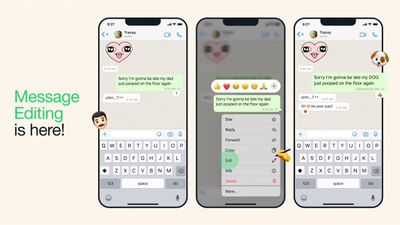
whatsapp edit sent messages
Here's how it works.

  1. In WhatsApp, open the conversation that contains the message you want to edit.
  2. Press and hold your finger on the message in question.
  3. Tap Edit in the pop-up menu that appears.
  4. Edit the message's contents in the input field by moving the text cursor with your finger if required, and retype the message.
  5. Tap the blue checkmark to indicate you're happy with your edited message to be sent.

The sent message has now been changed to reflect your edits. Note that you can only edit your own sent messages, not message bubbles sent by other users. If you can't see the Edit button in WhatsApp, either the feature hasn't quite rolled out to you yet or you need to update to the latest version of the app.


Popular Stories

iOS 27 Next to iPhone

Here's When iOS 27 Rolls Out Today in Every Time Zone [Update: It's Out]

Sunday September 13, 2026 3:00 am PDT by
Update 10:04 a.m.: iOS 27 is rolling out now, though it may take a bit for all users to see it, so keep checking! Apple is about to release iOS 27, which will finally deliver more advanced Siri AI capabilities as well as a variety of other refinements, improvements, and new features to iPhones. It's Apple's biggest software update of the year, and Apple announced at Wednesday's iPhone event...
iOS 27 Icon iPhone

iOS 27 Available Now With These 8 New Features

Monday September 14, 2026 9:00 am PDT by
Update — 10 a.m. Pacific Time: Apple has released iOS 27. During its iPhone 18 Pro and iPhone Duo event last week, Apple announced that iOS 27 will be released widely on Monday, September 14. iOS 27 should be available around 10 a.m. Pacific Time / 1 p.m. Eastern Time today via the Settings app, under General → Software Update. Below, we have highlighted eight new features and...
Apple iCloud Plus expansion hero

iCloud+ Now Includes Apple TV, Apple Arcade, and Curated Apple Music Stations in Over 100 Countries

Tuesday September 15, 2026 1:43 am PDT by
Apple today announced a new subscription initiative that turns paid iCloud+ subscriptions into a broader services bundle in more than 100 countries. In select countries, Apple says every paid iCloud+ plan, including the cheapest 50GB tier, now includes Apple TV and Apple Arcade "at no additional cost," while family sharing extends the storage, TV and Arcade access to up to five people....













