

Alongside iOS 15, Apple introduced an iCloud+ service that adds new features to its paid iCloud plans (upgraded iCloud storage tiers start at $0.99). One of these features is iCloud Private Relay, which is designed to encrypt all of the traffic leaving your device so no one can intercept it or read it.
Private Relay sends web traffic to a server that is maintained by Apple to strip the IP address. Once IP info has been removed, Apple sends the traffic to a second server maintained by a third-party company that assigns a temporary IP address and then sends the traffic to its destination, a process that prevents your IP address, location, and browsing activity from being used to create a profile about you.
Involving an outside party in the relay system is an intentional move that Apple says was designed to prevent anyone, including Apple, from knowing both a user's identity and the website the user is visiting.
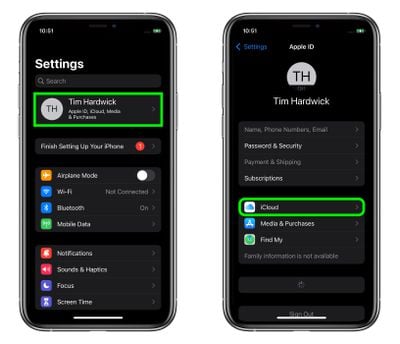
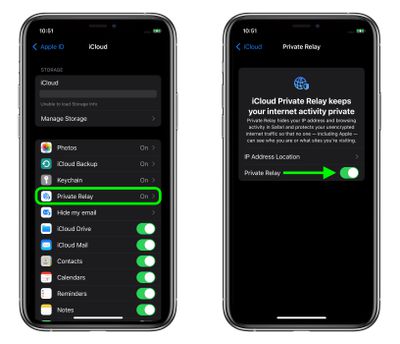
The following steps show you how to enable and disable Private Relay on an iPhone or iPad running iOS 15.
- Launch the Settings app on your iOS device.
- Tap your name at the top of the main settings menu.
- Tap iCloud.

- Tap Private Relay.
- Toggle on/off the switch next to iCloud Private Relay. If you're turning it off, tap Turn Off Private Relay to confirm.
- With Private Relay enabled, by tapping IP Address Location you can use the default Maintain General Location option to retain local content in browsing, or change to the less geographically specific and more private Use Country and Time Zone option.
Paid iCloud+ plans also include a new Hide My Email feature that lets you create unique, random email addresses that forward to your personal inbox, and it allows for iCloud Mail addresses to be personalized with a custom domain name. To learn more about Hide My Email and how to enable it, check out our dedicated how-to guide.















