

How good your digital music sounds often comes down to which file format it's encoded in. Be that as it may, every Mac audio setup is only as strong as it's weakest link, and if your Bluetooth connection isn't up to scratch, even the best BT headphones will fail to deliver a decent wireless listening experience.
By design, all Bluetooth devices support the low-power SBC audio compression codec as standard. Fortunately, modern Macs also support AAC (Apple's preferred iTunes codec) and aptX, which Android devices often use. These two codecs offer higher quality audio and generally lower latency than SBC, which is why most third-party wireless headphones on the market support one or the other, and sometimes both.
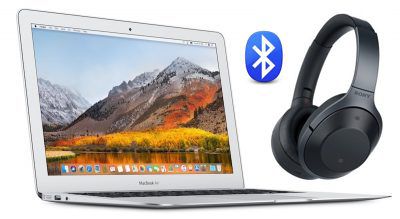
Yet for whatever reason, despite their AAC/aptX support, some headphones fall back to the bog-standard SBC codec when connected to a Mac. This can lead to a particularly underwhelming audio experience, not to mention latency-related sync issues, which will be a distinct concern if you use your headphones while gaming or watching movies.
Thankfully, it's possible to force macOS to connect to your headphones using one of the two superior codecs. In this article, we'll show you how to do so using Apple's Bluetooth Explorer utility. (And if you're comfortable opening a Terminal window, we've included a couple of commands at the end that do the same thing.)

But first, it's worth checking which codecs your brand of headphones actually supports: Look for codec logos on the box, and make sure to check for references to codecs in the manual and any accompanying/online spec sheets.
Once you've established that your headphones support aptX and/or AAC, you'll want to identify which codec is being activated when you connect the headphones to your Mac. Follow these steps to find out.
How to Identify Which Bluetooth Codec is Active
- Establish a Bluetooth connection between your Mac and headphones in the normal manner.
- Play some audio on your Mac so that it's streaming to the headphones.
- Now hold down the Option (Alt) key and click on the Bluetooth symbol in the menu bar. (If you don't see it there, you need to check Show Bluetooth in menu bar in System Preferences -> Bluetooth.)
- Hover your mouse cursor over the headphones in the connection list. You should see the headphones' Active Codec shown in grey.

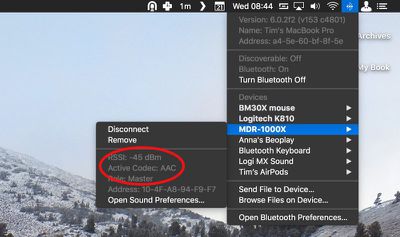
If your headphones are using AAC or aptX, you don't need to do anything. Without going into the technical details, both standards provide relatively stable wireless connections and – as far as Bluetooth goes – comparably decent sound quality. However, if the codec shown is SBC, you'll probably want to change it. Here's how.
How to Force-Enable aptX and AAC Codecs in macOS
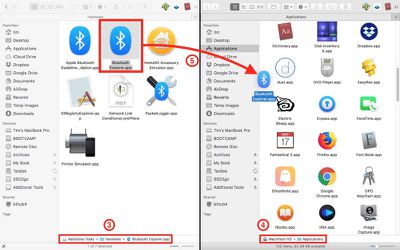
- Open a web browser, navigate to Apple's developer downloads page, and download Additional Tools for Xcode 9 [Direct Link] which contains Apple's Bluetooth Explorer utility. Note that to access the page you'll need to register for a free Apple developer account if you don't already have one. Alternatively, use Google to find the Bluetooth Explorer utility hosted elsewhere and skip to step 5, but if you're not downloading from Apple, be sure to screen the file for malware.
- Once downloaded, double-click the Additional Tools dmg file to mount it on your desktop.
- Open the Additional Tools drive and navigate to the Hardware folder.
- Open your Mac's Applications folder in another Finder window or tab.
- Drag Bluetooth Explorer into your Mac's Applications folder and launch the app from there.
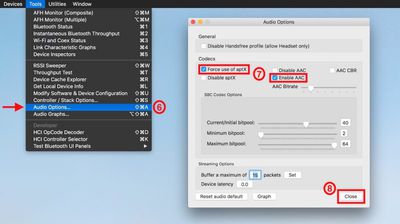
- From the Bluetooth Explorer menu bar, select Tools -> Audio Options.
- In the Codecs section, tick the checkboxes alongside Enable AAC and/or Force use of aptX (depending on your issue). Make sure Disable AAC and Disable aptX are left unchecked.
- Click Close to finish.
- Restart your Mac, or reset the Bluetooth module.

When your Mac reboots, you can confirm that the codec change has been applied by following the first series of steps in this article.
Terminal commands for enabling AAC and aptX Codecs
To enable aptX, input the following command, press Enter, and type your user password if prompted:
sudo defaults write bluetoothaudiod "Enable AptX codec" -bool true
Alternatively, to enable AAC, input the following and press Enter:
sudo defaults write bluetoothaudiod "Enable AAC codec" -bool true
To disable either codec via Terminal, simply replace -bool true with -bool false at the end of the command.




















Top Rated Comments
defaults write bluetoothaudiod "Enable AAC codec" -bool true
defaults write bluetoothaudiod "AAC Bitrate" 320
sudo defaults write bluetoothaudiod "Enable AAC codec" -bool true
sudo defaults write bluetoothaudiod "AAC Bitrate" 320