Apple's AirPods Pro in October 2021 received a software update that adds a Conversation Boost feature to the wireless earphones. This article explains what Conversation Boost does and how to enable it.

Designed to help people with mild hearing challenges hear conversations better, the Conversation Boost feature uses the beam-forming microphones on the AirPods Pro to boost the volume of a person talking in front of you, making it easier to listen to someone who's chatting with you.
To use the additional feature, first you'll need to make sure your AirPods Pro have been updated with the latest firmware.
How to Update Your AirPods Pro Firmware
You can do this by inserting them in the AirPods Pro charging case and connecting the case to a power source using the included Lightning to USB cable. Then move the iPhone or iPad that the AirPods have been paired with, near to the charging case, and make sure the iOS device has an internet connection.
After a short while, any available software updates should be automatically downloaded and installed. If you're having trouble updating your AirPods, make sure the charging case is fully charged. You can also try resetting the AirPods. You need AirPods firmware 4A400, and can check your firmware version by following these steps:
- Connect your AirPods or AirPods Pro to your iOS device.
- Open the Settings app.
- Tap General.
- Tap About.
- Tap AirPods.
- Look at the number next to "Firmware Version."
Turn On Conversation Boost
Once the AirPods Pro are updated, Conversation Boost can be turned on by following these steps on an iPhone or iPad running iOS 15 or iPadOS 15:
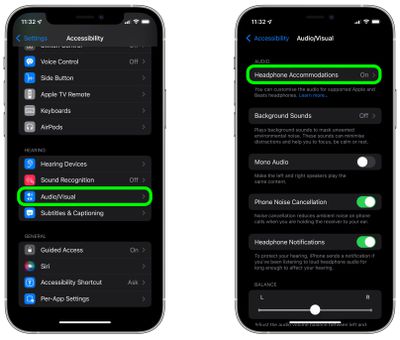
- Launch the Settings app.
- Tap Accessibility.
- Tap Audio/Visual.
- Tap Headphone Accommodations.

- Turn on Headphone Accommodations with the switch.
- Scroll down and tap Transparency Mode.
- Toggle the switch next to Conversation Boost to the green ON position.
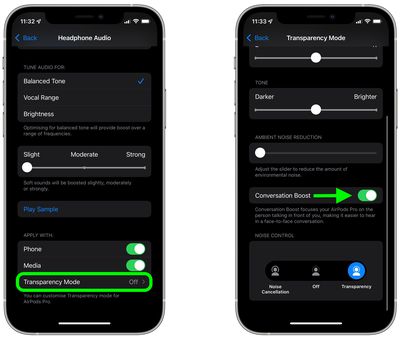
Along with the new feature, Apple also included an option to reduce ambient noise, which can be found in the last Settings menu above.