Send and Receive RCS Messages on iPhone - MacRumorsOpen MenuShow RoundupsShow Forums menuVisit ForumsOpen Sidebar
Skip to Content

Send and Receive RCS Messages on iPhone

by

Rich Communication Services (RCS) is a messaging standard Apple adopted in iOS 18 that is significantly enhancing the messaging experience between iPhone and Android devices. Think of it as SMS 2.0 – a major upgrade to the traditional text messaging we've been using for years.
apple rcs thumb

Key Features of RCS

Apple's decision to embrace RCS came last year after persistent persuasion from Google, which has been championing RCS adoption worldwide – and with good reason. Compared to MMS and SMS, the standards that Apple uses for text messages, RCS offers the following advantages:

  • Higher quality photos and videos
  • Larger file sizes for attachments
  • Audio messages
  • Improved group chats
  • Read receipts and typing indicators
  • Better encryption for chats between iPhone and Android users
  • Location sharing within text threads
  • Works over both cellular networks and Wi-Fi

RCS vs. iMessage: Bridging the Gap

While RCS offers many features that iPhone users have long enjoyed with iMessage, it's important to understand the differences between these two messaging protocols. The most significant advantage of RCS is its ability to work across different smartphone platforms.

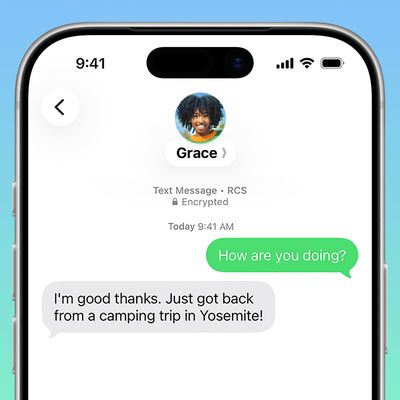
Unlike iMessage, which is exclusive to Apple devices and creates the infamous "green bubble" effect when iPhone users text Android users, RCS attempts to eliminate this disparity, creating a more unified messaging experience regardless of device type. That said, RCS messages will still appear as green bubbles in Apple's Messages app, but they will be accompanied by the label "Text Message – RCS" in the conversation thread to identify them.

In terms of features, RCS brings many of the capabilities iPhone users have come to expect from iMessage to cross-platform conversations. High-quality media sharing, read receipts, and typing indicators – all staples of the iMessage experience – are becoming available when texting Android users through RCS. This marks a significant improvement in the messaging experience between different platforms.
ios 18 beta 3 messages rcs toggle
When it comes to security though, iMessage still holds the upper hand. It offers end-to-end encryption for all communications between Apple devices. RCS, while offering improved encryption compared to traditional SMS, doesn't quite reach the same level of security as iMessage. However, it's a significant step up from the unencrypted SMS messages that have been the standard for cross-platform texting.

Another area where iMessage still maintains an edge is in its immediate availability across all Apple devices. RCS, on the other hand, depends on carrier support and implementation on both ends of the conversation. This means that while RCS promises a more unified messaging experience, its availability is not yet as universal as iMessage is within the Apple ecosystem.

Despite these differences, the adoption of RCS by Apple represents a major step towards bridging the gap between iMessage and Android messaging. While it may not completely eliminate the distinctions, it certainly narrows them considerably, promising a richer, more consistent messaging experience for all users, regardless of their choice of smartphone. In summary, here's a breakdown of what users can expect when messaging between iPhone and Android devices:

  • Enhanced Media Sharing: No more tiny, pixelated photos or videos when sharing media with Android friends. RCS allows for higher resolution and larger file sizes.
  • Rich Messaging Features: iPhone users will be able to see when Android users are typing and know when messages are read.
  • Better Group Chats: Group conversations including both iPhone and Android users will be more cohesive, with features like naming group chats and adding/removing participants working smoothly across platforms.
  • Wi-Fi Messaging: Like iMessage, RCS can work over Wi-Fi, allowing for messaging even without cellular service.
  • Seamless Fallback: If RCS isn't available for some reason, the system will automatically fall back to SMS/MMS, ensuring messages always get through.

How to Enable RCS Messaging in iOS 18

Apple introduced RCS support with iOS 18. However, full functionality will depend on carrier support. The good news is that major U.S. carriers like Verizon, T-Mobile, and AT&T already support RCS. Apple also has a list of carriers that support RCS on its website.

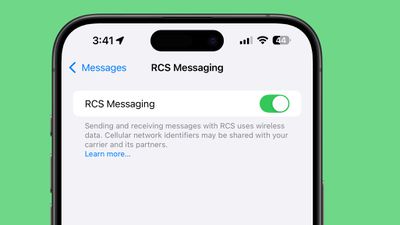
  1. Open Settings on your iPhone and select Apps at the bottom of the menu.
  2. Tap Messages.
  3. Under "Text Messaging," select RCS Messaging.
  4. Toggle RCS Messaging to the green ON position if it isn't already enabled.

If you don't see the setting on your iPhone, that's likely because your carrier does not yet support it. Check Apple's wireless carrier support page to check if yours is listed.

How to Tell If You're Using RCS

There's a simple way to tell that you are sending an RCS message in the Messages app. You'll see "RCS" at the top of the conversation window as soon as you type in the number of someone not using an Apple device.

The Future of RCS

Apple isn't stopping at just implementing RCS. The company plans to work with Google and other members of the Global System for Mobile Communications Association (GSMA) to further improve the RCS standard worldwide. This collaboration should lead to even more advanced features, such as the ability to edit and delete sent RCS messages.

Popular Stories

ios 26 5 rcs

iOS 27.3 May Expand RCS Support to Australia's Telstra in December

Tuesday October 20, 2026 9:04 am PDT by
In a support document that it has since deleted, Australian carrier Telstra said RCS support would be available starting with an iOS update coming in December. If this timeframe remains accurate, then iPhone users with Telstra will likely be able to use RCS in the Messages app starting with iOS 27.3. RCS has many benefits over the traditional SMS standard for text messaging with Android users, ...
apple pro tell logo

Apple Launching Five New Products Today

Thursday November 5, 2026 12:59 am PST by
Apple is launching five new products on Friday, November 6, following pre-orders that opened last week, including its first touchscreen MacBook Pro models. The following new products will be available from today: iPad mini with OLED display and A20 Pro chip iMac with M6 chip 14-inch MacBook Pro with M6 chip 14-inch MacBook Pro with OLED touchscreen 16-inch MacBook Pro with OLED...
duo aquarium

More Fun iPhone Duo Apps: 30 New Picks to Try

Friday November 6, 2026 3:27 pm PST by
When the iPhone Duo launched, we shared a list of some of the fun apps developers created for the new form factor. Two weeks out, developers are continuing to come up with fresh ideas, so we thought we'd share some of our favorites. Games Marbles Unhinged ($2.99) - Marbles Unhinged is a marble maze designed for the Duo. When you fold it, the floor turns into a ramp. If you stand the top...

Latest Stories
Early Apple Black Friday Deals on Apple Watch, MacBook Air, and More
13 hours ago
'Backglow' Lets You Customize New MacBook Pro's Glowing Apple Logo
13 hours ago
Top Stories: Apple Product Launches, iOS 27.3 Beta, and More
19 hours ago
More Fun iPhone Duo Apps: 30 New Picks to Try
1 day ago
Hands-On With Apple's New OLED Touchscreen MacBook Pro
1 day ago
Apple Store With All-New Design Opening Soon in Southern California
2 days ago
Control the Glowing Apple Logo on Your New MacBook Pro
2 days ago
Apple Shares New 'Apple Card: Apply and Use in Minutes' Ad
2 days ago
Apple Says More Than 100,000 Apps Optimized for iPhone Duo, Here's What's Still Missing
2 days ago
Early Black Friday Deals Kickoff With Steep Discounts on Apple Watch Ultras and More
2 days ago
The MacRumors Show: iOS 27.3 Looks Like a Huge Update
2 days ago
Best Buy's Black Friday Event Begins With Sitewide Savings on Apple, TVs, More
2 days ago
Apple Releasing Yet Another Two New Products Next Week
2 days ago
MacBook Air Drops to Lowest Price in Months With Amazon's $250 Discount
2 days ago
Apple Rumored to Drop the iPhone's Action Button Next Year
2 days ago
Apple's Extended Return Policy Now in Effect for 2026 Holiday Season
2 days ago
Apple Music Classical Updated With New Icon and Refreshed Design
2 days ago
OLED iPad Mini, M6 iMac, and New MacBook Pros Available From Today
2 days ago
Apple Surveys iPhone Duo Buyers About Crease and Camera
2 days ago
Apple's First Touchscreen Mac is Now Arriving to Customers
2 days ago
Claude Gets Personal Finance Feature With Bank Account Linking
2 days ago
Apple Arcade Adds Crossy Road Rush and NBA 2K27
2 days ago
Apple's New HomeView Smart Home Hub: Here's How Much RAM It Has
3 days ago
iPad Mini vs. iPad Air Buyer's Guide: Now Just $50 Apart


3 days ago
First iOS 27.3 and macOS Golden Gate 27.3 Public Betas Now Available
3 days ago
Apple Announces a New Mac Sales Record
3 days ago
Paid $200 for Logic Pro? Apple Says You Won't Get This New Feature
3 days ago
Instagram's Edits Video Editor is Now Available on Mac
3 days ago
Prevent Siri and Search From Accessing Specific iPhone Apps
3 days ago
Best Early Black Friday Deals on iPhone 18 Pro and iPhone Duo
3 days ago







































