

 One of the smaller improvements that Apple made in iOS 14 is the ability for users to enhance audio recordings made in the Voice Memos app.
The new Enhance Recording option is a one-touch feature that attempts to improve the quality of your recording. It does this by using machine learning to remove potentially unwanted sounds such as background noise and echoing.
Think of it as the audio equivalent of the Photos app's magic wand button that enhances the quality of the selected image. The result won't always be all that dramatic and may not even be particularly desirable for what you're recording, but it's worth a try and you can easily remove the enhancement if you don't like it. Here's how to do both.
How to Enhance Voice Memo Recordings
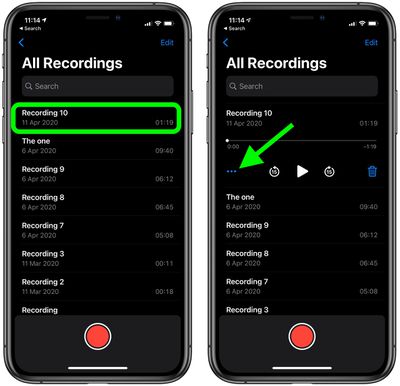
- Launch the Voice Memos app on your iOS device.
- Record a new audio memo or tap an existing recording.
- Tap the ellipsis (three dots) icon that appears at the bottom left of the selected recording.

- Select Edit Recording from the Actions menu.
- Tap the magic wand icon in the upper left corner of the screen.
- Tap Done.
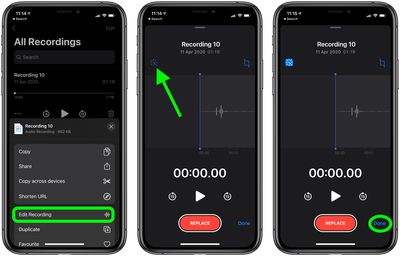
Now try tapping the Play button on the selected audio – hopefully you'll hear an improvement to the quality. If you don't, or it sounds worse to you, remove the enhancement by following the below steps.
How to Remove Voice Memo Enhancements
- Launch the Voice Memos app on your iOS device.
- Select an existing recording.
- Tap the ellipsis (three dots) icon that appears at the bottom left of the selected recording.
- Select Edit Recording from the Actions menu.
- Tap the magic wand icon in the upper left corner of the screen to deselect it.
- Tap Done.
After completely the above steps, the audio will sound identical to the original recording.















