How to Erase Your iPhone or iPad - MacRumorsOpen MenuShow RoundupsShow Forums menuVisit ForumsOpen Sidebar
Skip to Content

How to Erase Your iPhone or iPad

by

Erasing your iPhone or iPad is a good idea when it comes to selling the device, giving it away, or taking it to a store for repairs. It's also one way to start afresh if your device's storage is nearing full capacity, so it's worth knowing how it's done.

Unity Bloom Wallpaper iPhone iPad
Before you erase anything though, you should back up your device, just in case. You can back up your data to iCloud, but we'd advise you connect your ‌iPhone‌ up to a computer and perform a manual backup instead. Do that now, before going any further.

Now that you've backed up your ‌iPhone‌ or ‌‌iPad‌‌, it's time to erase the device. It's a simple procedure, once you know how. The following steps guide you through the process.

Erasing Your iPhone or iPad

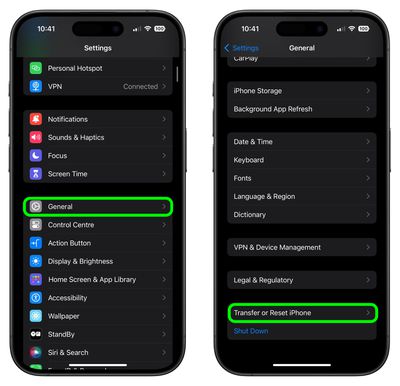
  1. Unlock your iPhone or ‌iPad‌ and launch the Settings app.
  2. Tap General.
  3. Scroll to the bottom and tap Transfer or Reset iPhone (or iPad).
    settings

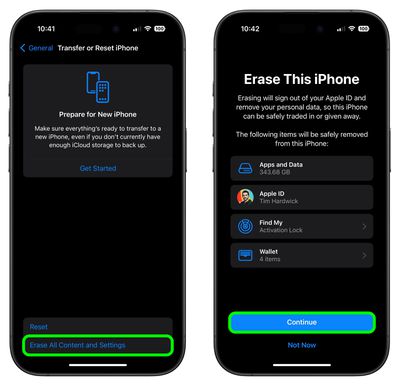
  4. Tap Erase All Content and Settings.
  5. Review the details of the data about to be wiped, then tap Continue.
  6. Tap in your passcode if requested.
  7. Enter your Apple ID password to erase the iPhone and remove it from your account.
  8. Tap Erase.
    settings

Allow the reset process to continue – it shouldn't take any longer than a couple of minutes. Once it's completed, you'll see the iOS or iPadOS welcome screen, then you're free to power off the device and sell it, pass it on, take it in for repair, set it up as new, or restore a backup.


Popular Stories

iCloud iPhone 17 Pro

iPhone Users Who Pay for iCloud Storage Get Two New Perks on iOS 27

Thursday July 2, 2026 6:10 am PDT by
If you pay for certain iCloud+ storage plans beyond the 5GB that Apple offers for free, you will receive two more perks on iOS 27 at no additional cost. A summary of the two new iCloud+ perks on iOS 27:Increased daily usage limits for some new Apple Intelligence features, including image generation in the revamped Image Playground app. HomeKit Secure Video cameras receive generated video...
iPhone 4 on Black Feature

Apple Facing One of Its Worst Leaks Since the iPhone 4

Thursday July 2, 2026 9:53 am PDT by
Apple supplier Tata Electronics recently suffered a cyberattack that resulted in thousands of confidential files being published on the dark web, and this reportedly included some photos and documents related to the upcoming iPhone 18 Pro. We have elected not to share any of the leaked photos in this story due to the illegal nature in which they were obtained, but they can easily be found...
American Express Gold Apple Pay Feature

American Express Announces New Apple Pay Feature

Tuesday June 30, 2026 10:27 am PDT by
American Express today announced that you can now redeem Membership Rewards points when checking out with Apple Pay on the web and in apps on the iPhone and iPad. When checking out with Apple Pay on iOS 18 or iPadOS 18 or later, tap on your eligible American Express card (Platinum, Gold, Green, and others) and select the Membership Rewards points option. You can use points to cover all or...