How to Use the New Files App in iOS 11 - MacRumorsOpen MenuShow RoundupsShow Forums menuVisit ForumsOpen Sidebar
Skip to Content

How to Use the New Files App in iOS 11

by

The new Files app in iOS 11 replaces iCloud Drive, offers a lot more functionality than its predecessor, and provides perhaps the best argument yet for using an iPad as your go-to mobile computer.

In Files, you have access not only to the files stored on your device and in iCloud, but also to those stored in third-party services that support integration with the app. Files also exploits all of the new multitasking gestures in iOS 11, making its file organization capabilities even more powerful.

The Files Interface

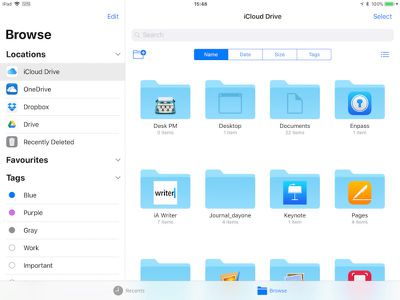
The Files app interface is very straightforward, although it varies from device to device and based on orientation, with various combinations using multiple columns, single columns with pages, or pop-overs. For the purposes of this overview, we'll look at using an iPad in landscape orientation, the most common setup for those doing productivity work.

Down the left side of the screen, in the Browse column, are links to your file sources, Favorites, and Tags to view files that are tagged with a particular color.
IMG 323500CABE8A 1
Over in the main window you'll see the files and folders in the selected location, which you can view by name, date, size, or tags. There's a button on the right of these options that you can tap to switch between list and icon view, while the button on the left lets you create a new folder.

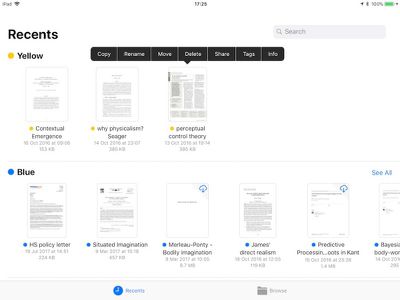
At the bottom of the screen are two buttons to switch between the default Browse view and a Recents view, which is useful for returning to the files you were last working with.
IMG 0084
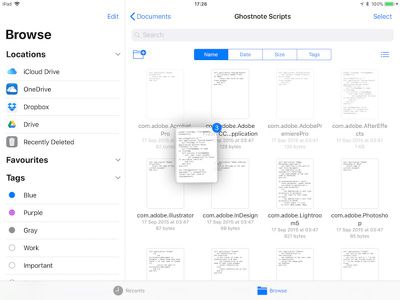
In either view, you can open a file in the main window simply by tapping it, or you can perform a long press on a file or folder to access a range of options, including rename, share, tag, favorite, and more. However, the best thing about the Files app is that you can organize multiple files quickly and easily by utilizing the new drag-and-drop features exclusive to iOS 11.

Moving Files With Drag and Drop
IMG 31B1ECA18F22 1

  1. Tap and hold a file you want to move, and it will expand slightly, ready to follow your finger around the screen.
  2. To move additional files, tap them while holding the original file and they will stack up underneath your finger.
  3. Keeping the same finger on the screen, use another finger – preferably one on your other hand – to browse the Files interface and locate a destination folder for the selected files.
  4. With the destination folder open, simply lift your finger from the screen to drop the files inside.

There's nothing to stop you from using iOS 11 drag-and-drop gestures to take files out of the Files app and move them into other iOS apps, as long as the app in question supports the file type. You might drag an image file into the Photos app to add it to your Photos Library, for example.

Organizing Your Files Manually

If you're uncomfortable using drag-and-drop gestures, you can organize your files using more traditional touch controls. Here's how.
IMG EDB71E7264A5 1

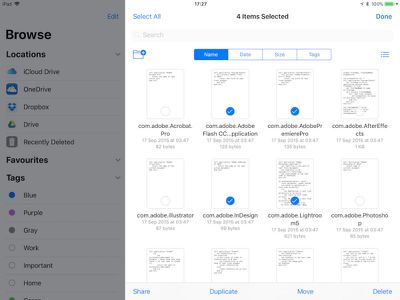
  1. Navigate to the folder containing the files you want to work with, and tap the Select button at the top-right of the screen.
  2. The Browse column will dim to put the focus on the currently selected folder. From here, you can tap one or more files to add a check mark against them indicating they've been selected for an action. A list of possible actions will appear along the bottom of the screen, including the option to duplicate or delete the file(s).
  3. Tap "Share" to bring up the iOS Share sheet, where you can send the file(s) to other people or apps, as well as access copy, print, and other actions.
  4. Tap the "Move" option and the Files app will present you with a directory tree, allowing you to navigate to the desired location for the file or files you've selected.

Tagging Documents

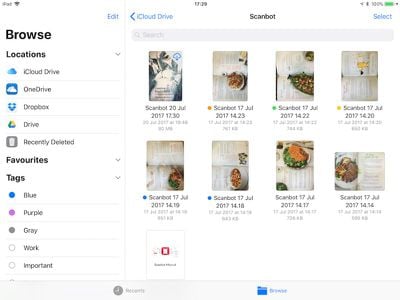
Using tags in the new Files app will help you locate particular files more easily, and they work much the same as tags do in macOS. As you'd expect, tapping a colored tag in the Browse column shows you all the files you've assigned that particular tag. To tag a file or folder, simply tap and hold it, and then drag it onto a tag in the sidebar.
IMG AE53E6EEC574 1

Linking Third-Party Storage Services

If you install a third-party storage app on your iOS device, it should automatically appear in the Files app under the Locations list. If the service doesn't appear, then it doesn't yet support Files integration. Services that do support Files app integration include Google Drive, Box, Dropbox, OneDrive, and Transmit, with more to come soon.


Tag: Files
Related Forum: iOS 11

Top Rated Comments

119 months ago
I guess slowly teaching them.
Hey sonny, we're old, not stupid. Many of us were working on computers before you were born! :-)
Score: 14 Votes (Like | Disagree)
tkermit Avatar
119 months ago
It still feels like Apple has managed to make file management a whole lot more confusing. Who really knows where things are stored anymore, how you get to them and what results in them (not) being copied/moved/opened in place. With traditional file management, at least there was a chance I could explain it to my mom or dad (whether they would listen is another matter), now even I have no idea what's going on. I suppose at least Apple has created a level playing field where nobody has an intuition about how things work anymore.

Score: 11 Votes (Like | Disagree)
nnoble Avatar
119 months ago
I wonder how elders are gonna figure out stuff with these complex features.
What d’you mean by elders - anyone over 18? I’m heading for 70 and I’ve no choice but to keep up. My elder brother is 80 next year and he can’t operate without accessing his stuff. I think motivation and maybe patience, rather than age, is the driver for coping with change.
Score: 10 Votes (Like | Disagree)
artfossil Avatar
119 months ago
I wonder how elders are gonna figure out stuff with these complex features.
It’s not that hard. Really. Sometimes we even, you know, read an article that points out the new features.

This elder loves the new Files app. Especially the iCloud files management—much better than the old iCloud Drive.
Score: 8 Votes (Like | Disagree)
Booch21 Avatar
119 months ago
Hey sonny, we're old, not stupid. Many of us were working on computers before you were born! :)
Back in our day, a file system was as good as the rubber band holding the stack of punch cards together!

I think any of us who worked with punch cards and large floppy disks can handle a phone file system.
Score: 4 Votes (Like | Disagree)
melchior Avatar
119 months ago
crazy that we've gone full circle on file management and ended up with a much more complex environment that if we had access to the underlying file system.
Score: 4 Votes (Like | Disagree)

Popular Stories

duo aquarium

More Fun iPhone Duo Apps: 30 New Picks to Try

Friday November 6, 2026 3:27 pm PST by
When the iPhone Duo launched, we shared a list of some of the fun apps developers created for the new form factor. Two weeks out, developers are continuing to come up with fresh ideas, so we thought we'd share some of our favorites. Games Marbles Unhinged ($2.99) - Marbles Unhinged is a marble maze designed for the Duo. When you fold it, the floor turns into a ramp. If you stand the top...
apple pro tell logo

Apple Launching Five New Products Today

Thursday November 5, 2026 12:59 am PST by
Apple is launching five new products on Friday, November 6, following pre-orders that opened last week, including its first touchscreen MacBook Pro models. The following new products will be available from today: iPad mini with OLED display and A20 Pro chip iMac with M6 chip 14-inch MacBook Pro with M6 chip 14-inch MacBook Pro with OLED touchscreen 16-inch MacBook Pro with OLED...
iOS 28 AI

Apple Taking New Approach to Developing iOS 28 and macOS 28

Sunday November 8, 2026 7:42 am PST by
Apple has made a change to its development process for iOS 28, macOS 28, and corresponding software updates, according to Bloomberg's Mark Gurman. In his Power On newsletter today, he said Apple separates development of each year's new operating systems into three major stages. Typically, he said each stage consists of four weeks of coding followed by a four-week "convergence" period where...


Latest Stories
Apple Store Subscription Sign-Up Controversy Exposed
49 minutes ago
Siri AI Rumored to Become 'More Like an Agent' as Early as Next Year
11 hours ago
Apple Taking New Approach to Developing iOS 28 and macOS 28
13 hours ago
Early Apple Black Friday Deals on Apple Watch, MacBook Air, and More
1 day ago
'Backglow' Lets You Customize New MacBook Pro's Glowing Apple Logo
1 day ago
Top Stories: Apple Product Launches, iOS 27.3 Beta, and More
2 days ago
More Fun iPhone Duo Apps: 30 New Picks to Try
2 days ago
Hands-On With Apple's New OLED Touchscreen MacBook Pro
2 days ago
Apple Store With All-New Design Opening Soon in Southern California
2 days ago
Control the Glowing Apple Logo on Your New MacBook Pro
2 days ago
Apple Shares New 'Apple Card: Apply and Use in Minutes' Ad
2 days ago
Apple Says More Than 100,000 Apps Optimized for iPhone Duo, Here's What's Still Missing
2 days ago
Early Black Friday Deals Kickoff With Steep Discounts on Apple Watch Ultras and More
3 days ago
The MacRumors Show: iOS 27.3 Looks Like a Huge Update
3 days ago
Best Buy's Black Friday Event Begins With Sitewide Savings on Apple, TVs, More
3 days ago
Apple Releasing Yet Another Two New Products Next Week
3 days ago
MacBook Air Drops to Lowest Price in Months With Amazon's $250 Discount
3 days ago
Apple Rumored to Drop the iPhone's Action Button Next Year
3 days ago
Apple's Extended Return Policy Now in Effect for 2026 Holiday Season
3 days ago
Apple Music Classical Updated With New Icon and Refreshed Design
3 days ago
OLED iPad Mini, M6 iMac, and New MacBook Pros Available From Today
3 days ago
Apple Surveys iPhone Duo Buyers About Crease and Camera
3 days ago
Apple's First Touchscreen Mac is Now Arriving to Customers
3 days ago
Claude Gets Personal Finance Feature With Bank Account Linking
3 days ago
Apple Arcade Adds Crossy Road Rush and NBA 2K27
3 days ago
Apple's New HomeView Smart Home Hub: Here's How Much RAM It Has
3 days ago
iPad Mini vs. iPad Air Buyer's Guide: Now Just $50 Apart
3 days ago
First iOS 27.3 and macOS Golden Gate 27.3 Public Betas Now Available
3 days ago
Apple Announces a New Mac Sales Record
3 days ago
Paid $200 for Logic Pro? Apple Says You Won't Get This New Feature
3 days ago







































