How to Locate a Lost Apple Watch Using Find My - MacRumorsOpen MenuShow RoundupsShow Forums menuVisit ForumsOpen Sidebar
Skip to Content

How to Locate a Lost Apple Watch Using Find My

by

Find My is an Apple feature that enables you to locate lost or misplaced Apple devices – including your Apple Watch. If you've already set up ‌Find My‌ on your paired iPhone, it's automatically enabled on your Apple Watch too.
lost apple watch
When you sign in to iCloud.com or the Find app, you can see your Apple Watch on a map and play a sound to locate it if it's nearby. ‌Find My‌ also has a Lost Mode to lock, track, or remotely erase all of your personal information.

One of the newest features in ‌Find My‌ is its ability to locate lost devices even when they're not connected to WiFi or LTE by leveraging Bluetooth and proximity to other nearby Apple devices.

When your lost device is offline but close to another device, it's able to connect to that other device over Bluetooth and relay its location. That means that your devices are more trackable than ever, and there's a better chance you can find a device that's been lost. Of course, if your Apple Watch is nowhere near another device, this feature won't work, but you can still try locating it if it's nearby by getting it to play an audible tone. Here's how.

Locating an Apple Watch Lost Nearby

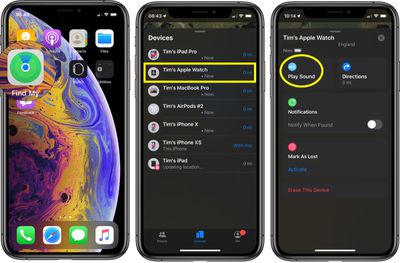
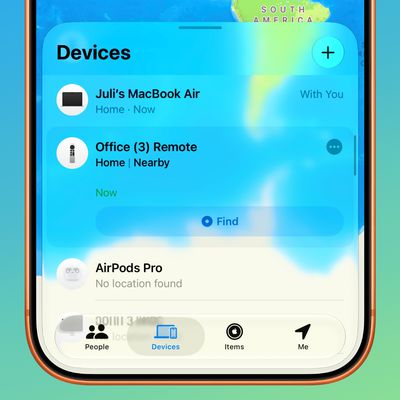
You can find your Apple Watch using the ‌Find My‌ app on iOS devices and iCloud.com. If your Apple Watch is powered on, it will show up on the ‌Find My‌ map, just like an iPad, iPhone, or Mac.

  1. Launch the Find My app on your iPhone or ‌iPad‌.
  2. Swipe up to reveal the full devices list.
  3. Tap the Apple Watch in the list.
  4. Tap Play Sound.

find my
A soft chirping sound will start playing after you initiate the "Play Sound" command, which will gradually get louder and louder with each chirp to make the Apple Watch easier to locate.

Locating an Apple Watch Lost Far Away

The way ‌Find My‌ works with an Apple Watch that's lost far away depends on the model. Apple Watch Series 3 and Series 4 use GPS and a trusted Wi-Fi or cellular connection to give you their approximate location, while Apple Watch Series 2 uses GPS and a trusted Wi-Fi connection. Apple Watch Series 1 models don't feature GPS, and they can only use the location of your paired iPhone or its Wi-Fi connection, making locating them at a distance impossible unless your iPhone is also nearby.

For these reasons, using ‌Find My‌ to locate an ‌Apple Watch Series 2‌, Series 3, or Series 4 that's been left behind isn't going to be very accurate, but it will give you a general idea of where the watch was lost so you can go back to that location. When attempting to locate an Apple Watch this way, tap the Directions option and you will be given Apple Maps directions to the last known location.

How to Put Your Apple Watch in Lost Mode

If you didn't turn on ‌Find My‌ before your Apple Watch was lost or stolen and your watch isn't connected to Wi-Fi, cellular, or your paired iPhone, you can't use it to locate your device. However, you can put your Apple Watch in Lost Mode, which ensures your passcode is required before anyone can turn off ‌Find My‌ iPhone, erase your watch, or pair it with another iPhone.

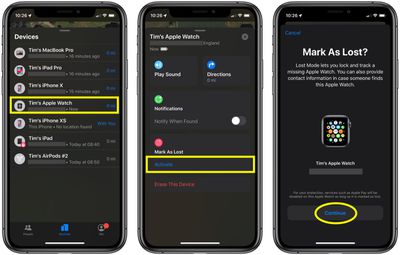
  1. Launch the Find My app on your iPhone.
  2. Swipe up to reveal a list of your devices, then tap your Apple Watch in the list.
  3. Swipe up to reveal the full device actions menu.
  4. Under Mark as Lost, tap Activate.
  5. Tap Continue to confirm that you want to turn on Lost Mode.
    find my Apple Watch

  6. Enter a phone number where you can be reached, then tap Next.
  7. Enter the message that you want to appear on the watch screen.
  8. Tap Enable.

‌Find My‌ iPhone will send you an email message to confirm that you've put your Apple Watch in Lost Mode. Once it's activated you can turn off lost mode any time using the same device actions menu described in the above steps (Pending -> Turn Off Mark as Lost).


Related Roundup: Apple Watch 12
Buyer's Guide: Apple Watch (Buy Now)
Related Forum: Apple Watch

Popular Stories

apple watch series 3 design

Apple Offers Steps to Fix Daylight Saving Time Bug on Apple Watch

Sunday November 1, 2026 3:34 am PST by
Apple has published a support document describing what to do if your Apple Watch continues to show time that's off by one hour after daylight savings time changes. "This incorrect time appears only on the Always On display when your wrist is down," says Apple. "When you activate the display by tapping it or raising your wrist, the time changes to the correct hour." To fix the issue, Apple says ...

siri recap live rewind

watchOS 27.3 Brings Live Rewind and Siri Recap to Apple Watch

Tuesday November 3, 2026 10:35 am PST by
With the first beta of watchOS 27.3, Apple is introducing new Audio Intelligence features it previewed for the Apple Watch Series 12 and Ultra 4 earlier this year. Powered by the S11 chip, Audio Intelligence includes Live Rewind, Siri Recap, Sound Recognition, and Shazam Music Recognition. Sound Recognition and Shazam are already on the watch, but Live Rewind and Siri Recap are now available ...
ios 27 2 apple tv remote

Older Siri Remotes Now Show Up in Find My With iOS 27.2

Monday October 26, 2026 5:13 pm PDT by
With iOS 27.2 and tvOS 27.2, second- and third-generation Siri Remotes can be tracked using the Find My app. There has been an option to locate a lost Siri Remote with an iPhone since iOS 17, but remotes did not previously show up in the Find My app. Locating a remote had to be done with the Apple TV Remote widget in the Control Center, which made the option hard to find. Supported Siri...
Latest Stories
Siri AI Rumored to Become 'More Like an Agent' as Early as Next Year
2 hours ago
Apple Taking New Approach to Developing iOS 28 and macOS 28
3 hours ago
Early Apple Black Friday Deals on Apple Watch, MacBook Air, and More
22 hours ago
'Backglow' Lets You Customize New MacBook Pro's Glowing Apple Logo
22 hours ago
Top Stories: Apple Product Launches, iOS 27.3 Beta, and More
1 day ago
More Fun iPhone Duo Apps: 30 New Picks to Try
2 days ago
Hands-On With Apple's New OLED Touchscreen MacBook Pro
2 days ago
Apple Store With All-New Design Opening Soon in Southern California
2 days ago
Control the Glowing Apple Logo on Your New MacBook Pro
2 days ago
Apple Shares New 'Apple Card: Apply and Use in Minutes' Ad
2 days ago
Apple Says More Than 100,000 Apps Optimized for iPhone Duo, Here's What's Still Missing
2 days ago
Early Black Friday Deals Kickoff With Steep Discounts on Apple Watch Ultras and More
2 days ago
The MacRumors Show: iOS 27.3 Looks Like a Huge Update
2 days ago
Best Buy's Black Friday Event Begins With Sitewide Savings on Apple, TVs, More
2 days ago
Apple Releasing Yet Another Two New Products Next Week
2 days ago
MacBook Air Drops to Lowest Price in Months With Amazon's $250 Discount
2 days ago
Apple Rumored to Drop the iPhone's Action Button Next Year
2 days ago
Apple's Extended Return Policy Now in Effect for 2026 Holiday Season
2 days ago
Apple Music Classical Updated With New Icon and Refreshed Design
2 days ago
OLED iPad Mini, M6 iMac, and New MacBook Pros Available From Today
2 days ago
Apple Surveys iPhone Duo Buyers About Crease and Camera
3 days ago
Apple's First Touchscreen Mac is Now Arriving to Customers
3 days ago
Claude Gets Personal Finance Feature With Bank Account Linking
3 days ago
Apple Arcade Adds Crossy Road Rush and NBA 2K27
3 days ago
Apple's New HomeView Smart Home Hub: Here's How Much RAM It Has
3 days ago
iPad Mini vs. iPad Air Buyer's Guide: Now Just $50 Apart
3 days ago
First iOS 27.3 and macOS Golden Gate 27.3 Public Betas Now Available
3 days ago
Apple Announces a New Mac Sales Record
3 days ago
Paid $200 for Logic Pro? Apple Says You Won't Get This New Feature
3 days ago
Instagram's Edits Video Editor is Now Available on Mac
3 days ago