

Apple has a "Find my iPhone" feature for lost iPhones, iPads, Macs, and more, but there's also a "Find my AirPods" feature that can be useful if you happen to misplace your AirPods.
Find My AirPods has its limitations because it's not able to work when the AirPods aren't connected to an iOS device via Bluetooth, but the feature can help you locate AirPods lost nearby and it gives clues as to where your AirPods might be found if they're lost out of the range of the iPhone.
It's worth noting that Find My AirPods only works for the AirPods themselves -- it can't locate a lost AirPods Case, nor does it work when the AirPods are disconnected from the iPhone and stored in the case.
How to Use Find My AirPods
Find My AirPods is located within the "Find My" app on iOS devices and iCloud.com. If the AirPods are out of the case and connected to the iPhone, they'll show up on the Find My map just like an iPad, iPhone, Apple Watch, or Mac.
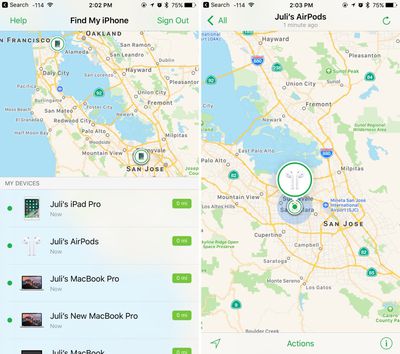
If your AirPods are in the case or not currently connected, the last known location will be displayed. If your AirPods haven't been in use at all recently, they'll be listed as "offline."
How to Find AirPods Lost Nearby
Your AirPods are most likely to be misplaced or lost when you set them down momentarily because there are no cords to keep them together or to make them easier to find. Find My AirPods is mostly designed to locate an AirPod that's nearby by playing a sound.
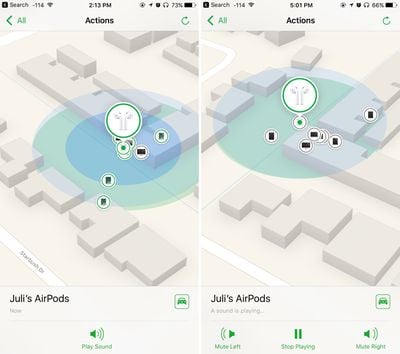
- Open "Find My" on an iOS device or iCloud.com.
- Tap the AirPods in the list.
- Tap "Actions."
- Tap "Play Sound."
A soft chirping sound will start playing after you initiate the "Play Sound" command, which will gradually get louder and louder with each chirp to make the AirPods easier to locate.
If just the left or just the right AirPod is missing, you can also mute the sound coming from the left or the right. To stop the sound once the AirPods are located, you'll need to tap "Stop Playing." Putting the AirPods back in the case will also turn the sound off after a few seconds.
How to Find AirPods Lost Far Away
If your AirPods aren't connected to your iPhone, their exact location is not relayed to Find My. In this situation, the last known location of the AirPods when they were connected to an iPhone is displayed.
So, for example, if you use them while at the airport and then leave them behind, their location when they were last connected to your iPhone over Bluetooth will be displayed, even if the AirPods are moved somewhere else.
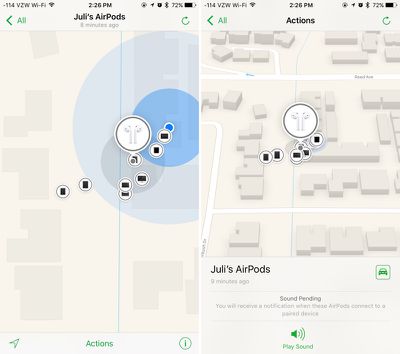
For this reason, using Find My AirPods to locate an AirPod that's been left behind isn't going to be particularly accurate, but it will give you a general idea of where they were lost so you can go back to the location.
When attempting to locate an AirPod this way, tap the little car icon and it will give you Apple Maps directions to the last known location.
Limitations with Find My AirPods
Your AirPods will not play a sound while they're in the case, so if you lose the AirPods and the AirPods Case somewhere in the house, you're out of luck.
There's also no way to track the AirPods case because a Bluetooth connection is needed for Find My AirPods, so there is no option for locating a lost case.
Replacing a lost AirPod or AirPods Case
Apple offers AirPods replacements if one is lost and can't be located. It costs $69 to replace a single AirPod or to replace the AirPods Charging Case.
Want new AirPods or AirPods Pro?
Check our constantly updated guide for best deals on AirPods.
















Top Rated Comments
Most people can learn to be careful and always put their AirPods in the case when not in their ears. But setting down the case somewhere in the house, good luck if you can’t remember where you last put them.
This is such an easily fixable problem. Have the AirPods case ping the iPhone once an hour or half hour. If it detects that it’s been asked to play a sound, it’ll take you an hour at worst to find where you put your AirPods. Without this, you’re on your own and have to find them manually, and they’ll play the damn sound after you already found them.