iOS 15: How to Find User Settings in Maps - MacRumorsOpen MenuShow RoundupsShow Forums menuVisit ForumsOpen Sidebar
Skip to Content

iOS 15: How to Find User Settings in Maps

by

In iOS 15, Apple has added a user account area in the Maps app that corrals several custom areas like direction mode, toll and highway avoidance options, transit options, and more.

apple maps icon ios 15 beta 2
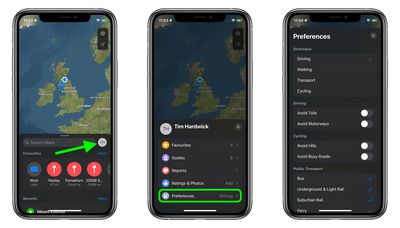
To access it, simply tap the circular icon to the immediately to the right of the search bar. You should see your initials within the circle, indicating it's your account.

A new menu card will pop up with submenus containing your Favorites, Guides, Ratings & Photos, along with quick access to reporting app issues and traffic accidents.
maps
The Preferences submenu is host to a range of options that are worth checking out. Here you'll find the ability to choose your main directions preference (driving, walking, transit, cycling) as well as toggles to control avoiding tolls and motorways while driving, avoid hills and busy roads while cycling, and modes of public transport to include in transit directions.

Any changes you make take effect immediately, are synced to all your devices, and will be automatically saved ready for the next time you fire up the Maps app.

Related Forum: iOS 15

Popular Stories

Apple Maps General

Apple Maps Flyover Gets a Visual Upgrade in iOS 27

Monday June 8, 2026 4:29 pm PDT by
Apple Maps is getting a visual update in iOS 27, with Apple planning to introduce new aerial imagery that's combined with Visual Intelligence models. Apple said everything will have sharper detail, from the "shapes of individual trees to the way light reflects off the glass of skyscrapers." Flyover is an Apple Maps view that lets users see more than 350 cities in 3D with detailed...
Apple Says iOS 27 Adds These 12 New Features to Your iPhone Feature

Apple Says iOS 27 Adds These 12 New Features to Your iPhone

Tuesday June 9, 2026 9:47 am PDT by
iOS 27's key new feature is a more intelligent and personal version of Siri, but the changes go well beyond that. In a press release, Apple outlined additional enhancements coming across Apple Maps, Find My, Apple Wallet, Apple Music, and more. Apple Maps has gained an enhanced Flyover experience powered by AI, enabling you to view aerial imagery in "stunning detail" for select cities. In ...
liquid glass app icon

Apple Maps to Get These 10 New Features in iOS 27

Thursday June 11, 2026 5:45 am PDT by
Apple Maps is getting a range of new features in iOS 27, headlined by an upgraded Flyover experience that uses AI to improve the realism and detail of its aerial imagery. Flyover is a longstanding feature of Apple Maps and lets users explore more than 350 cities in 3D with detailed landmarks, roads, parks, and buildings. Apple described the enhanced Flyover in iOS 27 as combining aerial...