

How to Fix Apple TV's Annoying Default Keyboard Layout - MacRumorsOpen MenuShow RoundupsShow Forums menuVisit ForumsOpen Sidebar
Skip to Content

How to Fix Apple TV's Annoying Default Keyboard Layout

by

If you've ever tried entering a complex password on your Apple TV, you know the pain. That default linear keyboard layout has you swiping endlessly left and right, hunting for characters like you're playing some sort of tedious game show.
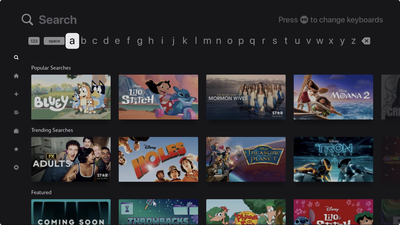
Apple TV Linear Keyboard Layout

The annoying default keyboard layout on Apple TV

Here's a secret that'll save your sanity: You can switch to a grid layout that actually makes sense. Head to Settings ➝ General ➝ Keyboard Layout and swap from Linear to Grid. After that, your on-screen keyboard will transform from a horizontal nightmare into a sensible square arrangement.

Perhaps you're asking "why didn't I know this sooner?" Indeed, it's one of those useful Apple TV settings that are hiding in plain sight. The grid layout feels infinitely more natural, especially if you're used to typing on literally any other device made in the past decade.

Of course, you've got other options too. Siri can handle voice dictation for most text entry, assuming you don't mind potentially shouting your Disney+ password across the living room. And if your iPhone or iPad is signed into the same Apple Account, you'll get a notification to type on your phone's keyboard instead.
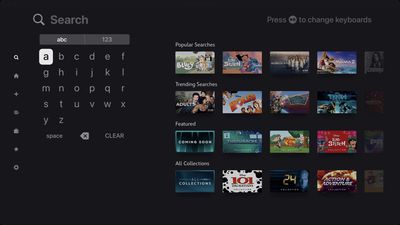
Apple TV Grid Keyboard Layout

The infinitely better Grid arrangement

But when you're stuck using the Apple TV remote itself, that grid keyboard is a game-changer. It's the kind of simple tweak that makes you appreciate Apple's attention to user experience, even if it doesn't explicitly tell you that an alternative exists.

The setting applies immediately, so you don't need to restart anything or jump through additional hoops. Just switch it once and forget about it.


Popular Stories

Aston Martin CarPlay Ultra Screen

Apple Says CarPlay Ultra is Coming to These Vehicle Brands

Thursday May 21, 2026 11:53 am PDT by
Last year, Apple launched CarPlay Ultra, the long-awaited next-generation version of its CarPlay software system for vehicles. Nearly a year later, CarPlay Ultra is still limited to Aston Martin's latest luxury vehicles, but that should change fairly soon. In May 2025, Apple said many other vehicle brands planned to offer CarPlay Ultra, including Hyundai, Kia, and Genesis. CarPlay Ultra...
iphone 18 pro blue%402x

iPhone 18 Pro: Dark Cherry, Light Blue, and Dark Gray Chassis Leaked [Update]

Thursday June 4, 2026 5:18 am PDT by
Update: Since publication, new information has come to light suggesting the images have been AI-manipulated and are not in fact iPhone 18 Pro chassis parts. The original article follows. The color options Apple is reportedly planning for the upcoming iPhone 18 Pro and ‌iPhone 18 Pro‌ Max have appeared online today in the form of images of chassis parts of unknown authenticity....
iOS 27 All the New App Features

iOS 27: All the Rumored App Features

Wednesday June 3, 2026 3:48 pm PDT by
Siri is getting a major overhaul in iOS 27, but Apple also has some big updates planned for apps like Camera, Photos, and Wallet. There are multiple new AI features in the works, plus some non-AI upgrades. Camera Apple is moving Visual Intelligence from the Camera Control button to the Camera app in iOS 27, according to Bloomberg. There will be a Siri mode that will be available alongside...













